
Choosing a home security system can feel overwhelming. There are dozens of brands, confusing tech terms, and pricing plans that seem to change every month.
But here’s the good news: you don’t need to be a tech expert to make a smart choice. You just need to understand a few basics.
This guide breaks everything down in plain language. By the end, you’ll know exactly what to look for, what to skip, and how to pick a system that actually fits your home, your family, and your budget.
Let’s get started.
Table of Contents
- Why Every Family Needs a Home Security System
- Assess Your Home Security Needs
- Types of Home Security Systems
- Wired vs Wireless Systems
- DIY vs Professionally Installed Systems
- Essential Features to Look For
- Smart Home Integration
- Indoor vs Outdoor Security Coverage
- Monitoring Options: Professional vs Self-Monitoring
- How Many Cameras and Sensors Do You Need?
- Budget Considerations
- Common Mistakes to Avoid
- Quick Buying Checklist
- Final Verdict
- Frequently Asked Questions (FAQ)
Why Every Family Needs a Home Security System
A home security system does more than scare off burglars. It gives you peace of mind.
You can check on your kids after school. You can see who’s at the door before opening it. You can get an alert if a window opens while you’re asleep.
Home security has also become more affordable. You no longer need a big contract or a technician visit to get started.
According to the Federal Bureau of Investigation (FBI), homes without visible security measures are more likely to be targeted by opportunistic burglars. Visible cameras, yard signs, and smart doorbells act as a deterrent before anyone even tries your door.
Key Takeaway: A security system isn’t just about catching crime after it happens. It’s about preventing it, and giving your family faster ways to respond in an emergency.
Assess Your Home Security Needs
Before you buy anything, figure out what you’re actually protecting against. Every home is different.
Ask yourself these questions:
- Do I live in a house, apartment, or condo?
- Do I own or rent my home?
- Is my neighborhood high-crime, low-crime, or somewhere in between?
- Do I have kids, elderly parents, or pets at home?
- Do I travel often or leave the house empty for long periods?
- Do I want to prevent break-ins, monitor deliveries, or both?
Buying Tip: Renters should look for wireless, no-drill systems that move with them. Homeowners have more freedom to choose wired, permanent setups.
Your answers will shape almost every other decision in this guide, so don’t skip this step.
Types of Home Security Systems
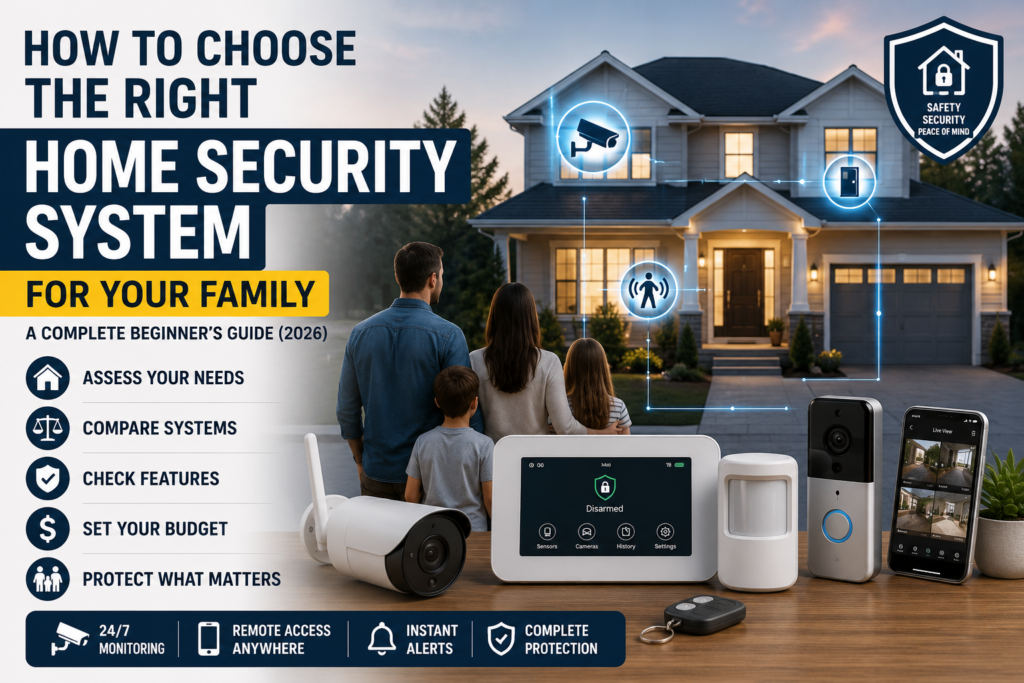
There are four main categories of home security systems available in 2026. Each one serves a different need.
1. Standalone Cameras and Doorbells
These are single devices, like a video doorbell or an outdoor camera, that aren’t connected to a full alarm system.
- Pros: Cheap, easy to install, no monthly contract required
- Cons: Limited coverage, no central alarm, no professional monitoring
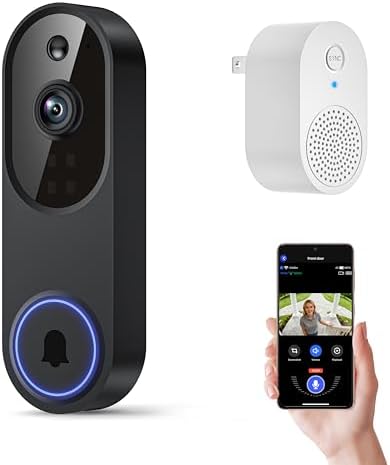
- AI-Powered Smart Detection: Advanced AI technology accurately identifies people while filtering out vehicles and animals…
- Secure Cloud Storage: Protect your recordings with AES-128 encrypted cloud storage
- Pre-Capture Recording: Cloud subscribers benefit from pre-capture functionality, ensuring the camera starts recording ri…
If you’re just starting out, our guide to the best video doorbells is a good place to compare top picks for entry-level coverage.
2. All-in-One Smart Security Kits
These bundle a hub, sensors, cameras, and an app into one starter kit. Brands like SimpliSafe, Ring, and Abode fall into this category.
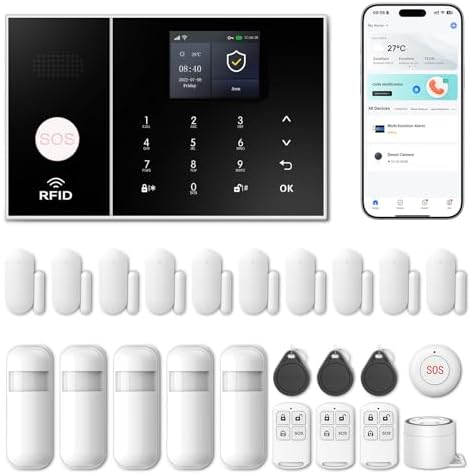
- APP Control & Highly DIY: Home Security Systems can be remotely controlled via Smart Life or Tuya APP. Additional PGST s…
- Voice Control & Color Screen Display: Supports connection to smart voice assistants, enabling voice control for home sec…
- Tamper Protection & Multi-alarm: Home Security System features physical tamper-proof design. Unauthorized removal trigge…
- Pros: Easy DIY setup, flexible monitoring plans, expandable over time
- Cons: Monthly fees for full features, reliant on Wi-Fi
3. Traditional Wired Alarm Systems
These are professionally installed systems with sensors wired directly into your home’s electrical system.

- MAKE ANY WIRED ALARM SYSTEM SMART: 12-Zone Alarm Panel Pro with Wi-Fi, Ethernet, and PoE retrofits any brand wired alarm…
- ACCESSORIES INCLUDED: Konnected Alarm Panel Pro Conversion Kit comes with all essentials: 12V power adapter, mounting st…
- CONNECTS TO WIRED SENSORS: Konnected is all about compatibility, plug in your wired motion, contact, window, door, leak …
- Pros: Very reliable, harder to disable, often required for insurance discounts
- Cons: Expensive installation, harder to move if you relocate
4. Hybrid Systems
These combine wired reliability for core sensors with wireless flexibility for cameras and add-ons.
- Pros: Best of both worlds, scalable
- Cons: Higher upfront cost, more complex setup
Key Takeaway: Most families in 2026 choose all-in-one smart kits because they balance cost, flexibility, and ease of use.
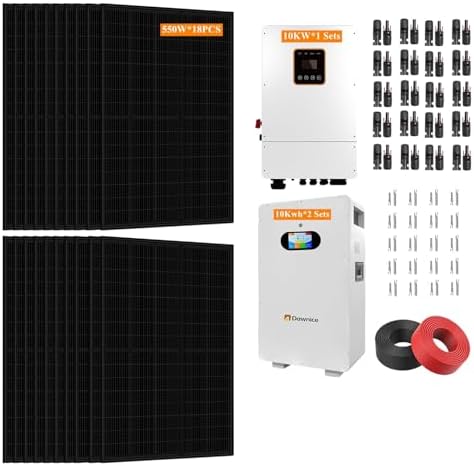
- 🌞【All-in-one Complete Kit】Inverter (built in MPPT controller ), solar panels, solar batteries are all-in-one complete ki…
- 🌞【A long-term investment】The Hybrid solar power system is a long-term investment that provides reliable power, independe…
- 🌞【Cost Savings】This Hybrid solar power systems can reduce or eliminate your electricity bills. Once the system is instal…
Wired vs Wireless Systems
This is one of the biggest decisions you’ll make. Here’s a simple breakdown.
| Feature | Wired System | Wireless System |
|---|---|---|
| Installation | Professional, drilling required | DIY, no drilling |
| Reliability | Very high, no battery issues | Depends on Wi-Fi and batteries |
| Cost | Higher upfront cost | Lower upfront cost |
| Portability | Fixed, hard to move | Easy to relocate |
| Power outage risk | Usually has backup battery | Can fail if router loses power |
| Best for | Homeowners, long-term homes | Renters, apartments, first-time buyers |
Expert Insight: Wireless doesn’t mean weaker anymore. Modern wireless systems use encrypted signals and battery backups that can last months, making them reliable enough for most households.
DIY vs Professionally Installed Systems
This decision affects your budget, setup time, and long-term flexibility.
DIY Systems
- You install everything yourself using an app-guided process
- Setup usually takes 30–90 minutes
- No installation fees
- Great for renters and small homes
Professionally Installed Systems
- A technician visits your home and sets everything up
- Better for large or complex homes
- Often includes a walkthrough and system training
- May be required for certain insurance discounts
Buying Tip: If you’re not confident with tech or have a large, multi-story home, professional installation is worth the extra cost. For smaller homes and apartments, DIY is usually enough.
Pros and Cons Table
| Option | Pros | Cons |
|---|---|---|
| DIY | Cheaper, fast, flexible | You’re responsible for setup errors |
| Professional | Expert setup, fewer mistakes | Higher cost, scheduling required |
Essential Features to Look For
Not every feature matters for every home. Focus on these essentials first.
- Motion detection with adjustable sensitivity
- Door and window sensors for entry points
- HD or higher camera resolution (1080p minimum)
- Night vision for low-light coverage
- Two-way audio to talk through cameras or doorbells
- Mobile app alerts in real time
- Battery backup in case of power outages
- Local and cloud storage options for footage
- Encryption and secure login (look for two-factor authentication)
Callout Box – Why Cybersecurity Matters Smart home devices connect to the internet, which means they can be vulnerable if not secured properly. The Cybersecurity and Infrastructure Security Agency (CISA) recommends using strong, unique passwords and enabling two-factor authentication on all connected smart devices, including security cameras.
Smart Home Integration
Many families now want their security system to work with other smart devices in the home.
Common integrations include:
- Amazon Alexa
- Google Assistant
- Apple HomeKit
- Smart locks
- Smart lighting
- Smart thermostats
For example, you could set lights to turn on automatically when a camera detects motion at night. Or you could unlock your smart lock remotely for a family member.
Key Takeaway: If you already own smart home devices, check compatibility before buying. Not all security brands work with every ecosystem.
Indoor vs Outdoor Security Coverage
Your home has two zones to protect, and each needs a different approach.
Indoor Coverage
- Motion sensors in hallways and main rooms
- Door and window sensors on all entry points
- Glass break sensors near ground-floor windows
- Optional indoor cameras for nurseries, living rooms, or offices
Outdoor Coverage
- Cameras at the front door, back door, and driveway
- Motion-activated floodlights
- Weatherproof, wide-angle cameras for full yard coverage
Outdoor cameras face different challenges than indoor ones, including weather resistance and wider field-of-view needs. Our detailed breakdown of outdoor security cameras covers the top-rated options for 2026 if you want to go deeper on this specific category.
Buying Tip: Start with your front door. Most break-ins happen through obvious entry points, so a visible camera and sensor there provides the biggest security boost for the lowest cost.
Monitoring Options: Professional vs Self-Monitoring
Once your system is installed, you need a way to respond to alerts. You have two main choices.
Professional Monitoring
A monitoring company watches your system 24/7. If an alarm triggers, they contact you and can dispatch police, fire, or medical services.
- Pros: Fast emergency response, works even if you’re asleep or away
- Cons: Monthly subscription fee, usually $15–$60 per month
Self-Monitoring
You get alerts directly on your phone and decide what to do yourself.
- Pros: No monthly fee, full control
- Cons: You must respond yourself, easy to miss alerts
| Factor | Professional Monitoring | Self-Monitoring |
|---|---|---|
| Cost | Monthly fee required | Usually free |
| Response speed | Fast, automatic dispatch | Depends on you noticing the alert |
| Best for | Families who travel, elderly residents | Tech-savvy users on a budget |
Expert Insight: According to Consumer Reports, professionally monitored systems tend to offer faster emergency response, but the right choice depends on your lifestyle and how quickly you can personally react to alerts.
How Many Cameras and Sensors Do You Need?
This depends entirely on your home’s size and layout. Use this as a general starting point.
Small Apartment (1–2 bedrooms)
- 1 video doorbell
- 1–2 indoor cameras
- 2–3 door/window sensors
Medium House (3–4 bedrooms)
- 1 video doorbell
- 2 outdoor cameras
- 1–2 indoor cameras
- 4–6 door/window sensors
- 1 motion sensor
Large House (5+ bedrooms or multi-story)
- 1–2 video doorbells
- 3–4 outdoor cameras
- 2–3 indoor cameras
- 8+ door/window sensors
- 2–3 motion sensors
Buying Tip: Cover every ground-floor window and door first. Upper floors are less commonly targeted, so you can add sensors there later if your budget is tight.
Budget Considerations
Home security systems range widely in price. Here’s what to realistically expect in 2026.
| System Type | Upfront Cost | Monthly Cost |
|---|---|---|
| Standalone camera/doorbell | $50–$200 | $0–$10 |
| DIY all-in-one kit | $150–$500 | $0–$30 |
| Professionally installed wired system | $300–$1,500 | $30–$60 |
| Hybrid system | $400–$1,200 | $20–$50 |
Hidden Costs to Watch For
- Cloud storage subscriptions for camera footage
- Extra sensor packs
- Professional monitoring add-ons
- Battery replacements over time
Buying Tip: Don’t just look at the starter kit price. Add up the monthly monitoring cost over 2–3 years to see the real total cost of ownership.
Common Mistakes to Avoid
Even smart shoppers make these errors. Don’t let this be you.
- Buying based on price alone — Cheapest isn’t always safest. Check reviews and reliability first.
- Ignoring Wi-Fi strength — A weak signal can cause dropped alerts and delayed footage.
- Skipping the front door — This is the most common entry point; don’t leave it uncovered.
- Forgetting about privacy settings — Always enable two-factor authentication and change default passwords.
- Overbuying for a small space — More cameras isn’t always better; match coverage to your actual home size.
- Not checking return or warranty policy — Test the system for a few weeks before committing long-term.
- Ignoring fire and carbon monoxide safety — A full home safety plan includes more than break-ins. The National Fire Protection Association (NFPA) recommends interconnected smoke alarms on every level of the home, which many modern security systems can now integrate with.
Callout Box – Insurance Discounts Many home insurance providers offer discounts for monitored security systems. Ask your provider directly, since the required system type varies by company.
Quick Buying Checklist
Use this checklist before you make your final decision.
- [ ] I know whether I need wired, wireless, or hybrid
- [ ] I’ve decided between DIY and professional installation
- [ ] I’ve counted my entry points (doors and windows)
- [ ] I’ve checked smart home compatibility
- [ ] I’ve compared professional vs self-monitoring costs
- [ ] I’ve set a realistic monthly and upfront budget
- [ ] I’ve checked the return policy and trial period
- [ ] I’ve enabled two-factor authentication in the setup app
- [ ] I’ve covered my front door and ground-floor windows first
- [ ] I’ve read at least 2–3 independent reviews before buying
Final Verdict
There’s no single “best” home security system for every family. The right choice depends on your home size, budget, and how much control you want over monitoring.
If you’re a renter or first-time buyer, start with a DIY wireless kit and a video doorbell. If you own a larger home and want maximum reliability, consider a professionally installed hybrid system with monitoring.
Whatever you choose, the most important step is simply getting started. Even one camera at your front door is better than none.
Frequently Asked Questions (FAQ)
1. What is the best home security system for beginners? For most beginners, a DIY all-in-one smart kit with a video doorbell and a few indoor cameras offers the easiest setup and lowest starting cost.
2. Do I need professional monitoring, or can I monitor my home myself? It depends on your lifestyle. If you travel often or want automatic emergency dispatch, professional monitoring is worth the monthly fee. If you’re home most of the time and comfortable checking alerts yourself, self-monitoring can save money.
3. Is a wireless security system as reliable as a wired one? Modern wireless systems are highly reliable thanks to encrypted signals and long-lasting battery backups. Wired systems still offer slightly higher reliability, especially during Wi-Fi outages.
4. How much does a home security system cost per month? Monthly costs typically range from $0 for basic self-monitored setups to $60 for fully professionally monitored systems with cloud storage.
5. Can renters install a home security system? Yes. Wireless, no-drill systems are designed for renters and can be taken with you when you move.
6. Do security cameras deter burglars? Visible cameras and alarm signage can discourage opportunistic break-ins, though no system guarantees complete prevention. Combining cameras with sensors and good lighting offers the strongest deterrent effect.
7. How many cameras does the average home need? Most medium-sized homes do well with 2–3 outdoor cameras and 1–2 indoor cameras, plus a video doorbell.
8. Are DIY security systems safe from hacking? They can be, if set up correctly. Always use strong passwords and enable two-factor authentication to reduce the risk of unauthorized access.
Have questions about a specific brand or setup for your home? Explore our full guides on outdoor security cameras and the best video doorbells for more in-depth comparisons.

Pingback: The Ultimate Smart Home Security Essentials Guide for Every Homeowner in 2026: Devices, Features & Buying Tips - Gadget Sentinel
Pingback: How to Choose the Best Indoor Security Cameras for Pets, Kids, and Elderly Care in 2026: Features, Buying Guide & Expert Recommendations - Gadget Sentinel
Pingback: Wireless vs Wired Security Cameras: Which One Should You Buy? - Gadget Sentinel