Affiliate and testing disclosure: Gadget Sentinel has not physically tested the locks in this guide. Everything below comes from manufacturer documentation, retailer listings, and other publications’ lab results, and we label which is which. Prices and specs were checked on November 10, 2026 and change often, so confirm them before you buy.
You can fix a leaking tap from a spreadsheet of contacts, but you cannot turn a deadbolt from 6,000 miles away with a spare key. That gap is why the best smart locks for digital nomads are a different shopping category from the locks reviewed for Airbnb hosts or apartment dwellers. A nomad needs to answer three questions from a phone in another time zone: Is my door locked? Who came in? And can I let someone in (or keep someone out) right now?
This guide compares five locks on what matters when you are away for weeks or months: genuine remote access, temporary codes for house sitters, activity alerts, and what still works when the internet or the battery does not. We also explain the hidden costs (bridges, modules, regional limits), and finish with a pre-trip checklist.
Quick Comparison of the Best Smart Locks for Digital Nomads
“Remote access” here means controlling or monitoring the lock from outside your home network. Bluetooth alone does not provide it.
| Product | Best for | Remote access | Wi-Fi requirement | Temporary access codes | Activity monitoring | Battery backup | Main limitation |
|---|---|---|---|---|---|---|---|
| Yale Assure Lock 2 (Wi-Fi) | Best overall, US and Canada | Yes, Yale Access app | Built-in on Wi-Fi models; Bluetooth models need a Wi-Fi module | Yes, shareable and schedulable | Activity feed and alerts | 4 AA; key on keyed trims | Bluetooth-only version looks identical; Yale’s US store says locks won’t operate outside US/Canada |
| Schlage Encode | Security-first owners | Yes, Schlage Home app | Built-in, no hub | Yes, custom codes | Lock history and access alerts | Battery-powered; key override (confirm per trim) | Higher price; no fingerprint |
| Nuki Smart Lock Ultra | European and UK doors | Yes | Built-in Wi-Fi; optional Thread | Time-limited access; keypad sold separately | Activity log and notifications | Rechargeable built-in battery | Requires swapping in Nuki’s cylinder; euro-profile doors |
| igloohome Deadbolt 2S (+ Bridge) | Offline-first access | Remote code creation without Wi-Fi; live lock/unlock needs the Bridge | None at the lock; Bridge adds Wi-Fi | Yes: one-time, duration, recurring | Logs; PIN logs sync in Bluetooth range unless bridged | 4 AA; physical key | No live remote control without the Bridge |
| August Wi-Fi Smart Lock (4th Gen) | Renters | Yes | Built-in 2.4 GHz | Yes (per listing) | Yes, app logs | 2 CR123; your own key still works | Bulky; won’t fit mortise or rim locks |
Best Smart Locks for Digital Nomads
We shortlisted these five from manufacturer pages and independent testing, not brand popularity. For a wider price-tiered list, see our best smart locks under $1,000.
Yale Assure Lock 2 (Wi-Fi): Best Overall for US and Canadian Homes
Overview. A keypad deadbolt replacement. Yale’s own product page lists a Wi-Fi touchscreen version at $279.99 (stock showed as limited when we checked), plus a fingerprint model and an Apple Home Key model.

- MORE WAYS TO ENTER: Hands full of groceries? This keyless entry door lock recognizes when you’re home and unlocks automa…
- CONTROL FROM ANYWHERE: The included Wi-Fi Bridge manages the connection to your 2.4 or 5 GHz network so your lock doesn'…
- UNLIMITED CODES, COMPLETE CONTROL: No more hiding spare keys. Give the dog walker Tuesday access, your parents a permane…
Important features. Per Yale’s Assure Lock 2 page, Wi-Fi models offer remote access, scheduled guest access, and an activity feed with real-time notifications. Yale says the lock holds up to 250 entry codes, uses four AA batteries, and fits doors 1-3/8 to 2-1/4 inches thick. DoorSense sensing powers auto-lock and tells you whether the door is actually closed.
Remote access. Built-in on Wi-Fi models. The Bluetooth-only version needs Yale’s Wi-Fi module (about $90) or an Apple home hub for remote control. Check the exact model number before you order.
Security. Yale describes two-layer encryption and two-factor authentication in its app (a manufacturer claim). Independent testing: Consumer Reports says the Assure Lock 2 held up against kick-ins and a cordless drill in its lab and was easy to control remotely (see the Consumer Reports lab-tested ratings).
Pros: unlimited-feeling code capacity, door-closed sensing, strong lab results. Cons: easy to buy the wrong variant; Yale’s US store says its locks will not operate outside the United States or Canada (the lock, not your phone), so UK and EU homes should look at Yale’s global range or another brand.
Who should buy it: US or Canadian homeowners who want one dependable all-rounder. Who should avoid it: anyone with a home outside North America, or anyone who wants a fingerprint or Matter-first setup.
Schlage Encode: Best Premium Pick for Security
Overview. A Wi-Fi deadbolt that lists from $299 on Schlage’s Encode page.

- ANYWHERE ACCESS: With built-in WiFi compatibility, you can easily and securely connect your Schlage Encode Plus lock to …
- PEACE OF MIND: Lock and unlock from anywhere, manage up to 100 access codes, view lock history, receive customizable not…
- TAP TO UNLOCK: Works with Apple HomeKit and Apple home keys; with home keys you can simply tap to lock or unlock using y…
Important features. Schlage says built-in Wi-Fi lets you lock and unlock remotely, check status, create custom access codes, and view lock history in the Schlage Home app. It lists Alexa and Google Assistant support and a three-year electronics warranty.
Remote access. Built-in Wi-Fi, no hub.
Security. Schlage lists a BHMA AAA-certified deadbolt and an encrypted connection (manufacturer claims). Consumer Reports tested the related Encode Plus, not this exact model, and found it strong against kick-ins and drilling but somewhat pickable, and not the easiest to set up. Treat that as a guide to Schlage’s mechanical quality, not a verdict on the Encode.
Pros: top published grade, no hub, simple remote control. Cons: priciest here; no fingerprint; setup can be fiddly.
Who should buy it: owners who prioritize physical strength and want first-party documentation. Who should avoid it: renters, or anyone who needs a lock that works with a non-US door setup.
Nuki Smart Lock Ultra: Best for European Homes
Overview. Nuki’s flagship, listed on Nuki’s own pages at €349 in Austria and £309 in the UK.
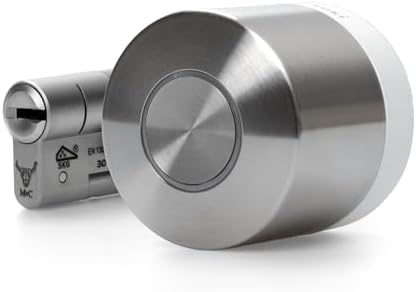
- Compatibility: The Nuki Smart Lock Ultra model is specifically designed for Euro Profile Cylinders. It is not compatible…
- Keyless access via Nuki App: Unlock your door without keys using the Nuki App – one of the best-rated smart lock apps (i…
- Easy Installation: Installing the Nuki Ultra Smart Lock and the included Universal Cylinder takes less than 15 minutes. …
Important features. Nuki lists built-in Wi-Fi, Matter over Thread, a rechargeable built-in battery and three locking speeds. Retailers report up to about six months per charge. Nuki’s remote-access help article says the Ultra and several other models have built-in Wi-Fi, so no extra Nuki remote access hardware is needed. One reviewer notes that Nuki lets you disable Wi-Fi and use Thread only.
Remote access. Built-in Wi-Fi. Thread-based remote access needs a compatible hub. Nuki once charged for remote access via Nuki Premium; Nuki’s page now lists remote access and the activity log as included, but verify this at checkout in your region.
Security. Nuki and retailers cite AV-TEST certification; we have not verified that independently. The lock sits on a cylinder, so physical strength depends on the cylinder and door.
Pros: compact, quick, no bridge, strong ecosystem support. Cons: one reviewer calls replacing your cylinder with Nuki’s a hurdle; designed for euro-profile doors.
Who should buy it: European and UK homeowners, and renters who can swap a cylinder. Who should avoid it: North American deadbolt doors; check Nuki’s US edition and availability before assuming a fit.
igloohome Deadbolt 2S: Best for Offline Access
Overview. A slim keypad deadbolt built around algoPIN, igloohome’s offline code system. US listings we saw ranged from about $130 to $170 and availability varied.

- Unlock via time sensitive PIN codes or bluetooth keys that you can create and control on our free igloohome app from any…
- This smart lock works with innovative technology involving encryption and synchronization, and does not require an inter…
- Door Thickness: 35mm (1-3/8”) to 60mm (2-3/8”)
Important features. igloohome explains that its app generates PIN codes with a validity period built in, and the lock verifies them offline. You can create codes from anywhere, share them by any messaging app, and set up to 199 PINs. Listings add Bluetooth keys, a physical backup key, and a tamper alarm.
Remote access. Read this carefully. Creating a code remotely does not need Wi-Fi at the lock. But live lock/unlock commands and real-time logs generally require the optional Wi-Fi Bridge (third-party reviews price it around $84 or €80). A Lowe’s spec sheet notes PIN logs and battery status update only when the lock syncs with the app in Bluetooth range. Confirm the Deadbolt 2S appears on igloohome’s Bridge compatibility list before buying.
Security. A Lowe’s spec sheet lists a Grade 2 deadbolt. We found no independent lab results for it.
Pros: works through Wi-Fi outages; guest codes need no app. Cons: no live remote control without the Bridge; thin independent testing.
Who should buy it: nomads with flaky home internet who mostly need to issue codes. Who should avoid it: anyone who wants an instant remote unlock button without extra hardware.
August Wi-Fi Smart Lock (4th Gen): Best for Renters
Overview. A retrofit unit that sits over the inside of your existing deadbolt, so the outside of the door and your keys stay as they are.

- UPGRADE YOUR EXISTING DEADBOLT: August smart locks fit on the inside of your door, making your regular deadbolt smarter,…
- GRANT ACCESS WITH THE AUGUST APP: Forget key copying. Quickly and easily share permanent, scheduled or temporary access …
- EASY TO INSTALL ON ANY DOOR: Even if you’re not so handy, installation only takes about 10 minutes. August locks fit per…
Important features. Per retailer listings and our earlier research, it has built-in 2.4 GHz Wi-Fi, no hub, a door sensor, and app-based permanent or scheduled guest access. The keypad is sold separately.
Remote access. Built-in Wi-Fi. Consumer Reports confirms Alexa voice control. Don’t confuse it with the older August Smart Lock Pro, which relies on a separate Connect bridge.
Security. No security grade is published; your existing deadbolt sets the strength. Retailer specs say it won’t fit mortise, integrated, or rim-cylinder locks.
Pros: renter-friendly, no drilling. Cons: bulky; keypad extra; needs a decent existing deadbolt.
Who should buy it: renters with a standard deadbolt. Who should avoid it: owners with weak locks or non-standard door hardware. Our smart lock guide for apartments covers renter-friendly installation in more detail.
Why Digital Nomads Need a Smart Lock
A conventional deadbolt gives you no information once you leave. A remote-capable smart lock gives you five things a nomad actually uses:
- Verification. Confirm the door is locked after a rushed departure, without asking a neighbor.
- Delegation. Give a house sitter, relative, or cleaner a code that works only on certain days, then delete it.
- Alerts. Get notified of unexpected unlocks, or a door left ajar if the lock has a sensor.
- A record. An activity log shows when each code was used.
- Fewer keys. No hidden spares or key handoffs across borders.
One caution: a smart lock reports the bolt and sometimes the door position. It does not see who is on your porch. For visual confirmation, pair it with a camera or video doorbell.
Essential Features to Look for in a Remote Smart Lock
- Real remote access. Built-in Wi-Fi, or a named bridge or hub. “Smart” on the box often means Bluetooth only.
- Temporary and scheduled codes. One-time, recurring, and date-range options for sitters and cleaners.
- Notifications you can tune. Alerts for unlocks, failed attempts, low battery, and offline status.
- Activity history. Who, when, and by which method.
- Door-closed sensing. A locked bolt on an open door is still an open door.
- Backup entry. A physical key, a 9V jump-start contact, or a USB or similar emergency port.
- Battery health reporting. Yale’s newer app lists battery insights and replacement estimates.
- Account security. Two-factor authentication and firmware updates.
- Real cost. Add any bridge, module, keypad, and subscription.
- Physical strength. The lock is still a deadbolt. Check BHMA grades and door fit in our front door smart lock guide before you spend on features.
Wi-Fi vs Bluetooth vs Thread: Which Is Best for Remote Access?
Bluetooth is short range, usually around the length of a room or two. It is excellent for unlocking with your phone at the door, but a Bluetooth-only lock cannot be controlled from another country unless something bridges it to the internet.
Built-in Wi-Fi puts the lock on your router. It gives the simplest remote setup but uses more battery and needs a strong signal at the door. Most smart home Wi-Fi locks use the 2.4 GHz band, so check the spec for yours.
Wi-Fi bridge or module adds Wi-Fi to a Bluetooth lock via a plug-in device. It extends battery life and works well, but it costs extra (Yale’s module is about $90) and is another thing to power and keep online.
Thread (with Matter) is a low-power mesh network. It lets locks join Apple, Google, and Amazon ecosystems, but it needs a Thread border router such as certain smart speakers or hubs. Whether a given lock supports full remote control over Thread, rather than just local control, varies by maker, so read the fine print.
The key distinction is local access (keypad, key, nearby Bluetooth, which never needs the internet) versus remote access (the app from anywhere, voice commands, alerts, and cloud-based code changes, which always need a path to the internet). For help matching a lock to your ecosystem, read our guide to smart locks for Alexa, Google Home, and Apple HomeKit.
What Happens If Your Home Internet Goes Down?
To see what keeps working, split features into local and remote:
| Feature | During a Wi-Fi or power outage |
|---|---|
| Keypad, fingerprint, physical key | Generally works |
| Auto-lock | Usually works (it runs on the lock) |
| Existing codes | Generally work, since they are stored on the lock |
| Remote lock/unlock from the app | Does not work |
| Voice commands and routines | Do not work |
| New code creation | Depends: igloohome offline codes can still be issued; most Wi-Fi locks cannot push new codes |
| Alerts | Do not arrive, though some apps flag the lock as offline |
Battery-powered locks keep working in a power cut, but your router and modem usually do not. If your home has an unreliable connection, consider a lock with an offline code system, a cellular option, or a router on a small battery backup. Voice control is a separate decision; if you want it, our Alexa-compatible smart lock guide explains Unlock by Voice and its risks.
If the lock battery dies: most of these locks warn you in the app first. If you miss the warnings, you can still enter with a physical key or a temporary power source, depending on the model. Yale lists 9V jump-starting for key-free versions in our earlier research, igloohome lists a backup key, and Nuki and August keep a mechanical option through your cylinder or original key. Confirm the emergency method for your exact model, and make sure someone local knows where the spare key is.
How to Secure Your Home While Traveling Abroad
Lock security is account security. If someone takes over your lock app, they own the door. Use a unique, long password, a password manager, and two-factor authentication on the lock account, your email, and your phone carrier account. Install firmware updates when the app prompts.
Secure the network. Change the default router password, use WPA2 or WPA3, update router firmware, and keep the lock on your main network or a guest network that your router supports.
Hand out access sparingly. Give each person their own code, with a start and end date. Never share your own login. Review the code list monthly and delete anything stale.
Cleaners and maintenance workers. Use recurring codes limited to the cleaning window, then check the activity log afterward to confirm the visit happened when expected.
House sitters and family. Issue a code for the sitter’s dates, and give a trusted local contact an emergency code and your key location.
Watch for hidden costs. A Wi-Fi module, a bridge, a keypad, and sometimes a subscription can add up. Nuki dropped its remote-access subscription according to its own site and PCWorld’s coverage, but other brands change terms, so check your model’s fee page.
Mind regional differences. Yale’s US store restricts locks to the US and Canada, Nuki sells euro-profile locks with region-specific pricing, and igloohome sells different hardware by region. Buy the model made for your door type and country.
What Digital Nomads Should Set Up Before Leaving Home
Work through this the week before you travel, not the night before:
- Test remote lock and unlock from mobile data, not your home Wi-Fi, so you know the connection works from outside.
- Configure notifications for unlocks, failed codes, low battery, and offline status, and confirm they reach your phone abroad.
- Enable two-factor authentication on the lock app and the email account tied to it.
- Create emergency access codes and store them in your password manager.
- Arrange a trusted local contact who knows your plan, the spare key location, and who to call.
- Check battery health and replace batteries if the app reports less than half. Carry spares for the lock if you will be gone for months.
- Test backup entry (key, 9V contact, or whatever your lock offers) while you are still home.
- Secure the home Wi-Fi network with a strong password, current router firmware, and a router that restarts cleanly after a power cut.
- Delete old codes from past guests and workers.
- Test the first alert. Open the door while you are home and check that the notification arrives.
Best Smart Locks for Different Digital Nomad Needs
- Best overall: Yale Assure Lock 2 (Wi-Fi) for US and Canadian homes. Built-in remote access, door-closed sensing, and strong independent kick-in and drilling results.
- Best for renters: August Wi-Fi Smart Lock (4th Gen), as long as your existing deadbolt is solid.
- Best for remote monitoring: Yale Assure Lock 2 (Wi-Fi) or Schlage Encode, both of which list real-time activity and alerts. Add a door sensor where offered.
- Best for offline access: igloohome Deadbolt 2S, with the Bridge if you also want live control.
- Best premium option: Schlage Encode for physical security, or Nuki Smart Lock Ultra if you want the most polished hardware and Matter over Thread.
- Best for European homes: Nuki Smart Lock Ultra, designed for euro-profile cylinders and sold in the UK and EU.
Common Mistakes to Avoid When Buying a Smart Lock
- Buying the Bluetooth version by accident. Always confirm built-in Wi-Fi or a bridge.
- Ignoring door fit. Check thickness, backset, and lock type (deadbolt, mortise, euro cylinder).
- Skipping the offline plan. Know your backup entry before you leave.
- Sharing one code with everyone. Individual, time-limited codes are traceable and revocable.
- Forgetting account security. A strong lock with a weak password is a weak lock.
- Assuming the lock sees the door. Without a sensor, it knows only the bolt position.
- Overlooking regional restrictions. Check that your lock is supported where it will be installed.
- Ignoring total cost. Add modules, keypads, spare batteries, and any fees.
Frequently Asked Questions
1. Can I control my smart lock from another country? Yes, if the lock has built-in Wi-Fi or a working bridge or hub, and your home internet is online. Bluetooth-only locks cannot be controlled remotely without one. Also confirm the lock is supported in the country where it is installed.
2. Do smart locks work without Wi-Fi? Locally, yes: keypads, keys, fingerprint readers, and auto-lock usually work offline. Remote control, alerts, and voice commands need the internet. igloohome’s offline codes are the exception for issuing guest codes.
3. What happens if my home internet goes down? Existing codes and your key keep working, but remote lock/unlock, alerts, and voice control stop until the connection returns.
4. Can I give temporary access to a house sitter? Yes. Yale, Schlage, Nuki, igloohome, and August all describe scheduled or time-limited access. Set the code to expire on the sitter’s last day.
5. Are smart locks safe for homes left unattended? They can be, if the deadbolt itself is strong, the door and frame are solid, and your account is protected with two-factor authentication. Independent lab results vary a lot by model, so check them rather than relying on marketing.
6. Can someone hack a smart lock remotely? No connected device is risk-free. The most common weak points are poor passwords and reused accounts, so use unique passwords, two-factor authentication, and firmware updates. We did not find verified claims we could cite about specific remote hacks of these models.
7. How long do smart lock batteries last? It depends on the model and connectivity. Examples we found: igloohome lists up to about a year on its Deadbolt 2S (third-party review), and a retailer cites up to about six months for the Nuki Ultra. Wi-Fi usually drains batteries faster. Check app battery reports before a long trip.
8. Do smart locks require monthly subscriptions? Not necessarily. We found no mandatory subscription for the core remote features on the locks above, but Nuki charged one until recently and other extras vary. Confirm fees for your model and region.
9. Can I monitor who enters my home while traveling? Yes, with a Wi-Fi-connected lock that keeps an activity log and sends alerts. Pair it with a camera if you need visual confirmation.
10. Which smart lock is best for digital nomads? For most North American homes, the Yale Assure Lock 2 with Wi-Fi. For European homes, the Nuki Smart Lock Ultra. For unreliable internet, the igloohome Deadbolt 2S.
Final Verdict
The best smart locks for digital nomads share three traits: a clear path to remote access, controllable temporary codes, and a backup plan when Wi-Fi or batteries fail.
- Pick the Yale Assure Lock 2 (Wi-Fi) if you own a US or Canadian home and want the best balance of features and tested strength.
- Pick the Schlage Encode if physical security and documentation matter most.
- Pick the Nuki Smart Lock Ultra if your home has a European-style door.
- Pick the igloohome Deadbolt 2S if your connection is unreliable and you mostly need to issue codes.
- Pick the August Wi-Fi Smart Lock if you rent a standard deadbolt.
Whichever you choose, run the pre-trip checklist, add a camera if you want visual confirmation, and test your backup entry before you board.