Saying “Alexa, lock the front door” from the couch is one of the few smart home tricks that earns its place in daily life. The best Alexa-compatible smart locks go further: they report whether the bolt is thrown, lock on a schedule, and, if you choose, unlock by voice with a spoken PIN.
Affiliate disclosure: Gadget Sentinel may earn a commission if you buy through links on this page, at no extra cost to you. Gadget Sentinel has not physically tested these locks. This guide is built from manufacturer documentation, retailer listings and other publications’ lab results, and we label which is which. Prices and specs were checked November 8, 2026 and change often.
Here’s the catch: “works with Alexa” is not one feature. Alexa can usually lock a connected deadbolt and report its status out of the box, but unlocking stays off until you enable it, and some locks need a Wi-Fi module or bridge before Alexa can see them at all. Even model names hide different hardware. This guide compares six Alexa-compatible door locks on what each supports, what it needs and what it costs once add-ons are counted. If you also use Google Home or Apple Home, start with our guide to smart locks compatible with Alexa, Google Home, and Apple HomeKit. Here we stay on voice control.
Quick Comparison of the Best Alexa-Compatible Smart Locks
“Confirmed” means manufacturer documentation. “Reported” means a retailer listing or reviewer. “Unconfirmed” means we could not verify it.
| Product | Best For | Alexa Voice Locking | Alexa Voice Unlocking | Wi-Fi / Hub Requirement | Entry Methods | Security Rating | Main Limitation |
|---|---|---|---|---|---|---|---|
| Yale Assure Lock 2 (Wi-Fi, YRD450-WF1 / YRD410-WF1) | Best overall | Reported yes | Yale says yes via Wi-Fi module; PIN steps unconfirmed | Wi-Fi module (included on WF1 models); no hub | Keypad, app, key (keyed trims), auto-unlock | BHMA Grade 2 (reported) | Must buy the Wi-Fi version; not AAA |
| Schlage Encode Plus (BE499WB) | Premium; best-documented voice unlock | Confirmed | Confirmed, spoken PIN after you enable it | Built-in Wi-Fi; no hub for Alexa | Keypad, app, Apple Home Key, key | BHMA A156.40 AAA (Schlage) | No fingerprint; no Matter listed |
| August Wi-Fi Smart Lock, 4th Gen (AUG-SL05) | Renters | Reported yes | Unconfirmed for this model | Built-in 2.4 GHz Wi-Fi; no hub | App, voice, your own key; keypad sold separately | None published | Bulky; relies on your deadbolt |
| Kwikset Halo Select Plus (998010 series) | Alexa-first homes that want Matter | Reported yes | Unconfirmed | Built-in Wi-Fi or Matter over Thread (choose one) | Touchscreen, app, Apple Home Key, key | AAA (retailer-listed) | Weak against drilling in Consumer Reports tests |
| Eufy Smart Lock Touch & Wi-Fi S230 (T8520) | Fingerprint entry | Reported yes | Retailer text says yes; steps unconfirmed | Built-in 2.4 GHz Wi-Fi; no hub | Fingerprint, keypad, app, key | BHMA Grade 2 (Eufy) | No Apple Home or Matter |
| ULTRALOQ U-Bolt Pro WiFi (U-BOLT-PRO-WiFi) | Value fingerprint | Reported yes | Reported yes (reviewer); steps unconfirmed | Built-in 2.4 GHz Wi-Fi; no hub | Fingerprint, keypad, app, key | Grade 1 claimed in listings; unverified | Thin independent testing |
Best Alexa-Compatible Smart Locks Reviewed
We shortlisted from manufacturer documentation and other outlets’ testing. Consumer Reports’ lab-tested smart lock ratings supply the only independent break-in results we cite (kick-in, picking and drill tests). WIRED’s smart lock guide is another independent roundup worth reading alongside ours.
Yale Assure Lock 2 (Wi-Fi) – Best Overall
A keypad deadbolt replacement that gets to Alexa through a plug-in Wi-Fi module.

- MORE WAYS TO ENTER: Hands full of groceries? This keyless entry door lock recognizes when you’re home and unlocks automa…
- CONTROL FROM ANYWHERE: This electronic door lock puts home security in your pocket—connecting directly to 2.4 or 5 GHz W…
- UNLIMITED CODES, TOTAL CONTROL: No more hiding spare keys. Give the dog walker Tuesday access, your parents a permanent …
Model/SKU: YRD450-WF1 (key-free touchscreen) and YRD410-WF1 (push-button, keyed); finish suffixes vary. The SKU trap: the Assure Lock 2 also ships Bluetooth-only, and Yale sells the Wi-Fi module separately at $89.99. Consumer Reports tested the YRD450-WF1-BSP bundle, which included the module and a door sensor. Reference price about $280 (Gadget Sentinel check, Nov. 2).
Alexa: Yale’s module page says you can use a voice assistant to unlock or check your door, and retailer listings say lock, unlock and status. We could not find Yale-specific spoken-PIN steps, so treat those as unconfirmed.
Connectivity and install: Built-in Bluetooth plus the module for Wi-Fi; no hub. Full deadbolt replacement; Yale lists door thickness from 1-3/8 to 2-1/4 inches.
Security: Grade 2 per retailer listings. Consumer Reports found it held up against kick-ins and a cordless drill.
Power and backup: Four AA batteries. Key-free models can be jump-started with a 9V battery on the keypad; keyed trims include a key. Warranty (retailer-listed): one year electronics, lifetime mechanical.
Pros: Strong lab results for a Wi-Fi lock; no hub; unlimited codes. Cons: Not AAA; TechRadar found setup fussy; the wrong variant won’t reach Alexa.
Buy it if you want a proven all-rounder. Skip it if you want fingerprint or Apple Home Key.
Schlage Encode Plus – Best Premium Pick
A keypad deadbolt with built-in Wi-Fi and Apple Home Key.

- ANYWHERE ACCESS: With built-in WiFi compatibility, you can easily and securely connect your Schlage Encode Plus lock to …
- PEACE OF MIND: Lock and unlock from anywhere, manage up to 100 access codes, view lock history, receive customizable not…
- TAP TO UNLOCK: Works with Apple HomeKit and Apple home keys; with home keys you can simply tap to lock or unlock using y…
Model/SKU: BE499WB with trim codes such as BE499WBCAMFFF. Schlage lists it from $329.
Alexa: Of the six, this is the best-documented. Schlage’s smart home integrations page says Alexa can lock the door, check its status, and unlock with a spoken PIN once you enable Unlock by Voice. Schlage has said Alexa disables voice unlocking after three wrong PINs.
Connectivity and install: Built-in Wi-Fi; no hub for Alexa. Apple Home Key needs a Thread-capable Apple hub, which doesn’t matter for an Alexa-only home. Full replacement; doors 1-3/8 to 1-3/4 inches, backset 2-3/8 or 2-3/4.
Security: BHMA A156.40 Grade AAA (Schlage). Consumer Reports found it solid against kick-ins and drilling but somewhat pickable, and not the easiest to set up.
Power and backup: Four AA (Schlage cites up to about six months); physical key. Retailer listings show a three-year electronics warranty.
Pros: Published top grade; documented voice unlock; no hub. Cons: Priciest here; no fingerprint; no Matter.
Buy it if you own the door and want security and documentation first. Skip it if you rent or want fingerprint.
August Wi-Fi Smart Lock (4th Gen) – Best for Renters
A retrofit that sits over the inside of your existing deadbolt.

- UPGRADE YOUR EXISTING DEADBOLT: August smart locks fit on the inside of your door, making your regular deadbolt smarter,…
- GRANT ACCESS WITH THE AUGUST APP: Forget key copying. Quickly and easily share permanent, scheduled or temporary access …
- EASY TO INSTALL ON ANY DOOR: Even if you’re not so handy, installation only takes about 10 minutes. August locks fit per…
Model/SKU: AUG-SL05 family; Consumer Reports tested AUG-SL05-M01-G01. Don’t confuse it with the August Smart Lock Pro, which TechRadar picks for Alexa and which relies on a separate Connect bridge. Reference price about $249 (PCMag, via our earlier roundup).
Alexa: Consumer Reports confirms voice control via Alexa. August announced Alexa voice unlock with a PIN in 2017; we could not re-verify it for this model.
Connectivity and install: Built-in 2.4 GHz Wi-Fi; no hub; installs in minutes. Retailer specs say it does not fit mortise, integrated or rim-cylinder locks.
Security: No grade published; your existing deadbolt sets the strength.
Power and backup: Two CR123 batteries; your original key still works.
Pros: Renter-friendly; no hub; door sensor. Cons: Bulky; keypad sold separately; no Matter.
Buy it if you rent a standard deadbolt. Skip it if your existing lock is weak.
Kwikset Halo Select Plus – Best for Alexa-First Homes That Want Matter
A keypad deadbolt that offers Wi-Fi or Matter over Thread.

- TAP TO UNLOCK: With NFC technology and Apple home keys, simply tap to unlock Halo Select Plus using your iPhone or Apple…
- CONTROL AND MONITOR FROM ANYWHERE: Remotely lock and unlock, share guest access and ensure your door
- SMART HOME INTEGRATION: Works with Amazon Alexa, Apple Home and Google Home. Control your lock with your voice, create h…
Model/SKU: 998010 series (Consumer Reports tested 998010-003); Kwikset’s listing reads 9801 WIFI THRD TSCR. It is not the Halo Touch or the Halo Select, which differ on Home Key and Matter. Seen at about $289 (Amazon, Nov. 2) to $359 (Home Depot, June).
Alexa: Kwikset’s listing says it works with Alexa, Apple Home and Google Home. Voice-unlock steps are unconfirmed.
Connectivity and install: You pick Wi-Fi (Kwikset app) or Matter over Thread. Consumer Reports notes Echo speakers include Thread border routers. Full replacement.
Security: AAA per retailers. Consumer Reports found it good against kick-ins and picking but highly susceptible to a cordless drill.
Power and backup: Four AA; physical key. Warranty: lifetime mechanical and finish, one year electronics.
Pros: Matter-ready; Home Key. Cons: Drill result; Wi-Fi or Thread, not both.
Buy it if your Echo devices are the center of the house and you want Matter. Skip it if drill resistance is your top concern.
Eufy Smart Lock Touch & Wi-Fi S230 – Best for Fingerprint Entry
A fingerprint-and-keypad deadbolt with built-in Wi-Fi.

- Your Finger is the Key: Smart Lock recognizes your fingerprint in just 0.3 seconds and unlocks your door in 1 second—it’…
- Control From Anywhere: With its all-new Wi-Fi connectivity, you can control Smart Lock from absolutely anywhere via the …
- Always Has Your Back: Even when you’re in a hurry, Smart Lock is ready to protect your home. A built-in sensor detects w…
Model/SKU: T8520 (earlier T8520J11; some listings use T8510013). Eufy lists $229.99.
Alexa: Eufy and Consumer Reports list Alexa and Google voice control; a retailer says you can unlock by voice. Steps unconfirmed.
Connectivity and install: Built-in Wi-Fi on 2.4 GHz only; no hub. Fits 35–55 mm doors per Eufy.
Security: BHMA Grade 2 (Eufy). Consumer Reports: strong kick-in and picking scores, decent drilling.
Power and backup: Rechargeable battery (Eufy cites up to a year); USB emergency power; two keys.
Pros: Fingerprint; no subscription (Eufy); strong lab results. Cons: No Apple Home or Matter; warranty term unconfirmed.
Buy it if you use Alexa and want fingerprint access. Skip it if you use Apple Home.
ULTRALOQ U-Bolt Pro WiFi – Best Value
A fingerprint deadbolt with Wi-Fi built in.
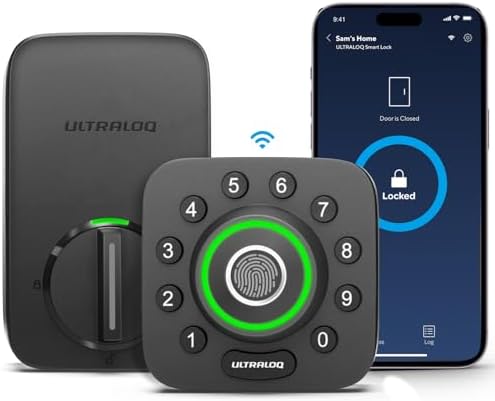
- Control Your Ultraloq Smart Lock Anytime, Anywhere: Lock, unlock, share access and see a Log of who’s entered and exactl…
- 8-in-1 Keyless Entry Door Lock: Fingerprint ID(stores up to 100 fingerprints, 2 per user) + Passcode(up to 50 codes) + A…
- Enhanced Security and Intelligence: smart deadbolt lock auto-locks when the door closes and unlocks as you approach with…
Model/SKU: U-BOLT-PRO-WiFi (part UUL-U-BOLT-PRO-WIFi). The older U-Bolt Pro needs a Wi-Fi bridge. Seen around $140 on sale; availability varied.
Alexa: An earlier Reviewed review says Alexa and Google can unlock it and that Alexa Routines work. We could not find manufacturer steps.
Connectivity and install: Built-in Wi-Fi (2.4 GHz only per Reviewed); no hub.
Security: Listings claim ANSI/BHMA Grade 1; we could not verify it, and Consumer Reports’ roundup tested a different Ultraloq.
Power and backup: Four AA, 3–6 months per U-tec via Reviewed; backup key. A reseller lists lifetime mechanical and 18-month electronics warranties.
Pros: Lowest price; fingerprint. Cons: Unverified grade; shorter battery life.
Buy it if price matters and you’ll verify the certificate. Skip it if documented security is non-negotiable.
What Can Alexa Actually Do With a Smart Lock?
Three things, with very different risk:
- Check status. Alexa reports whether the door is locked. It needs the lock to report bolt position.
- Lock. The safe half: a misheard command just locks a door.
- Unlock. Off by default. Open the lock’s settings in the Alexa app, turn on Unlock by Voice, set a PIN and confirm with your Amazon login. Alexa then asks for the PIN each time.
Schlage’s page documents all three for the Encode Plus. Other brands vary, so don’t assume.
| Command | Status |
|---|---|
| “Alexa, lock the front door.” | Supported on locks that expose lock control |
| “Alexa, is the front door locked?” | Supported where status is exposed (documented by Schlage) |
| “Alexa, unlock the front door.” (then say your PIN) | Supported only after Unlock by Voice is enabled |
| A “Goodnight” routine that locks the door and turns off lights | Illustrative; build it in the Alexa app |
| An unlock routine with the PIN typed in | Community workaround; we advise against it |
Any Alexa-enabled speaker or display, including an Echo Dot or Echo Show, can carry these commands, and the Alexa app works without one. Voice commands also fail when the internet does, as covered below.
Do Alexa-Compatible Smart Locks Need Wi-Fi?
Alexa reaches a lock over the internet, so the lock needs some path to your network.
| Connection | What it does | Alexa path | Remote access |
|---|---|---|---|
| Built-in Wi-Fi | Lock joins your router directly | Direct, no hub | Yes |
| Bluetooth | Short range to your phone | Needs a module, bridge or hub | No on its own |
| Zigbee / Z-Wave | Low-power radios | Needs a compatible hub (for example Schlage Connect, Z-Wave) | Via hub |
| Thread + Matter | Low-power mesh plus a shared standard | Needs a border router; Consumer Reports says Echo speakers include one | Yes via controller |
Local access (keypad, fingerprint, key, nearby Bluetooth) never needs the internet. Remote access and Alexa always do.
How to Connect a Smart Lock to Amazon Alexa
Steps vary by maker and model.
- Install the manufacturer’s app and create the account.
- Install and configure the lock, then test it from the app.
- Put your phone on 2.4 GHz Wi-Fi; most smart home Wi-Fi devices only use that band.
- Open the Alexa app and check whether the lock already appears under Devices.
- Enable the maker’s Alexa skill or integration if prompted.
- Follow Amazon’s smart home setup steps: Devices, the plus icon, Add Device, pick the type, then the brand.
- Name the lock clearly (“Front Door”) so voice commands are unambiguous.
- Open the lock’s settings in Alexa, enable Unlock by Voice if you want it, and choose a PIN you don’t use anywhere else.
- Test lock, status and unlock commands with the door open first.
If you’re building a larger setup, our DIY home security setup guide covers sequencing the lock with cameras and sensors.
Is Alexa Voice Unlocking Safe?
It can be, if you treat it as a decision rather than a default.
- The spoken PIN is the control. Without it, anyone within earshot of an Echo could try to open the door. Schlage says Alexa disables voice unlock after three wrong PINs.
- Echo placement matters. A speaker near a window or porch is a different risk from one in a hallway.
- Shared devices. Guests and kids can hear your PIN. Change it periodically.
- Account security. Your Amazon login authorizes voice unlock, and the lock app has its own account. Use unique passwords and two-step verification on both.
- Don’t store the PIN in a routine. Community workarounds exist, but they put the PIN in plain text in your account.
- Mechanical security still matters most. BHMA grades measure physical strength, not apps or firmware. Check the BHMA directory rather than trusting “bank-level” marketing.
If in doubt, leave voice unlock off. Every lock here works identically with it disabled.
Built-in Wi-Fi vs Smart Lock Hubs
Built-in Wi-Fi means fewer boxes and simpler setup, but it drains batteries faster and depends on a strong signal at the door. Hubs and bridges cost more up front and add a device to power and place, but can extend battery life and unify several devices. The hidden costs are real: Yale’s Wi-Fi module is $89.99 if you buy the Bluetooth version, August’s keypad is extra on some listings, and Matter setups may need a Thread border router.
For a no-extra-box setup, built-in Wi-Fi locks such as the Schlage, Eufy, August and Ultraloq are the simplest route to Alexa. For a broader hub explainer, our multi-ecosystem lock guide goes deeper.
What Happens If Wi-Fi Stops Working?
| Feature | Works offline? |
|---|---|
| Physical key | Yes |
| Keypad and fingerprint | Generally yes |
| Local Bluetooth with your phone | Generally yes, when nearby |
| Remote app access | No |
| Alexa voice commands | No; Alexa and the lock’s cloud need the internet |
| Alexa routines | Not while offline |
Power cuts don’t stop battery locks. Some Matter-over-Thread setups may keep local control through a border router, but we couldn’t verify how Alexa behaves, so treat that as unconfirmed. Test your key twice a year.
How to Choose the Best Alexa-Compatible Smart Lock
- Confirm the exact model. “Works with Alexa” depends on the variant, as the Yale and August examples show.
- Decide on voice unlocking. If you want it, favor a lock where the maker documents it.
- Measure the door. Check thickness and backset before buying. Our best smart locks for front doors guide has a measuring checklist.
- Pick the install type. Retrofit for renters; replacement for owners.
- Check mechanical security. Prefer published BHMA grades and independent test results.
- Plan for batteries and emergencies. Look for a key or USB/9V power.
- Weigh privacy. For fingerprint locks, read where biometric data is stored.
- Count total cost. Add modules, keypads, bridges and an Echo if you lack one. To compare the best smart locks for different budgets, see our price-tiered roundup.
- Confirm hub needs. Prefer built-in Wi-Fi if you want zero extra hardware.
We found no mandatory subscription for core lock, unlock or voice functions on these six, but extras like video or extended history vary by brand.
Frequently Asked Questions
1. What is the best smart lock that works with Alexa? There’s no single winner. We’d start with the Yale Assure Lock 2 (Wi-Fi) overall, the Schlage Encode Plus for documented voice unlock, and the August for renters.
2. Can Alexa unlock my front door? On supported locks, yes: enable Unlock by Voice in the Alexa app, set a PIN and say it when asked. Schlage documents it; confirm for other models.
3. Do Alexa-compatible smart locks require Wi-Fi? Alexa needs an internet path: built-in Wi-Fi, or a module, bridge or hub. Keypad and key entry work without it.
4. Can Alexa lock my door automatically? Most locks have their own auto-lock, and Alexa routines can issue lock commands on a schedule. Check what your lock’s skill allows.
5. Can Alexa tell me whether my door is locked? On locks that report status, yes: “Alexa, is the front door locked?” Schlage documents it.
6. Do I need an Amazon Echo to use an Alexa smart lock? No for app control, but voice needs an Alexa-enabled device such as an Echo Dot or Echo Show. Thread locks also benefit from an Echo’s border router.
7. Are Alexa-compatible smart locks secure? That depends on the deadbolt’s grade, your door and your account security. Voice unlock adds the spoken PIN as a safeguard, and you can turn it off.
8. What happens if the internet goes down? Keypad, fingerprint and key still work. Alexa and remote access don’t.
9. Can I use Alexa with a smart lock without a subscription? Yes on the six here, based on what we could verify. Confirm for your model.
10. What is the difference between Alexa and Matter compatibility? Alexa support is Amazon’s own integration. Matter is a shared standard that lets one lock join Alexa, Apple Home and Google Home, usually over Thread with a border router. A lock can have one, both or neither.
Final Verdict
- Best overall: Yale Assure Lock 2 (Wi-Fi). Top Consumer Reports Wi-Fi pick, no hub, reasonable price.
- Best premium option: Schlage Encode Plus. Published AAA grade and the clearest Alexa documentation.
- Best for renters: August Wi-Fi Smart Lock (4th Gen). Keeps your exterior and keys.
- Best for fingerprint access: Eufy S230. Strong lab results for the price.
- Best for Alexa-first households: Kwikset Halo Select Plus, if you want Matter on Echo’s Thread network and accept the drill result.
- Best value option: ULTRALOQ U-Bolt Pro WiFi, if you verify the certificate before buying.
We didn’t pick any lock for brand popularity, and we put limitations before the buy buttons. TechRadar’s smart lock roundup is a good cross-check on how different testers rank the field.