Choosing an indoor security camera isn’t really about finding “the best” one — it’s about matching a camera’s features to who or what you’re actually watching. A camera built to catch package thieves isn’t necessarily good at picking out a whimper from a nursery monitor speaker, and a camera tuned for baby-cry detection may not track a cat sprinting across the living room. The right pick depends on your specific use case, and that’s the lens this guide uses throughout.
We built this guide by pulling current specifications directly from manufacturer spec sheets and cross-checking them against recent hands-on testing, rather than recycling numbers from older roundups. Where a spec varies by region or model generation, we say so.
Quick Answer
If you only read one section, here’s the short version:
- Best overall: Google Nest Cam Indoor (wired, 3rd gen) — sharp 2K video, a wide field of view, and reliable AI alerts, if you’re willing to lean into the Google ecosystem.
- Best for pets: Eufy Indoor Cam S350 — 4K dual-lens zoom and 355° pan/tilt make it easy to actually see what your dog or cat is doing across the room.
- Best for kids and babies: TP-Link Tapo C225 — dedicated baby-crying detection, an invisible night-vision mode, and a physical privacy shutter.
- Best for elderly care: Ring Indoor Cam Plus — simple setup, easy multi-user family access, and two-way talk for quick check-ins.
- Best no-subscription option: Wyze Cam Pan v3 — free local recording and free short cloud clips with no mandatory monthly fee.
- Best budget option: Wyze Cam v3 — a genuinely capable fixed camera for well under $40.
- Best privacy-focused option: Aqara Camera Hub G3 — on-device AI recognition and no requirement to send video to a company’s cloud at all.
Comparison Table
| Camera | Best For | Resolution | Pan/Tilt | AI Detection | Night Vision | Storage | Subscription | Privacy Feature |
|---|---|---|---|---|---|---|---|---|
| Google Nest Cam Indoor (wired, 3rd gen) | Best Overall | 2K HDR | No | Person, animal, vehicle | Infrared (black & white) | Cloud only — a few hours free; 30–60 days with a paid plan | Optional, for extended video history | No physical shutter — camera can be unplugged or angled away |
| Eufy Indoor Cam S350 | Pets | 4K wide-angle + 2K telephoto (8× hybrid zoom) | Yes — 355° pan / 75° tilt | Human, pet, crying | Infrared, up to ~40 ft | Local microSD (up to 128GB) + optional HomeBase; cloud optional | Not required for core recording | Motorized privacy mode; footage can stay entirely local |
| TP-Link Tapo C225 | Kids/Babies | 2K QHD | Yes — 360° pan / 149° tilt | Person, pet, baby crying, glass break, bark/meow | Invisible 940nm IR, up to ~30 ft | Local microSD (up to 512GB) + optional Tapo Care cloud | Not required for core recording | Physical privacy button that mechanically covers the lens |
| Ring Indoor Cam Plus | Elderly Care | 2K (Retinal) | No (a separate Pan-Tilt Indoor Cam model exists) | Person | Color night vision | Cloud only | Ring Protect required to record and review clips | Manual privacy cover on some models; shared-user permissions |
| Wyze Cam Pan v3 | No-Subscription | 1080p | Yes — 360° pan / 180° tilt | Motion/sound free; person and pet detection require Cam Plus | Color + infrared | Free local microSD + free short cloud clips | Optional (Cam Plus) for AI detection and longer history | Manual privacy mode |
| Wyze Cam v3 | Budget | 1080p | No | Motion/sound free; person detection requires Cam Plus | Color (Starlight sensor) + infrared | Free local microSD + limited free cloud clips | Optional | None built-in |
| Aqara Camera Hub G3 | Privacy-Focused | 2K (2304×1296) | Yes — 340° pan / 45° tilt | On-device face, pet, and gesture recognition | Infrared | Local microSD (up to 128GB); no mandatory cloud | Not required; HomeKit Secure Video is optional via iCloud+ | Physical privacy mode with a visible on-camera indicator |
Prices and subscription tiers shift often — always confirm current pricing on the manufacturer’s site before buying.
Best Overall: Google Nest Cam Indoor (Wired, 3rd Gen)
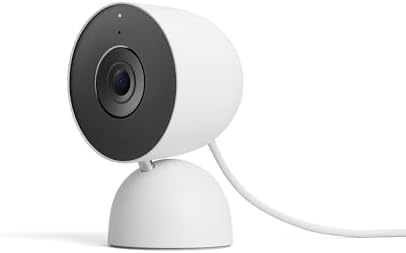
- Meet the smarter, sharper wired Google Nest Cam Indoor; with 2K HDR video and Gemini, it knows what to look out for and …
- With an Advanced subscription to Google Home Premium, know more about what’s happening with notifications like “Kids are…
- Google Nest Cam Indoor keeps your data safe with encrypted video, two-step verification, and enhanced security through y…
The newest wired Nest Cam Indoor jumped from 1080p to 2K HDR video with a wider, taller field of view for larger rooms and long hallways, and Google’s own spec sheet lists it at 152° diagonal, a meaningful step up from the 130° view on Google’s battery-powered Nest Cam. It includes built-in intelligent alerts for person, animal, and vehicle detection without a subscription, though free video history is limited — the camera ships with 3 hours of event-based video history with clips up to 3 minutes on the free tier.
This camera earns “best overall” because it balances image quality, alert accuracy, and ecosystem simplicity without asking you to buy a pan-and-tilt motor or commit to a niche brand. It’s a strong fit if you already use Google Home or Nest Hub displays and want one camera that can reasonably watch a living room, a hallway, or a playroom. It’s a weaker fit if you specifically need pan/tilt tracking, since this model is fixed.
Best Indoor Security Camera for Pets: Eufy Indoor Cam S350

- Superior Clarity: With dual cameras and 4K UHD resolution, this indoor camera delivers clear and detailed views of your …
- Advanced Zoom Capabilities: The 4K wide-angle and 2K telephoto cameras work together to provide an impressive 8× hybrid …
- Complete Coverage: The 360° pan and tilt capabilities ensure a complete view of your space without blind spots. This mak…
Pet monitoring has different demands than general home security: you need to actually see a small, low-to-the-ground, fast-moving animal, not just detect that “something” moved. The Eufy Indoor Cam S350 handles this with a genuinely dual-lens design — a 4K wide-angle lens for full-room coverage paired with a 2K telephoto lens, combining for up to 8x hybrid zoom — genuine reach, not smeary digital cropping. That distinction matters if you want to zoom in and actually confirm whether your dog got into something it shouldn’t have.
Coverage-wise, the camera’s own spec table lists a 355° pan figure (marketed as “full 360°”) with roughly 75° of tilt, and its AI runs human, pet, and cry detection plus auto-tracking on-device, with footage recording to a microSD card or an eufy HomeBase — no subscription required for the core job. One caveat worth knowing before you buy: eufy has a documented past privacy incident, which some privacy-conscious buyers may want to weigh against the strong feature set.
Best for Kids and Babies: TP-Link Tapo C225

The Tapo C225 was clearly designed with nurseries in mind. TP-Link’s own product page describes “naptime-friendly night vision” — invisible night vision that keeps an eye on a sleeping baby without the distraction of visible red lights, paired with baby crying alerts that notify you when your attention is needed. It uses a dedicated 940nm IR mode to remove the red lights that can distract people or pets at night, which is a small but genuinely thoughtful detail for a dark bedroom.
Beyond baby-cry detection, the manufacturer’s datasheet lists AI recognition for motion, person, pet, vehicle, line-crossing, camera tampering, baby crying, cat meows, dog barks, and glass breaking — useful if your household has both a baby and a pet setting off notifications. It also supports local storage on a microSD card up to 512GB, or optional Tapo Care cloud storage, and includes a complete privacy option via a physical lens conceal for times you don’t want the camera recording at all. TP-Link publishes more detail on how the privacy shutter and privacy modes work across the Tapo and Kasa lineup, which is worth a read if privacy mode is a deciding factor for you.
A camera like this is a supplement to good judgment, not a substitute for it — a security camera should not be relied on as a medical monitor, and it doesn’t replace a dedicated baby monitor with apnea or breathing-pattern sensing if your pediatrician has recommended one.
Best for Elderly Care: Ring Indoor Cam Plus
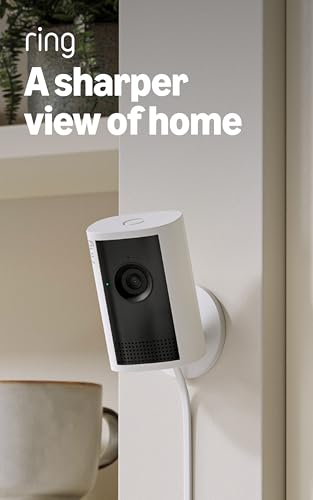
- Capture it all with Retinal 2K video — See every detail of your home or business in full view — powered by Retinal 2K. (…
- Zoom in 4x — Catch details at a distance with up to 4x Enhanced Zoom.
- True color, even in low light — With Low-Light Sight, just a little ambient light gives you true color video. In total d…
Elderly-care monitoring has a different priority than pet or baby monitoring: ease of use for the person being watched, and ease of shared access for the family members doing the watching. Ring’s ecosystem is built around exactly that kind of multi-user sharing, and the Indoor Cam Plus offers Retinal 2K resolution — a meaningful jump in clarity over Ring’s base 1080p Indoor Cam — along with two-way talk, so an adult child can check in verbally without a phone call.
It’s worth being direct about a limitation here: Ring’s indoor lineup tops out at a 150-degree viewing angle even on higher-end models, narrower than some competitors like Arlo, which reach 180 degrees on select cameras. For a small den or hallway that’s rarely an issue; for a large open living space, you may need two cameras or a pan-tilt model. Also worth flagging clearly: a consumer indoor camera like this is not a medical device. It cannot detect a fall, call for help automatically, or replace a dedicated medical alert system or fall-detection wearable — it can only show you what’s happening if you happen to be watching or if motion triggers an alert you check promptly.
Best No-Subscription Option: Wyze Cam Pan v3

- 【Stunning Color Night Vision for Low-Light Environments】- See vivid details even in darkness with advanced color night v…
- 【AI-Powered Motion Tracking for Pets & People】- This versatile pet camera automatically detects and follows movement—whe…
- 【True Outdoor Durability with IP65 Rating】- Built to resist rain, heat, and cold, this outdoor camera delivers unwaverin…
If a monthly fee is a dealbreaker, the Wyze Cam Pan v3 is one of the few pan-and-tilt cameras that doesn’t require one for basic use. Wyze’s own pricing page confirms there are no mandatory subscriptions or monthly fees for core motion and sound alerts, and the camera includes 1080p video, night vision, and Alexa integration at $39.99. The catch, and it’s a real one: person and pet detection require a Cam Plus subscription, which Wyze prices affordably (roughly $2–3 per month per camera, or a flat multi-camera plan) but which is not free.
Consumer Reports’ guide to home security cameras without a subscription is a useful independent reference if you’re building a fully subscription-free setup across multiple rooms — it’s worth comparing against this pick before you buy.
Best Budget Option: Wyze Cam v3
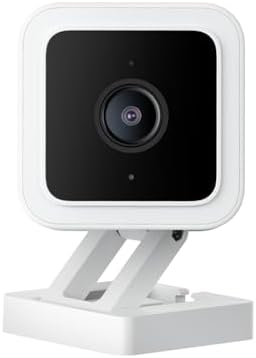
- Motion & Sound Detection: Wyze Cam sends an alert to your phone when baby is crying. 24/7 Continuous video recording wit…
- Indoor/Outdoor: Wyze Cam v3 is a wired video camera with an IP65 rating so you can confidently install it outside in the…
- 2-Way Talk: Wyze Cam now comes with simultaneous 2-way communication. Let your baby hear the sound of your voice no matt…
For a single room where you just want basic coverage without spending much, the fixed Wyze Cam v3 remains one of the cheapest cameras worth actually buying, typically listed around $35.98. It uses a CMOS Starlight sensor for color night vision and works over Wi-Fi with no subscription required for basic motion and sound alerts. It’s not pan-and-tilt and its 1080p resolution won’t match 2K or 4K competitors in detail, but for a closet, entryway, or secondary room, it’s a sensible way to add a camera without spending $100+.
Best Privacy-Focused Option: Aqara Camera Hub G3
Most “privacy-focused” claims in this category boil down to a physical shutter. The Aqara Camera Hub G3 goes further: its AI recognition — facial, gesture, and pet recognition — runs locally on an NPU-equipped processor, meaning the analysis doesn’t have to leave your home network to work. It supports local storage to a microSD card up to 128GB, and if you’re in the Apple ecosystem, it works with HomeKit Secure Video, which encrypts footage in a way Apple itself can’t view. Aqara also builds in a genuine physical safeguard: a hardware privacy protection mode that can be turned on manually or automatically, identifiable by a sleepy-face icon on the camera itself — a nice, visible confirmation that recording has actually stopped, not just a toggle buried in an app.
It’s pricier than a basic Wyze or Tapo camera and its ecosystem (Zigbee hub features, HomeKit) is more relevant if you’re already building out a broader smart home. But for someone who specifically doesn’t want video routinely leaving their house, it’s the strongest option here.
What Makes an Indoor Security Camera Good for Pets?
A few features separate a genuinely pet-friendly camera from a general-purpose one:
- Pet detection distinguishes an actual animal from a swaying curtain or a Roomba, which cuts down on false alerts dramatically.
- Pet motion tracking — a pan-tilt camera that follows movement — matters because pets don’t sit still in one spot the way a doorway does.
- Bark, meow, or general sound alerts let you know your dog is distressed even if it’s out of frame.
- Two-way audio lets you verbally interrupt bad behavior (or just say hello) remotely.
- Pan and tilt, ideally with a wide rotation range, covers more of a room than a fixed lens can.
- Night vision matters more than people expect — many pets are most active at night or during naps when the house is dark.
- Field of view should be wide enough to cover the areas your pet actually uses, not just a doorway.
- Alert customization (activity zones, sensitivity sliders) reduces notification fatigue from an animal that’s constantly moving somewhere in frame.
- Local storage is genuinely useful here, since pet-monitoring footage can rack up quickly and you may not want years of it sitting in a company’s cloud.
- Camera placement — elevate the camera above furniture height and angle it to cover the pet’s main living area (bed, food area, door) rather than a random corner.
What Makes an Indoor Security Camera Good for Kids and Babies?
Nursery and playroom monitoring has its own priority list:
- Baby crying detection is a genuinely useful add-on alert, though it should complement, not replace, a proper baby monitor if one is medically recommended.
- Night vision, ideally invisible IR rather than visible red LEDs, avoids disturbing sleep.
- Two-way audio lets a parent soothe from another room.
- A privacy shutter matters more here than almost anywhere else in the house — you want a hard, physical way to confirm the camera is off, not just a software toggle.
- Activity zones help you get alerts for a crib or play area specifically, rather than every hallway shadow.
- Reliable notifications — a camera that misses real events or spams false ones is worse than no camera at all for peace of mind.
- Low-light performance is critical since nurseries are typically kept dark.
- Nursery placement should avoid pointing directly at a crib from above (cord and mounting safety matter) and should keep any cables well out of reach.
- Caregiver monitoring — if a nanny or babysitter is present, be transparent that a camera is recording, both for trust and, in many places, for legal reasons.
Again: a security camera is not a substitute for a dedicated baby monitor with breathing or apnea sensing where a doctor has recommended one.
What Makes an Indoor Security Camera Good for Elderly Care?
Monitoring an aging parent or relative calls for a different feature set than watching a pet or a nursery:
- Remote check-ins via live view let family members glance in without a phone call.
- Two-way communication lets you talk through the camera, which some elderly users find more natural than a phone.
- Motion and activity alerts can flag unusual patterns, like a normally active relative who hasn’t moved through a monitored space by a certain time.
- Sound alerts can catch things like a call for help or an alarm going off.
- Night vision matters if there’s a risk of nighttime falls.
- A wide field of view reduces blind spots in a living room or hallway.
- Pan/tilt helps cover larger rooms with one camera instead of several.
- Multiple-user access lets several family members monitor and share responsibility.
- Privacy controls matter enormously here too — many elderly users understandably want control over when they’re being watched, and involving them in that decision preserves dignity and trust.
- Living-room and hallway placement, rather than bedrooms or bathrooms, is generally the right balance between safety and privacy.
It bears repeating clearly: no camera in this guide is a certified medical fall-detection or emergency-response system. If automatic fall detection or emergency response is the actual goal, that calls for a dedicated medical alert device — a security camera can supplement that, but shouldn’t be presented as a replacement.
Indoor Security Camera Features That Actually Matter
1080p vs. 2K vs. 4K: 1080p is still perfectly usable for identifying people and pets in a small-to-medium room. 2K adds real clarity for zooming in on details — like reading a face across a room. 4K goes further still but produces larger files and needs more storage or bandwidth; it mostly matters if you plan to zoom in digitally or cover a large space with one camera.
HDR balances bright windows against dark corners in the same frame, which matters a lot in rooms with strong daylight.
Night vision — most cameras use infrared, which produces black-and-white footage; some newer models add color night vision using bigger sensors and available ambient light, which can make faces easier to identify.
Field of view determines how much of a room one camera actually covers — a narrower FOV may mean you need two cameras for one room.
Pan and tilt lets a single camera cover a wider area by physically or digitally moving, which matters most for pet tracking or large rooms.
Digital vs. optical zoom: digital zoom just crops and enlarges pixels, losing detail; optical zoom (like the Eufy S350’s telephoto lens) genuinely gets you closer without the mush.
Person, pet, and baby-crying detection cut down dramatically on false alerts compared to generic motion detection.
Motion tracking keeps a moving subject centered in frame rather than letting them wander in and out of view.
Activity zones let you tell the camera to ignore certain areas (a busy street-facing window, a TV) and focus alerts on the zones that matter.
Two-way audio turns a passive camera into something you can actually use to communicate.
Local storage (a microSD card or local hub) avoids recurring fees and keeps footage on your own hardware.
Cloud storage offers off-site backup and remote access without a physical card to manage, at the cost of a subscription and someone else’s server holding your footage.
A privacy shutter or privacy zone gives you a hard guarantee that the camera isn’t watching a specific area or time.
Encryption protects footage in transit and storage from interception.
Two-factor authentication is one of the single most effective things you can do to keep a camera account from being hijacked — the FTC’s guide on securing home security cameras specifically recommends enabling it wherever it’s offered.
Cloud Storage vs. Local Storage
Neither option is universally “more secure” — each shifts the risk somewhere different.
| Factor | Cloud Storage | Local Storage |
|---|---|---|
| Monthly cost | Usually requires a subscription | Usually free after the initial camera purchase |
| Privacy | Footage stored on a third-party company’s servers | Footage stays on your own SD card or hub |
| Remote access | Generally easy from anywhere | Often limited or requires extra setup |
| Storage capacity | Effectively unlimited, tied to your plan | Capped by card size (commonly 128GB–512GB) |
| AI features | Often more advanced (face recognition, longer history) | Typically more basic, though improving |
| Reliability | Depends on your internet connection and the vendor’s uptime | Vulnerable if the physical card or camera is stolen or damaged |
| Best for | Multi-camera households wanting long history and advanced AI | Privacy-conscious users or anyone avoiding recurring fees |
Cloud storage isn’t inherently unsafe — reputable vendors encrypt footage and secure their infrastructure — but it does mean trusting a company’s servers and account-security practices with sensitive footage. Local storage removes that third party but puts the burden of physical security and backups on you; if the card is stolen along with the camera, that footage is gone too. Consumer Reports’ home security camera buying guide is a solid independent resource for weighing this tradeoff further.
Are Indoor Security Cameras Safe and Private?
Used thoughtfully, yes — but “safe” depends heavily on how you configure the camera, not just which one you buy. A few concrete steps matter more than which brand you choose:
- Physical privacy shutters or privacy mode give you a hardware-level guarantee, not just a software toggle you have to trust.
- Privacy zones let you mask out specific areas of a shared room, like a neighbor’s window.
- Encryption protects footage from being intercepted in transit.
- Strong, unique passwords — never reuse a password from another account on your camera’s login.
- Two-factor authentication, enabled wherever offered, is one of the most effective single steps you can take.
- Firmware updates patch known vulnerabilities; set them to install automatically if the option exists.
- Account permissions should be reviewed periodically — remove access for a former babysitter, contractor, or ex-partner promptly.
- Cloud privacy depends on the vendor’s stated policies; read them, especially around whether footage is used to train AI models.
- Avoid installing cameras in bathrooms or other highly private spaces — even with good intentions, that’s a serious privacy and, in some jurisdictions, legal risk.
The FTC’s guide on securing home security cameras is a genuinely useful starting point on this, and TP-Link publishes its own walkthrough of how privacy mode works across the Tapo and Kasa camera lines if you want a concrete example of how one vendor implements it.
How to Reduce False Alerts From Pets, Kids, and Normal Household Activity
- Use person detection instead of raw motion detection wherever your camera supports it — this alone eliminates most curtain-sway and shadow alerts.
- Turn on pet detection if you have an animal, so the camera can distinguish “the cat walked by” from an actual concern.
- Set activity zones to exclude high-traffic but low-priority areas, like a hallway a toddler runs through constantly.
- Adjust sensitivity settings — most cameras let you dial detection sensitivity up or down; a lower setting in a busy household cuts noise dramatically.
- Use notification schedules so you’re not getting alerts for normal daytime movement when you don’t need them.
- Tune sound detection thresholds if your camera supports audio alerts, since a loud TV or vacuum can otherwise trigger constant pings.
- Watch for alert fatigue — if you’re getting so many notifications that you start ignoring them, the settings need adjusting, because an ignored alert defeats the entire purpose of the camera.
Where Should You Place an Indoor Security Camera?
For pets: Aim for the room they spend the most time in — near a bed, food area, or favorite window — and elevate the camera above furniture height for a fuller view.
For babies and kids: Position above and to the side of a crib, never directly overhead, and keep all cords well out of reach, following the same cord-safety logic recommended for any nursery electronics.
For elderly parents: Common living spaces — a living room, kitchen, or main hallway — tend to strike the best balance between usefulness and privacy. Avoid bedrooms and bathrooms.
For general home security: Entryways, staircases, and main hallways typically give the best coverage-to-camera ratio.
Across all of these, think about what’s in the background of the shot, too — a camera aimed at a crib might also capture a neighbor’s window through a side wall, which is worth checking during setup.
Indoor vs. Outdoor Security Cameras
Indoor cameras are built for controlled environments: consistent temperature, no rain or direct sun, and typically Wi-Fi rather than battery power, which is why most indoor models in this guide are plug-in only. Outdoor cameras need weatherproofing, wider temperature tolerances, and often battery or solar power options since running an outlet to a porch corner isn’t always practical. The AI priorities differ too — outdoor cameras lean heavily on vehicle and package detection, while indoor cameras (as this guide covers) lean into pet, baby, and person-focused features. If you’re building out a full perimeter, a complete home security system that pairs indoor cameras with outdoor units, a video doorbell, and door/window sensors generally covers more ground than any single indoor camera can on its own.
Buyer’s Guide: Which Camera Type Fits Your Situation?
- Apartment: A compact, plug-in camera like the Wyze Cam v3 or Tapo C225 avoids drilling and works well in a smaller footprint.
- Family home: A pan-tilt camera like the Eufy S350 or a multi-camera Ring setup covers more square footage per device.
- Pet owner: Prioritize pet detection and pan/tilt tracking — the Eufy S350 or Tapo C225 both fit well.
- New parents: Baby-crying detection and a physical privacy shutter, as on the Tapo C225, should top the list.
- Elderly-parent monitoring: Prioritize simplicity, two-way audio, and easy multi-user family access — Ring’s ecosystem is built for exactly this.
- Privacy-conscious users: The Aqara Camera Hub G3’s on-device AI and optional HomeKit Secure Video minimize what leaves your home network.
- People avoiding subscriptions: Wyze and Eufy both let you record locally without a mandatory monthly fee.
- Budget buyers: The Wyze Cam v3 delivers real functionality for under $40.
If you’re also locking down entry points, our guides to the best smart locks and best video doorbells cover the rest of a layered home security setup.
Frequently Asked Questions
What is the best indoor security camera for pets?
The Eufy Indoor Cam S350 stands out for pets thanks to its 4K dual-lens zoom and wide 355° pan range, which make it easier to actually see what a pet is doing across a room rather than just detecting that something moved.
What is the best indoor camera for elderly parents?
The Ring Indoor Cam Plus is a strong fit for its simplicity, two-way talk, and easy multi-user family sharing — though it should never be treated as a medical fall-detection device.
Can indoor security cameras detect a baby crying?
Yes — several models, including the TP-Link Tapo C225, include dedicated baby-crying detection as part of their AI alert system, separate from general motion or sound detection.
Do indoor security cameras need Wi-Fi?
Nearly all consumer indoor cameras, including every model in this guide, connect over Wi-Fi to send alerts and stream live video, even when they record locally to a memory card.
Do indoor security cameras require a subscription?
Not always. Cameras like the Wyze Cam Pan v3, Wyze Cam v3, Eufy Indoor Cam S350, and Aqara Camera Hub G3 all support core recording without a mandatory monthly fee, while cameras like the Ring Indoor Cam Plus generally require a subscription to record and review footage.
Can indoor cameras record without the internet?
Cameras with local microSD or hub storage, like the Eufy S350, Tapo C225, and Aqara G3, can typically keep recording locally during an internet outage, though live remote viewing and push notifications require a connection.
Are indoor security cameras safe?
They can be, when set up carefully — strong unique passwords, two-factor authentication, and prompt firmware updates go a long way. The FTC’s guide on securing home security cameras is a good starting checklist.
Where should you not place an indoor security camera?
Avoid bathrooms and other highly private spaces, and be mindful of what’s visible in the background — including through windows facing neighbors.
Are 2K cameras better than 1080p?
2K delivers noticeably more detail, especially useful for zooming in or identifying faces at a distance, but 1080p is still perfectly usable for basic monitoring in smaller rooms.
Do indoor security cameras work at night?
Yes — nearly all include infrared night vision, and some newer models add color night vision for more natural-looking low-light footage.
Conclusion: Which Indoor Camera Should You Actually Buy?
There’s no single universal winner here — what’s “best” depends entirely on what you’re watching and why:
- Best for pet owners: Eufy Indoor Cam S350, for its zoom and pan/tilt tracking.
- Best for parents: TP-Link Tapo C225, for baby-crying detection and its physical privacy shutter.
- Best for elderly care: Ring Indoor Cam Plus, for ease of shared family access — with the clear caveat that it’s not a medical device.
- Best for privacy-conscious buyers: Aqara Camera Hub G3, for on-device AI and optional end-to-end encrypted storage.
- Best for no-subscription users: Wyze Cam Pan v3, for free local recording with genuine pan-and-tilt coverage.
- Best budget choice: Wyze Cam v3, for solid basics at a low price.
Whichever camera you choose, the feature that matters most in practice usually isn’t the resolution number on the box — it’s whether you set up detection zones, notifications, and privacy controls in a way that actually fits your household.