
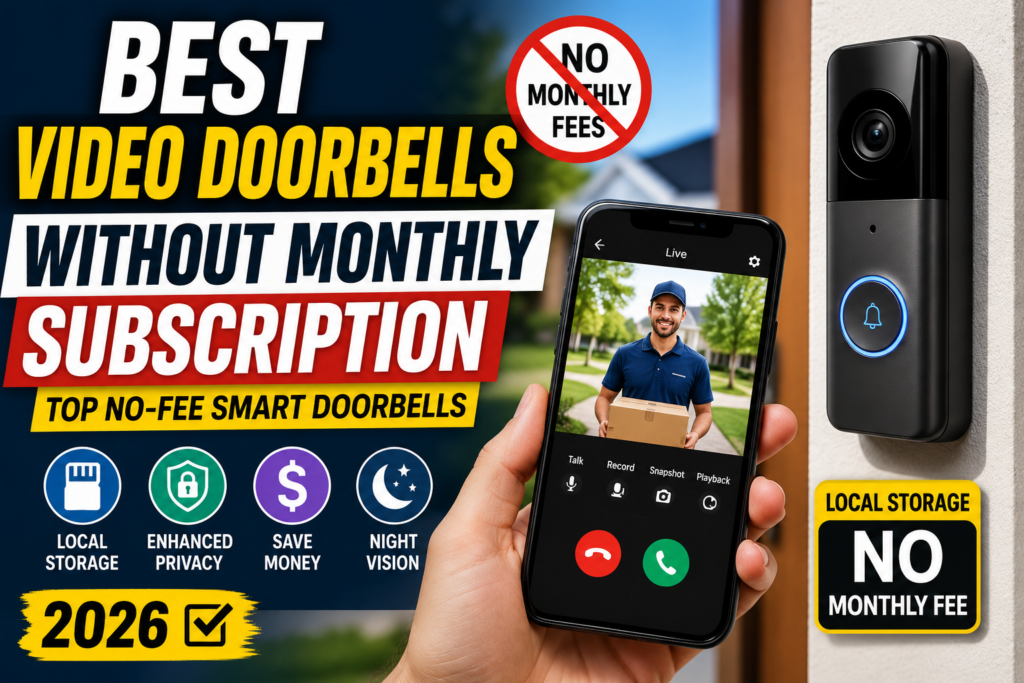
Ever add up how much a “smart” doorbell has cost you after three years of subscription fees? For a lot of people, the number is genuinely surprising.
You buy the hardware once. Then you keep paying — every single month — just to see the footage that your own camera recorded, at your own front door.
That’s the problem this guide solves. We’re going to walk through the best video doorbells without a monthly subscription, how “subscription-free” actually works under the hood, and how to pick the right one for your home without getting locked into another recurring bill.
Image alt text suggestion: “Video doorbell mounted beside a front door with no cloud subscription required”
Table of Contents
- The Subscription Fatigue Problem
- What “Subscription-Free” Really Means
- Local Storage vs. Cloud Storage: The Real Comparison
- Advantages and Disadvantages of Subscription-Free Doorbells
- Comparison Table: Top No-Subscription Video Doorbells
- Best Video Doorbells Without a Subscription (2026 Picks)
- Wired vs. Battery-Powered Video Doorbells
- The Complete Buying Guide
- Privacy and Security Considerations
- Frequently Asked Questions
- Final Verdict and Recommendations
The Subscription Fatigue Problem
Streaming services. Cloud storage. Meal kits. Fitness apps. And now, apparently, your doorbell.
It’s a lot. And smart home security has quietly become one of the worst offenders.
Here’s the pattern most people fall into. You buy a popular video doorbell for $100–$200. It looks like a great deal. Then, a week later, you get a notification: to view footage older than a few hours, save clips, or unlock person detection, you need a monthly plan.
Suddenly your “one-time purchase” is a subscription in disguise.
Over three years, that monthly fee can easily add up to more than the doorbell itself cost. Multiply that across a video doorbell, an outdoor security camera or two, and maybe a smart lock, and you’re running a small monthly security budget just to keep an eye on your own porch.
There’s a growing category of doorbells built specifically to avoid this. They store footage locally — on a memory card, a hub, or your own network — instead of a company’s cloud servers. No monthly access fee. No footage held hostage behind a paywall.
That’s what this guide is about: real, subscription-free video doorbells that do the job without the recurring bill.
What “Subscription-Free” Really Means
“Subscription-free” gets thrown around a lot in doorbell marketing, and it doesn’t always mean the same thing. Here’s how to read the fine print.
The Three Flavors of “No Subscription”
1. Truly local, no cloud option at all. The doorbell records straight to a microSD card or hub. There’s no cloud plan to opt into because there isn’t one. This is the purest form of subscription-free.
2. Local storage included, cloud storage optional. The doorbell works completely fine with local recording, but the manufacturer also offers a paid cloud tier for people who want offsite backup or extra features. You’re never forced into it.
3. “Free” cloud tier with paid upsells. Some brands offer a short free cloud trial (say, a few days of clip storage) and market this as “no subscription required,” when in practice, the features people actually want — person detection, longer history, multi-camera plans — sit behind a paywall.
When you’re shopping, the phrase to look for is local storage with no subscription required for core features — not just “free cloud trial.”
A Quick Reality Check on Free Tiers
A useful test: does the free tier lock you out of AI person/package detection, or just cloud backup?
If basic detection and local playback work with zero ongoing cost, that’s a genuinely subscription-free doorbell. If you need to pay to get person alerts instead of “something moved,” that’s a subscription model wearing a disguise.
Image alt text suggestion: “Comparison graphic showing local storage doorbell versus cloud subscription doorbell”
Local Storage vs. Cloud Storage: The Real Comparison
This is the heart of the decision, so let’s break it down properly.
How Local Storage Works
With local storage, video doorbells with local storage save clips directly onto:
- A microSD card inside the doorbell itself
- A dedicated hub or base station (like a HomeBase or similar)
- A NAS (network-attached storage) device on your home network
The footage never has to leave your house to be reviewed. You open the app, and it pulls the clip from the card or hub over your Wi-Fi.
How Cloud Storage Works
Cloud-based doorbells upload every clip (or continuous stream, in some cases) to the manufacturer’s servers. You then pay monthly or annually to:
- Store more than a day or two of footage
- Access advanced AI detection (people vs. packages vs. animals)
- Share footage with multiple household members
- Get emergency/law enforcement request handling from the vendor
Side-by-Side: Local vs. Cloud
| Factor | Local Storage | Cloud Storage |
|---|---|---|
| Monthly cost | $0 (aside from an SD card, one-time) | $3–$20/month typical |
| Footage location | Your property | Third-party servers |
| Works if internet is down | Often yes (records locally) | No, upload fails |
| Storage limit | Set by card/hub size | Set by your plan tier |
| Data privacy | You control access | Vendor controls access, subject to their policies |
| Offsite backup if doorbell is stolen | No (unless also cloud-synced) | Yes |
| Long-term cost | One-time purchase | Increases every year |
Neither approach is objectively “better” for everyone. If someone steals the entire doorbell unit, local-only footage recorded on an internal card can go with it (SD-card models are more vulnerable here than hub-based ones, where the card stays inside your house). Cloud storage protects against that specific scenario — at the cost of an ongoing fee and less direct control over your footage.
For most homeowners who just want reliable front-door coverage without an ongoing bill, local storage video doorbells hit the sweet spot.
Advantages and Disadvantages of Subscription-Free Doorbells
Let’s be balanced about this. Subscription-free isn’t automatically the “right” choice for everyone.
Advantages
No recurring cost. You pay once for the hardware (and maybe a memory card). That’s it.
You own your footage. Clips live on hardware you control, not a company’s servers.
Works during internet outages. Local recording to an SD card or hub typically continues even if your Wi-Fi drops, since it doesn’t rely on an upload to function.
Fewer feature paywalls. Person detection, package alerts, and two-way audio are usually included out of the box rather than gated behind a plan.
Better long-term value. Over 2–3 years, a subscription-free doorbell can cost a third of what an equivalent subscription model costs.
Disadvantages
No automatic offsite backup. If the doorbell (and its card) is stolen or destroyed, that footage may be gone — unless you’re using a hub that keeps the card indoors.
Card management. SD cards can fill up, need formatting occasionally, and, in rare cases, fail. It’s a small maintenance task cloud users don’t have.
Slightly higher upfront cost sometimes. A few local-storage models cost more upfront than the cheapest subscription-locked competitors (though you make it back quickly by skipping fees).
Fewer smart AI extras in some models. Cloud-processed AI (like advanced facial recognition across multiple cameras) can be more powerful when it’s not limited to on-device processing — though many current local models now handle this well too.
For most homeowners, the advantages outweigh the tradeoffs — especially once you calculate the true 3-year cost of a subscription model.
Comparison Table: Top No-Subscription Video Doorbells
Here’s how five of the most popular subscription-free options stack up against each other.
| Model | Resolution | Storage Type | Monthly Fee | Smart Assistant Support | Two-Way Audio | Night Vision | Motion Detection | Weather Resistance | Best For |
|---|---|---|---|---|---|---|---|---|---|
| Reolink Video Doorbell | Up to 2K/5MP | microSD (up to 256–512GB) + NVR/FTP option | None | Alexa, Google Assistant | Yes | Yes | AI person/vehicle/package detection | IP65 | Best overall value |
| Eufy Video Doorbell E340 | 2K front + 1080p downward dual cam | 8GB built-in + optional HomeBase (up to 16TB) | None | Alexa, Google Assistant | Yes | Color night vision | AI person/package/face detection | Weather-resistant, wired/battery | Best for package monitoring |
| TP-Link Tapo Doorbell (D130/D230 series) | Up to 2K/5MP | microSD (up to 512GB) or optional cloud | None (SD) / optional Tapo Care | Alexa, Google Assistant | Yes | Color night vision + spotlight | AI person/vehicle detection | IP64/IP65 depending on model | Best budget pick |
| Aqara Video Doorbell G4 | 1080p (G4) / 2K (G410) | microSD, NAS, or free HomeKit Secure Video (7-day) | None | Apple HomeKit, Alexa, Google Assistant | Yes | Infrared night vision | Local AI face recognition | IPX3 (G4) / higher on newer models | Best privacy pick (Apple HomeKit users) |
| Lorex 2K Video Doorbell | 2K QHD | microSD + local NVR support | None | Alexa, Google Assistant | Yes | Color night vision | Smart motion detection with zones | Weatherproof outdoor rating | Best for existing Lorex/NVR systems |
Image alt text suggestion: “Side-by-side comparison table of subscription-free video doorbells including Reolink, Eufy, Tapo, Aqara, and Lorex”
Specs above reflect manufacturer listings and are worth double-checking against the exact model number you’re buying, since brands frequently release near-identical variants (like the Aqara G4 vs. G410, or Tapo D130 vs. D230) with different resolutions and storage options.
Best Video Doorbells Without a Subscription (2026 Picks)
Let’s go deeper on each recommendation, including who should actually buy it.
Best Overall Pick: Reolink Video Doorbell
Reolink has built its entire reputation around subscription-free security hardware, and the video doorbell lineup is a good example of why.
Key Features:
- Up to 2K/5MP resolution with a 4:3 aspect ratio (better for capturing full-body visitors and packages on the ground than typical 16:9 widescreen doorbells)
- Local storage via microSD card (capacity varies by model, up to 256GB or higher), plus optional NVR or FTP server storage
- Built-in AI detection for people, vehicles, and packages, included at no extra cost
- Dual-band 2.4GHz/5GHz Wi-Fi for a more stable connection
- Available in wired, battery, and PoE versions depending on your setup
Pros:
- Genuinely free of monthly fees, including AI detection
- Sharp daytime video with a wide, tall field of view
- Multiple power options to fit different homes
- Long-term cost is a fraction of subscription-based competitors
Cons:
- Battery models are optimized for motion-triggered clips rather than true 24/7 recording
- Wired/PoE versions need existing wiring or an Ethernet run
Who Should Buy It: Homeowners who want the best all-around mix of picture quality, detection accuracy, and zero ongoing cost — especially if you’re comparing it directly against a subscription-based brand like Ring or Nest. You can find more detail on how this fits into a broader setup in our home security system guide.

- 2K Super HD Day & Night! Incredible 2K HD, with advanced HDR/3D DNR and distortion correction technologies, brings you s…
- 2.4/5GHz WiFi & Waterproof! No worry about network disconnection; its 5GHz WiFi ensures a stable and fluent network expe…
- 4:3 &180° Wide Viewing Angle! Find the right position for your doorbell with its 15° wedge kit and enjoy the super wide …
Best for Package Monitoring: Eufy Video Doorbell E340
Eufy’s E340 solves a specific, common problem: seeing a visitor’s face and the package on the ground at the same time.
Key Features:
- Dual cameras — one facing forward for visitors, one angled down toward the porch
- 2K resolution on the main camera, 1080p on the downward-facing lens
- 8GB of built-in local storage (roughly 60–90 days of typical event clips), expandable with an optional HomeBase hub
- Color night vision using motion-activated dual lights instead of grainy infrared
- Works wired or on battery power
Pros:
- Solves the “package cut off at the bottom of frame” problem that plagues single-camera doorbells
- No monthly fee for core recording and detection
- Reasonably simple setup, even without the optional hub
Cons:
- No native Apple HomeKit support
- Built-in 8GB storage is modest without the optional HomeBase expansion
Who Should Buy It: Anyone who regularly has deliveries left at the door and wants a doorbell smart doorbell without cloud fees that actually shows the whole scene, not just a visitor’s torso.

- 𝐃𝐮𝐚𝐥 𝐂𝐚𝐦𝐞𝐫𝐚𝐬, 𝐃𝐨𝐮𝐛𝐥𝐞 𝐒𝐞𝐜𝐮𝐫𝐢𝐭𝐲 | Dual cameras work seamlessly together. The front camera captures visitors head-to-toe, w…
- 𝐋𝐨𝐜𝐚𝐥 𝐒𝐭𝐨𝐫𝐚𝐠𝐞,𝐍𝐨 𝐒𝐮𝐛𝐬𝐜𝐫𝐢𝐩𝐭𝐢𝐨𝐧 | 8GB emmc local storage built in. No subscription. No monthly fee. Ever! Saves you over $…
- 𝐒𝐞𝐞 𝐖𝐡𝐚𝐭 𝐌𝐚𝐭𝐭𝐞𝐫𝐬 𝐢𝐧 𝟐𝐊 𝐅𝐮𝐥𝐥 𝐇𝐃 𝐂𝐥𝐚𝐫𝐢𝐭𝐲 | When a stranger rings your bell, details matter. 2K clarity reveals more detail…
Best Budget Pick: TP-Link Tapo Doorbell
The Tapo doorbell lineup (D130, D205, D230 series) consistently shows up as one of the best no subscription doorbell camera options for people who want solid performance without a premium price tag.
Key Features:
- Up to 2K/5MP resolution with a wide 180-degree diagonal field of view on higher-end models
- microSD storage up to 512GB, with optional Tapo Care cloud storage for those who want it (not required)
- AI detection for people and vehicles
- Color night vision with an integrated spotlight on several models
- Both wired and battery-powered variants available
Pros:
- Very competitive pricing relative to features
- Local storage handles everything most households need without ever touching a paid plan
- Solid app experience with two-way audio and preset quick replies
Cons:
- Some higher-end features (like hub-based recording on the D230S1) require an additional accessory
- Optional cloud tier can be confusing to compare against local-only competitors
Who Should Buy It: Budget-conscious buyers who still want 2K video, real AI detection, and a doorbell camera with SD card storage rather than a bare-bones 1080p model.

- 【2K+/5MP Live View】Always know what happens in front of your door through the Tapo app. With the starlight sensor and 2K…
- 【Color Night Vision】With the embedded spotlight and starlight sensor, Tapo D230S1 reveals high-fidelity details and colo…
- 【Head-to-Toe View】With the camera’s ultra-wide FOV(160° Diagonal), Tapo 4:3 live view ensures users can check visitors f…
Best Privacy Pick: Aqara Video Doorbell G4
If you’re an Apple Home user, or privacy is your top priority, the Aqara G4 (and its newer G410 sibling) deserve a serious look.
Key Features:
- Native Apple HomeKit Secure Video support, which stores encrypted clips in your own iCloud account rather than a third-party server
- Local AI face recognition that runs on-device, reducing what has to leave your home network at all
- microSD or NAS storage options, plus free HomeKit Secure Video cloud storage (roughly 7 days of event clips) with no subscription
- Two-way audio with a fun voice-changing feature for extra anonymity when answering the door
- Works with Alexa and Google Assistant too, though HomeKit integration is the standout
Pros:
- One of the few doorbells offering a genuinely subscription-free path to encrypted cloud backup, via HomeKit Secure Video
- On-device AI processing appeals to privacy-focused buyers
- Strong ecosystem fit if you already use Apple Home or other Aqara devices
Cons:
- Lower base resolution (1080p) on the original G4 compared to 2K competitors (the newer G410 addresses this)
- IPX3 weather rating on the G4 is modest; check the specific model’s rating before installing somewhere very exposed
Who Should Buy It: Apple Home households and anyone who considers the best video doorbell for privacy to be one where processing happens locally and cloud backup, if used at all, is encrypted end-to-end.

- 【HomeKit Secure Video Doorbell & Local Face Recognition】Connect your Aqara Video Doorbell G4 to Apple HomeKit Secure Vid…
- 【24/7 Recording & Multiple Storage Methods】24/7 recording helps you to check your front door – Micro SD card(not include…
- 【Long Battery Life and Wired Powering for the Doorbell Main Module】 The G4 can be powered by a 6 AA 1.5V battery pack (b…
Best for Existing NVR Systems: Lorex 2K Video Doorbell
Lorex has a long history in professional and prosumer camera systems, and its 2K video doorbell brings that same philosophy to the front door.
Key Features:
- 2K QHD resolution for crisp detail
- Local storage via microSD card, with support for integration into a broader local NVR-based Lorex system
- Color night vision
- Smart motion detection with customizable zones to reduce false alerts from cars or sidewalks
- Weatherproof design built for outdoor exposure
Pros:
- Strong fit for households that already use, or plan to use, a Lorex NVR-based camera system
- No monthly fee for local recording and detection
- Motion zones help cut down on notification fatigue
Cons:
- Less “plug and play” for buyers who don’t already have compatible Lorex hardware
- Smaller ecosystem of accessories compared to Reolink or Eufy
Who Should Buy It: Homeowners building out a full local storage video doorbell and camera system who want everything to live on one NVR, rather than juggling several apps.

- Wire Free – Our wireless, WiFi battery-operated video doorbell has a built-in battery of 6200mAh. It is perfect for situ…
- Motion Activated Detection – Program the Nightlight feature to turn on in the dark when motion is detected, or manually …
- See Every Detail – Receive optimal video image quality and an expansive wide-angle camera view with 2K Video Resolution …
Wired vs. Battery-Powered Video Doorbells
This decision affects both your installation experience and your day-to-day reliability, so it deserves its own section.
Wired Video Doorbells
Wired doorbells connect to your existing doorbell transformer wiring (or PoE/Ethernet, in some models).
Advantages:
- Continuous power means true 24/7 recording is realistic, not just motion-triggered clips
- No battery to charge or replace
- Generally more consistent performance in cold weather (battery capacity drops in the cold)
Disadvantages:
- Requires existing low-voltage wiring, typically 16–24V AC
- Homes built before roughly 1990 sometimes have incompatible or underpowered transformers, which may need an inexpensive upgrade
- Installation is slightly more involved if you’re not comfortable with basic wiring
Battery-Powered Video Doorbells
Battery models run on a rechargeable pack, often lasting weeks to months depending on activity levels.
Advantages:
- Install almost anywhere, no wiring required
- Great for renters or homes without existing doorbell wiring
- Removable batteries make charging simple, and spares can eliminate downtime
Disadvantages:
- Typically records only in short, motion-triggered clips rather than continuously
- Battery life shortens significantly in cold climates
- Periodic recharging is one more small chore
Quick Decision Guide
- Want true 24/7 recording and already have doorbell wiring? Go wired.
- Renting, or don’t want to deal with wiring? Go battery.
- Want the best of both? Several models on this list (Reolink, Eufy E340, Tapo) support both wired and battery configurations, so you can hardwire now and still have battery backup during an outage.
If you’re also considering a full perimeter setup, our outdoor security cameras guide covers the same wired-vs-battery tradeoffs in more depth.
The Complete Buying Guide
Here’s a practical checklist for choosing the right subscription-free video doorbell for your home.
1. Decide Your Storage Preference First
Before comparing resolution or design, figure out whether you want:
- On-device microSD storage (simplest, cheapest, fully local)
- A hub/base station (keeps the storage indoors, safer if the doorbell itself is stolen)
- NAS integration (best for tech-comfortable households wanting long-term, expandable local storage)
2. Check Resolution Honestly
2K (roughly 2560×1440 or 5MP) is now common and genuinely useful for identifying faces, license plates, or package labels. 1080p models are still fine for general visitor monitoring, just with less zoom-in detail.
3. Confirm the Aspect Ratio
Standard 16:9 widescreen doorbells often crop out the bottom of the frame — meaning packages on the ground get cut off. Many purpose-built doorbells (Reolink, Tapo) use a taller 4:3 aspect ratio specifically to solve this.
4. Match Power Type to Your Home
Refer back to the wired vs. battery section above. This is often the single biggest factor in whether installation is a 15-minute job or a weekend project.
5. Verify Smart Assistant Compatibility
If your home already runs on Alexa, Google Assistant, or Apple HomeKit, check compatibility before buying — not after installing. HomeKit support, in particular, is still limited to a smaller set of brands like Aqara.
6. Look at Weather Resistance Ratings
An IP65 rating handles rain and dust well. Lower ratings (like IPX3) are fine under a covered porch but risky in direct, driving rain.
7. Read the Free-Tier Fine Print
Some doorbells marketed as subscription-free still lock person detection, package alerts, or advanced AI recognition behind a paid plan. Read the feature comparison chart on the manufacturer’s site, not just the box copy.
8. Consider the Broader Ecosystem
If you’re also planning a smart lock upgrade or a full home security system, it’s worth choosing a doorbell brand that plays nicely with the rest of your setup (shared app, shared hub, etc.).
Image alt text suggestion: “Buying guide checklist for choosing a subscription-free video doorbell”
Privacy and Security Considerations
Subscription-free doesn’t automatically mean more private — but it usually correlates with better privacy, for a few concrete reasons.
Where Does Your Footage Actually Live?
With a local storage video doorbell, clips stay on a card or hub inside your home. With cloud models, footage travels to and is stored on a third-party company’s servers, governed by that company’s data retention and law enforcement request policies.
If keeping footage entirely under your own control matters to you, that’s the core reason people search for the best video doorbell for privacy in the first place.
Encryption Still Matters
Local storage isn’t automatically secure. Look for models that:
- Encrypt footage stored on the SD card or hub
- Use WPA2/WPA3 encryption for the Wi-Fi connection
- Require two-factor authentication for the companion app
- Receive regular firmware updates
Manufacturer security pages (like Reolink’s security center or Eufy’s security overview) are worth a quick check before buying, especially if the device will be internet-connected at all.
Network Segmentation
A simple, often-overlooked step: put smart home devices, including your doorbell, on a separate guest or IoT network rather than your main home network. Most modern routers support this, and it limits what a compromised device could access even in a worst-case scenario.
Physical Security of the Storage
If you’re using an on-device SD card, remember it’s physically inside the doorbell — meaning it could be removed if someone steals the whole unit. Hub-based systems (like Eufy’s HomeBase or Aqara’s NAS option) keep the storage indoors, which is a meaningful privacy and security advantage if that’s a real concern in your area.
Data You’re Not Sending to Anyone
One underrated privacy benefit of local processing: features like on-device AI face recognition (used by Aqara and others) mean your visitors’ faces don’t need to be uploaded to a cloud server for analysis at all. That’s a genuinely different privacy posture compared to cloud-dependent AI detection.
Frequently Asked Questions
Are subscription-free video doorbells as good as Ring or Nest?
In terms of video quality, motion detection accuracy, and two-way audio, the top subscription-free options (like Reolink and Eufy) are genuinely competitive with Ring and Nest’s entry and mid-tier models. Where cloud-first brands sometimes pull ahead is in advanced, cross-camera AI features that rely on cloud processing power — though that gap has narrowed significantly.
Do I need an SD card for a video doorbell?
Most local storage video doorbells require you to purchase a microSD card separately (commonly up to 128GB, 256GB, or 512GB depending on the model). It’s usually a one-time cost of $15–$40 for a high-endurance card rated for continuous read/write cycles.
Can a video doorbell work without Wi-Fi?
No — video doorbells need Wi-Fi (or Ethernet, for PoE models) to send live view and notifications to your phone. However, with local storage, recording can typically continue even during a temporary internet outage, since the clip is saved locally first and synced or reviewed once the connection returns.
What is the best video doorbell without a subscription?
Based on overall video quality, detection accuracy, and total cost of ownership, the Reolink Video Doorbell is widely considered the best overall subscription-free pick for most households, with the Eufy Video Doorbell E340 a strong runner-up for package-heavy homes.
Is local storage safe from hackers?
Local storage removes one attack surface (a cloud server breach affecting many users at once), but it introduces others, like anyone gaining access to your home Wi-Fi network. Using strong Wi-Fi encryption, a separate IoT network, and keeping firmware updated addresses most of this risk.
How long does footage stay on a local storage doorbell?
This depends entirely on card or hub size and how much motion your camera detects. As a rough guide, an 8GB built-in storage tier (like on the Eufy E340) can hold around 60–90 days of typical event clips, while a 256GB microSD card can store weeks of continuous or high-motion footage.
Do subscription-free doorbells support Alexa and Google Assistant?
Yes, most of the models covered in this guide — including Reolink, Eufy, TP-Link Tapo, and Lorex — support both Alexa and Google Assistant. Apple HomeKit support is more limited, with Aqara being one of the few widely available options.
Is wired or wireless better for a video doorbell?
Wired is better if you want true 24/7 continuous recording and already have compatible doorbell wiring. Wireless (battery) is better if you’re renting, don’t have existing wiring, or want the flexibility to install anywhere without an electrician.
Final Verdict and Recommendations
If you’ve made it this far, you already understand the core tradeoff: subscription doorbells trade a lower upfront price for an ongoing bill, while subscription-free video doorbells with local storage cost a bit more to set up (an SD card, maybe a hub) and then cost nothing, month after month, year after year.
Here’s the short version of our recommendations:
- Best Overall Pick: Reolink Video Doorbell — the strongest all-around mix of video quality, detection, and zero fees.
- Best Budget Pick: TP-Link Tapo Doorbell — excellent value with real 2K video and local storage without breaking the bank.
- Best Privacy Pick: Aqara Video Doorbell G4 — on-device AI processing and encrypted HomeKit Secure Video, no subscription required.
Whichever one you choose, the underlying idea is the same: your front door footage should belong to you, not to a company’s server farm, and definitely not to a monthly invoice.
If you’re building out a full setup, pair your new doorbell with a look at our best smart locks guide and our complete home security system guide to round out a subscription-free, privacy-first home security setup.
Ready to ditch the monthly fee? Pick the subscription-free video doorbell that fits your home, your budget, and your privacy priorities — and start owning your own footage today.
Pingback: Best Home Security Cameras for Every Budget in 2026: Complete Buyer's Guide to Indoor, Outdoor, Wireless & Smart Security Cameras - Gadget Sentinel