
Affiliate disclosure: Some links below are affiliate links, and Gadget Sentinel may earn a commission at no extra cost to you.
Gadget Sentinel has not physically tested these locks. This guide is editorial research built on independent lab and hands-on testing by other publications, manufacturer documentation and the BHMA standard. We say which is which throughout.
The best smart locks under $1,000 rarely come close to $1,000. The seven locks below run from about $230 to about $350. Even with a Wi-Fi bridge or keypad added, none of our setups needs more than roughly $510. Treat $1,000 as a ceiling. A pricier lock isn’t automatically harder to break into, and some of the strongest results below came from mid-priced models.
Best Smart Locks Under $1,000 at a Glance
Seven smart deadbolts on a white surface, from retrofit to touchscreen models
| Product | Best For | Price* | Unlocking Methods | Smart-Home Compatibility | Security Certification | Connectivity | Key Limitation |
|---|---|---|---|---|---|---|---|
| Yale Assure Lock 2 (Wi-Fi, YRD450-WF1-BSP) | Best overall | ~$280 | Touchscreen code, app, voice | Apple Home, Alexa, Google Home, SmartThings | BHMA Grade 2 (retailer listings) | Wi-Fi, Bluetooth | Not AAA; no fingerprint or Home Key |
| Level Lock Pro | Best premium | $349 (+$79 bridge, +$79 keypad optional) | App, Home Key, key fobs, key | Apple Home, Alexa, Google Home, SmartThings via Matter | BHMA AAA / Grade 1 (Level) | Bluetooth, Matter over Thread | Needs Thread hub or bridge for remote use |
| Schlage Encode Plus (BE499WB) | Apple Home | ~$260–$330 | Touchscreen code, Home Key, app, key | Apple Home, Alexa, Google Home | BHMA AAA (retailer-listed) | Wi-Fi, Bluetooth | No Matter; somewhat pickable in CR tests |
| Eufy Smart Lock Touch & Wi-Fi S230 | Fingerprint | $229.99 | Fingerprint, code, app, voice, key | Alexa, Google Assistant | BHMA Grade 2 (Eufy) | Wi-Fi, Bluetooth | No Apple Home or Matter |
| Kwikset Halo Select Plus | Google Home / mixed homes | ~$290–$360 | Touchscreen code, Home Key, app, key | Alexa, Apple Home, Google Home (Matter) | BHMA AAA (retailer-listed) | Wi-Fi or Thread | Very drill-vulnerable in CR tests |
| August Wi-Fi Smart Lock (4th gen) | Renters | ~$249 | App, voice, auto-unlock, your key | Apple Home, Alexa, Google Home | None published | Wi-Fi, Bluetooth | Bulky; no keypad; no Matter |
| Lockly Visage Zeno (PGK728WRHKSN) | Facial recognition | $349 | Face, fingerprint, code, Home Key, app, key | Apple Home, Alexa, Google Home | Unclear (listings conflict) | Wi-Fi, Bluetooth | Large; face-data handling not verified |
*Prices are approximate and dated June–October 2026. Check the live price before buying.
How We Chose the Best Smart Locks
We started with the models shortlisted by Consumer Reports, Tom’s Guide, PCMag and TechRadar, then cross-checked specifications against manufacturer pages and retailer listings that quote them.
We weighted six things:
- Independent physical-attack results.
- Documented certifications.
- Ecosystem support, including Apple Home Key.
- Total cost, with hubs and bridges counted.
- Backup access if the battery dies.
- Subscription requirements.
Consumer Reports’ lab swings a 100-pound steel ram at a locked door for the kick-in test and also tests picking and cordless-drill attacks. Those are the only independent security results here. Everything else is a manufacturer claim, a hands-on review or our own editorial judgment, and we label it that way.
Limitations: Prices move constantly. We could not open some manufacturers’ own pages, so a few specs come from retailers quoting them. We did not verify certificates in the BHMA database ourselves.
1. Best Overall Smart Lock: Yale Assure Lock 2 (Wi-Fi)
Best for: Most households that want a dependable keypad lock with Wi-Fi.
Consumer Reports names this its best Wi-Fi smart lock. It held up against kick-ins and a cordless drill, and it was easy to set up. In CR’s tested bundle, the Wi-Fi module and door sensor, together worth $90, came at no extra charge. It supports Apple Home over Bluetooth, plus Alexa, Google Home and SmartThings through the module.
- Pros: Strong CR kick-in and drill results; easy remote control; no extra module cost in the bundle CR tested.
- Cons: BHMA Grade 2, not AAA. TechRadar found installation fussy and Wi-Fi setup tricky. Retailer listings show a one-year electronics warranty.
- Check before buying: The CR-tested YRD450 is a key-free touchscreen model. Yale also sells keyed versions. Confirm the exact model and how its emergency power works.
Buy it if you want proven all-round performance. Skip it if you want fingerprint or Home Key.
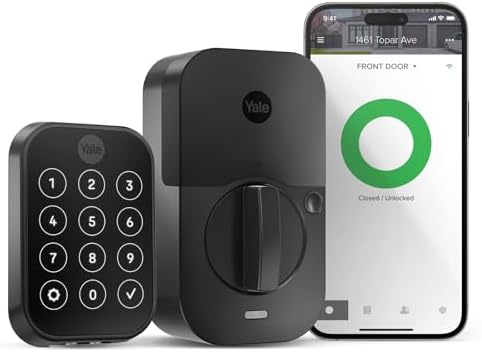
- KEYLESS ENTRY WITH A TOUCHSCREEN KEYPAD: The Yale Assure Lock 2 is a keyless entry door lock with Wi-Fi and a sleek, res…
- BUILT-IN WI-FI, NO HUB REQUIRED: Monitor lock status, receive real-time activity alerts, and grant or revoke access from…
- ELECTRONIC DOOR LOCK WITH CODE SHARING: Create and share unlimited unique access codes for family, housekeepers, guests,…
2. Best Premium Smart Lock: Level Lock Pro
Best for: Buyers who want a lock that looks like an ordinary deadbolt.
The Pro hides its electronics inside the door. Level lists it at $349, and Level states it works with Apple Home Key, key fobs and Matter over Thread. Consumer Reports found it performed well in kick-in tests and decently in picking and drilling. Level reports BHMA AAA and says battery life runs 9–12 months on one CR2.
- Pros: Discreet look; two key fobs and two keys in the box; strong battery claim.
- Cons: Remote control needs a Thread hub or the $79 Wi-Fi bridge, and a keypad is another $79. Gizmodo’s review reported a sluggish Home Key and one stretch where the lock went unresponsive.
- Total cost: About $349, or roughly $507 with the bridge and keypad.
Buy it if looks and Apple/Matter flexibility matter most. Skip it if you want a built-in keypad or fingerprint reader.

- INVISIBLE BY DESIGN: Advanced smart lock technology is fully hidden inside your door. Level Lock Pro is 62% smaller than…
- LOOKS LIKE A TRADITIONAL LOCK: Packed with features like door status detection, Apple home key, and Matter compatibility…
- STAY CONNECTED FROM ANYWHERE: Lock, unlock, manage access, and view activity from the Level Home app. Remote access requ…
3. Best Smart Lock for Apple Home: Schlage Encode Plus
Best for: iPhone and Apple Watch households that want tap-to-unlock without a hub for Alexa and Google.
Consumer Reports lists it among its best Apple Home Key locks. It performed well against kick-ins and drilling but was somewhat susceptible to picking, and it isn’t the easiest to set up. Retailer listings show BHMA AAA, 100 codes, four AA batteries (Schlage’s family spec is up to about six months) and a three-year electronics warranty.
- Pros: Strong kick-in and drill results; Home Key; built-in Wi-Fi.
- Cons: No Matter that we could confirm; Consumer Reports found it pickable; setup can be fiddly.
Compare it against other Apple options in our guide to smart door locks for Alexa, Google Home and Apple HomeKit.
Buy it if you’re in Apple Home and want a high-grade keypad deadbolt. Skip it if you want one Matter lock to move between ecosystems.

- ANYWHERE ACCESS: With built-in WiFi compatibility, you can easily and securely connect your Schlage Encode Plus lock to …
- PEACE OF MIND: Lock and unlock from anywhere, manage up to 100 access codes, view lock history, receive customizable not…
- TAP TO UNLOCK: Works with Apple HomeKit and Apple home keys; with home keys you can simply tap to lock or unlock using y…
Alternative: The Aqara U400 adds hands-free ultra-wideband unlocking for Apple users and sells around $220–$270. Tom’s Guide lists it as BHMA Grade 3, so it suits convenience more than maximum security.
4. Best Fingerprint Smart Lock: Eufy Smart Lock Touch & Wi-Fi S230
Best for: Households that want a fingerprint reader at a moderate price.
Consumer Reports calls the S230 one of its best built-in-Wi-Fi locks, with strong kick-in and picking scores and a decent drilling score. Eufy lists BHMA Grade 2, a $229.99 price, and says there is no subscription. Eufy’s listings give a battery life of up to a year from a 10,000 mAh rechargeable pack.
- Pros: Strong independent results for the price; fingerprint, code, app and key; no monthly fee.
- Cons: Alexa and Google only, with no Apple Home or Matter.
Buy it if you’re an Alexa or Google household that values fingerprint access. Skip it if you use Apple Home.

- Your Finger is the Key: Smart Lock recognizes your fingerprint in just 0.3 seconds and unlocks your door in 1 second—it’…
- Control From Anywhere: With its all-new Wi-Fi connectivity, you can control Smart Lock from absolutely anywhere via the …
- Always Has Your Back: Even when you’re in a hurry, Smart Lock is ready to protect your home. A built-in sensor detects w…
5. Best Smart Lock for Google Home: Kwikset Halo Select Plus
Best for: Google Home and mixed-ecosystem households.
Kwikset’s Halo Select Plus combines Wi-Fi, Matter over Thread and Home Key. Retailer listings show BHMA AAA. Consumer Reports found it held up well against kick-ins and picking but was highly susceptible to a cordless drill. It named it its best Matter lock.
- Pros: Works with Alexa, Apple Home and Google Home; Thread should extend battery life.
- Cons: You choose Wi-Fi or Thread, not both. PCWorld found that Matter mode on the sister Halo Select removed some app features.
Buy it if you want Matter and Google Home. Skip it if drill resistance is your top concern.

- TAP TO UNLOCK: With NFC technology and Apple home keys, simply tap to unlock Halo Select Plus using your iPhone or Apple…
- CONTROL AND MONITOR FROM ANYWHERE: Remotely lock and unlock, share guest access and ensure your door
- SMART HOME INTEGRATION: Works with Amazon Alexa, Apple Home and Google Home. Control your lock with your voice, create h…
6. Best Smart Lock for Renters: August Wi-Fi Smart Lock (4th Generation)
Best for: Renters who want to keep their existing deadbolt and keys.
This retrofit unit replaces only the interior thumb turn. Consumer Reports and PCMag both name it a top retrofit pick. PCMag lists it at $249 and calls it renter-friendly. It uses two CR123 batteries and 2.4 GHz Wi-Fi, and it includes a door sensor.
- Pros: No drilling; easy to reverse at move-out; no hub.
- Cons: Tom’s Guide calls it bulky. No keypad unless you add one. Best Buy Canada lists no Matter support. We found no official battery-life figure.
Check your lease and get landlord approval first. For more rental options, see our guide to smart locks for apartments and rental properties.
Buy it if you rent and your current deadbolt is on August’s compatibility list. Skip it if you want a keypad or fingerprint reader built in.

- UPGRADE YOUR EXISTING DEADBOLT: August smart locks fit on the inside of your door, making your regular deadbolt smarter,…
- GRANT ACCESS WITH THE AUGUST APP: Forget key copying. Quickly and easily share permanent, scheduled or temporary access …
- EASY TO INSTALL ON ANY DOOR: Even if you’re not so handy, installation only takes about 10 minutes. August locks fit per…
7. Best Smart Lock With Facial Recognition: Lockly Visage Zeno
Best for: Hands-free entry when your hands are full.
PCMag says it’s the first lock it tested with facial recognition and that the feature worked well in dark and bright light. Tom’s Guide praises its many unlock methods and no-subscription design. It supports Home Key, and it sells for about $349.
- Pros: Face, fingerprint, keypad and Home Key; USB-C emergency power; no subscription.
- Cons: Large hardware. Tom’s Guide reports monthly charging at default settings, while PCWorld reports Lockly claiming up to eight months. Retailer listings disagree on its BHMA grade (Grade 2 at Lowe’s, no grade at Home Depot). We did not verify where face data is stored.
Buy it if hands-free entry is worth a premium. Skip it if you want a verified security grade or are uneasy about biometric data.

- Your Face is Your Key: Unlock your smart lock for front door effortlessly with Lockly Visage’s advanced facial recogniti…
- Unlock Your Home Effortlessly: Enjoy seamless smart home integration with Apple Home Key. Unlock your door with a simple…
- Self-Learning AI Fingerprint & 6 Ways to Unlock: Experience lightning-fast access with a 3D biometric sensor enhanced by…
Smart Lock Comparison: Which Model Should You Choose?
| Product | Install type | Backup access | Extra cost | Warranty (as listed) |
|---|---|---|---|---|
| Yale Assure Lock 2 | Deadbolt replacement | Confirm for key-free model | Module included in CR bundle | 1-yr electronics, lifetime mechanical (retailer) |
| Level Lock Pro | Replaces deadbolt internals | Key + 2 fobs | $79 bridge; $79 keypad | Not verified |
| Schlage Encode Plus | Deadbolt replacement | Physical key | Apple hub for remote Apple Home | 3-yr electronics (retailer) |
| Eufy S230 | Deadbolt replacement | Key + emergency unlock | None | Not verified |
| Kwikset Halo Select Plus | Deadbolt replacement | Physical keys | Thread router for Matter | 1-yr electronics (sister model) |
| August 4th gen | Retrofit | Your own key | Keypad extra | Not verified |
| Lockly Visage Zeno | Deadbolt replacement | Key + USB-C port | None | 5-yr mechanical, 2-yr electronics (PCWorld) |
What to Consider Before Buying a Smart Lock
Security Grades and Physical Protection
The BHMA’s A156.40 standard covers residential deadbolts across durability, strength and security, and finish. A “AAA” rating means top marks in all three. “Grade 1/2/3” is a separate scale used on some listings. Lab tests run under controlled conditions, so real results vary with your door and frame.
Check the BHMA certified-products directory instead of trusting a box. A reinforced strike plate is also a cheap upgrade that Consumer Reports recommends.
Wi-Fi vs Bluetooth vs Matter
Wi-Fi locks work remotely without a hub but use more power. Bluetooth works only nearby. Matter is a shared standard that runs over Thread or Wi-Fi, so one lock can join several platforms. Thread locks usually need a border router, which many speakers and streaming boxes include.
Fingerprint vs Keypad vs Smartphone Access
Each method has a failure mode: a wet finger, a phone with a dead battery, a code someone watches you type. Pick a lock with at least two methods plus a physical or emergency fallback.
Battery Life and Emergency Access
Outages don’t disable battery locks. Wi-Fi outages usually remove only remote control. Look for a physical key, a USB-C port or another emergency method.
Installation and Door Compatibility
Measure your backset and door thickness. Schlage’s Encode family adjusts between 2-3/8″ and 2-3/4″ backsets. Yale lists door thicknesses from 1-3/8″ to 2-1/4″. Eufy lists doors 35–55 mm thick. Our DIY home security setup guide walks through the installation steps.
Privacy and Subscription Requirements
We found no mandatory subscription for core lock and unlock functions on these seven. Only Eufy and Lockly state it plainly, so confirm the rest. For biometric locks, read the privacy policy to see where fingerprint or face data is kept. Use unique passwords and two-factor authentication, and see our ultimate smart home security essentials guide for network tips.
Smart-Home Ecosystem Compatibility
Check the exact model, not just the brand. Home Key is separate from general Apple Home support. Our Alexa, Google Home and Apple HomeKit lock guide explains the differences in detail.
Are Expensive Smart Locks Worth It?
Sometimes. Paying more makes sense for a premium look (Level), hands-free entry (Lockly, Aqara U400) or a documented AAA grade (Schlage, Level, Kwikset). It doesn’t buy better drill or pick resistance on its own: Kwikset’s $290–$360 lock was highly drill-vulnerable in Consumer Reports’ tests, while the $230 Eufy did well on kick-ins and picking.
A cheaper model is enough if you just want codes and remote lock status. Remember a lock is one layer. Our home security gadgets guide explains where else to spend.
Which Smart Lock Should You Buy?
- Most people: Yale Assure Lock 2 (Wi-Fi).
- Apple households: Schlage Encode Plus.
- Design-first, Matter-ready: Level Lock Pro.
- Fingerprint on a budget: Eufy S230.
- Google Home or mixed: Kwikset Halo Select Plus.
- Renters: August Wi-Fi Smart Lock.
- Hands-free face unlock: Lockly Visage Zeno.
Whichever you choose, verify the live price, confirm your door fits, and back it up with the layers in our smart home security essentials guide.
Frequently Asked Questions
1. What is the best smart lock under $1,000?
For most homes, the Yale Assure Lock 2 with Wi-Fi, based on Consumer Reports’ testing. The best choice depends on your ecosystem and whether you rent.
2. Are smart locks more secure than traditional locks?
Not automatically. Physical strength comes from the deadbolt, and the app account adds a new risk. Certified hardware plus two-factor authentication is a sound combination.
3. Which smart lock is hardest to break into?
No single winner. In Consumer Reports’ tests, the Yale and Schlage did well against kick-ins and drilling, and the Eufy S230 did well against kick-ins and picking. Use a reinforced strike plate.
4. Do smart locks work without Wi-Fi?
Yes for local methods like keypad, fingerprint and Bluetooth. You lose remote control and voice control.
5. Can smart locks work during a power outage?
Yes, they run on batteries. A router outage affects only the remote features.
6. Which smart locks work with Apple Home Key?
Among our picks: Schlage Encode Plus, Level Lock Pro, Kwikset Halo Select Plus and Lockly Visage Zeno.
7. Are fingerprint smart locks reliable?
Generally, but wet or dirty fingers can fail. Tom’s Guide said the fingerprint reader on Eufy’s E330 (a sibling model) never failed in its tests. Keep a backup method.
8. Do smart locks require monthly subscriptions?
We found no mandatory fee for core functions on these seven. Eufy and Lockly say so explicitly.
9. Can smart locks be hacked?
Any connected device carries some risk. Use strong passwords, two-factor authentication and firmware updates.
10. Are smart locks suitable for renters?
Retrofit locks like August are the best fit, but get your landlord’s permission.
11. How long do smart lock batteries last?
Manufacturer figures vary: Level up to 12 months, Eufy up to a year, Lockly up to eight months (Tom’s Guide reports monthly charging), Schlage up to about six. Real life varies.
12. Is Matter better than Wi-Fi for smart locks?
Not strictly. Matter over Thread can improve battery life and cross-platform support but needs a Thread router. Wi-Fi is simpler for a single ecosystem.
Pingback: Best Smart Locks for Digital Nomads: Secure Your Home From Anywhere - Gadget Sentinel