A solar panel solves a charging problem. It does not automatically solve a recording problem.
Many shoppers search for “solar security camera 24/7” and assume the two ideas go together. In practice, most solar-powered cameras are battery cameras with a panel attached. To save power, they usually sleep until motion wakes them. A few use workarounds, such as low-frame-rate snapshots between events. Only some offer a true continuous-recording mode.
This guide covers four current solar-capable outdoor cameras. It explains what each one actually records and how much sun the maker says it needs. It also covers when a wired camera is the more honest answer.
How we sourced this: Gadget Sentinel did not run hands-on tests for this article. Specs come from manufacturer pages and support documents, and independent findings are labeled as such. Some specs vary by region, bundle or firmware version, and we flag those where sources disagree. Confirm details on the product page before you buy.
Quick Answer
- Closest to continuous recording on solar: Reolink Altas PT Ultra. Reolink lists a continuous-recording mode and says it needs a solar panel with adequate sun.
- Best for smart-home users who want a complete kit: Tapo C660 KIT. It has a panel in the box, but its “24/7 Capture” is not true 24/7 recording.
- Best for panel-on-the-camera simplicity and no monthly fee: eufy SoloCam S340. It has a removable panel and event-based recording.
- Best for covering a large area with a motion-triggered camera: Reolink Argus PT Ultra.
If you need genuine uninterrupted 24/7 video, read the section on when solar is not the right choice.
At-a-Glance Comparison
Specs come from manufacturer listings and can vary by bundle and region. The table is split in two so it stays readable on a phone.
Table 1: Recording and power
| Camera | Resolution | Solar setup | Recording type | Storage / subscription |
|---|---|---|---|---|
| Reolink Altas PT Ultra | 4K (8MP) @ 15 fps | Reolink Solar Panel 2 (6W), sold separately or bundled | Motion, scheduled, and continuous recording | microSD (up to 512GB) or Reolink Home Hub; no monthly fee stated |
| Tapo C660 KIT | 4K (8MP), 15/20 fps | Tapo A201 panel included | Motion events plus 24/7 Capture (low-frame-rate, not true 24/7) | microSD (up to 512GB); optional Tapo Care cloud |
| eufy SoloCam S340 | 3K wide + 2K telephoto | Removable 2.2W panel included | Event-based | 8GB built-in; HomeBase S380 optional; no monthly fee required |
| Reolink Argus PT Ultra | 4K (8MP) @ 15 fps | Optional Reolink solar panel (bundles vary) | Motion-triggered | microSD; Reolink Cloud in selected countries |
Table 2: Features
| Camera | Battery | Night vision | AI detection | Weather rating | Smart home | Best for |
|---|---|---|---|---|---|---|
| Altas PT Ultra | 20,000mAh (72Wh) | Color (“ColorX”), no IR listed | Person, vehicle, animal | IP65 | Confirm on current listing | Continuous-style solar use |
| Tapo C660 KIT | 10,000mAh | IR (40 ft) + spotlights | Person, vehicle, pet | IP65 | Alexa, Google | All-in-one kit |
| eufy S340 | Built-in (non-removable) | IR + spotlight | Motion, human | Confirm on listing (retailers list IP67) | Alexa, Google | Simple, no-fee setup |
| Argus PT Ultra | 21.6Wh | IR (10 m) + spotlights | Person, vehicle, pet | IP65 (some retailers list IP64) | Alexa, Google | Large-area coverage |
Best Solar-Powered Security Cameras
1. Reolink Altas PT Ultra: best for continuous-style solar monitoring
Best suited for: People who want a wire-free camera that can record continuously, and can give the panel real sun.

- [4K ColorX Night Vision] Featuring an F1.0 aperture and 1/1.8” sensor, this security camera captures 2x more light than…
- [PT + AI Detection + Auto Tracking] With 355° pan and 90° tilt, this outdoor security camera covers every corner. It fea…
- [Dual-Band 2.4/5GHz Wi-Fi 6 Connection] Experience superior connectivity with dual-band support—2.4GHz for extended rang…
Key specs: According to Reolink’s product page, the Altas PT Ultra offers 96 hours of continuous recording on its high-capacity battery, and up to 500 days in PIR trigger mode based on 300 seconds of recording per day. Reolink’s listing puts it at 3840×2160 at 15 fps, a 1/1.8″ sensor, and a 20,000mAh (72Wh) battery. reolinkameridroid
Solar charging design: The panel is separate. Reolink lists the Solar Panel 2 (6W), and a Reolink review page says the camera supports 6W and 12W panels. Buy the panel separately or as a bundle, and confirm what’s in the box. ameridroidreolink
Recording method: Motion, scheduled and 24/7 recording. There is also pre-recording of up to 10 seconds.
Video quality and night vision: 4K at 15 fps. Night vision is “ColorX,” a color mode that Reolink says works without spotlights or infrared. That is a manufacturer claim. manuals
Detection/AI: PIR, motion, person, vehicle and animal detection.
Storage and subscription: Local microSD, or a Reolink Home Hub. The manual says a Home Hub or Home Hub Pro supports up to 16TB with no monthly fees. Reolink also markets the camera as subscription-free. manuals
Weather resistance: IP65 per retailer listings.
Smart-home compatibility: I did not confirm this in the sources I read, so check the current listing.
Advantages:
- Documents a continuous-recording mode on a wire-free camera, which is uncommon.
- Large battery reserve.
- 355° pan and 90° tilt with auto-tracking.
Limitations:
- Continuous recording is the mode that most strains the battery. Reolink’s manual says to ensure the panel gets at least 5 hours of direct sunlight daily for continuous recording or frequent pre-recording. Many yards won’t deliver that in winter. manuals
- The battery is non-removable, and the solar panel is sold separately.
Who should buy it: Buyers with a sunny, unshaded panel location who want the closest thing to continuous recording without wiring.
Who should skip it: Anyone who can only place the panel in shade. Also skip it if you need guaranteed, zero-gap recording every night of the year.
2. Tapo C660 KIT: best all-in-one kit with a caveat
Best suited for: Smart-home users who want a complete solar kit, 4K video and local storage.

- What’s Included – This purchase includes 2x Tapo VistaCam 360 with Solar Panel and 1x Tapo H500 Smart Hub with Chime. Co…
- 4K Ultra HD Clarity – Experience 4× the resolution of standard 1080p for sharper images, finer details, and enhanced cla…
- Centralized Smart Home Hub – Tapo H500 connects and controls up to 16 Tapo cameras and 64 sensors, unifying your smart h…
Key specs: B&H lists 4K at 20 fps, a 1/2.7″ starlight sensor, IR night vision up to 40 ft, and a 105° diagonal field of view. TweakTown lists a 10,000mAh sealed battery and a solar panel rated up to 5.2V/2.5W. bhphotovideotweaktown
Solar charging design: The kit includes the Tapo A201 panel. TP-Link says the panel can be mounted separately or combined with the camera using a 3.8-meter cable. tp-link
Recording method: This is where wording matters. TP-Link markets “24/7 Capture,” but TP-Link’s own continuous-capture page answers the question “Is this true 24/7 recording?” with “No”: it uses continuous low-frame capture between detections, then switches to full video during motion events. The same page says full functionality requires an SD card. tp-link
Video quality: Sharp in daylight per independent testing. TechRadar reported that clips were crisp and detailed. TweakTown noted that pushing the 18x digital zoom to the limit gets blocky. techradartweaktown
Night vision: IR plus dual motion-activated spotlights for color recording at night. bhphotovideo
Storage and subscription: microSD up to 512GB (sold separately). Optional Tapo Care cloud storage requires a subscription. bhphotovideo
Weather resistance: IP65 for camera and panel.
Smart-home compatibility: TechRadar lists Alexa, Google Home and Siri Shortcuts, with no HomeKit. A How-To Geek review notes there is no RTSP or ONVIF support, which matters if you want to feed a third-party recorder. techradarhowtogeek
Advantages:
- The panel is included.
- 360° pan / 90° tilt.
- Local storage is subscription-free.
Limitations:
- 24/7 Capture is snapshot-style, and TP-Link’s guidance is that it increases power use and shuts down automatically when the battery gets too low. On TP-Link’s community forum, the company says it shuts off below 15% battery and needs a charge above 30% to re-enable. tp-linktp-link
- Sun claims depend on conditions (see below).
Who should buy it: Buyers who want a kit and are comfortable with event recording plus low-frame-rate context.
Who should skip it: Anyone who needs full-frame video during every minute of the day.
3. eufy SoloCam S340: best for a no-monthly-fee, panel-on-the-camera setup
Best suited for: Buyers who want dual-lens coverage and a simple standalone setup.

- 𝐄𝐧𝐡𝐚𝐧𝐜𝐞𝐝 𝐃𝐮𝐚𝐥-𝐂𝐚𝐦𝐞𝐫𝐚 𝐂𝐥𝐚𝐫𝐢𝐭𝐲 𝐚𝐭 𝐔𝐩 𝐭𝐨 𝟒𝟎 𝐟𝐭 (𝟏𝟐 𝐦): Capture every event around your home in ultra-clear 3K resolution. E…
- 𝐒𝐨𝐥𝐚𝐫-𝐏𝐨𝐰𝐞𝐫𝐞𝐝, 𝐈𝐧𝐬𝐭𝐚𝐥𝐥 𝐎𝐧𝐜𝐞 𝐚𝐧𝐝 𝐢𝐭 𝐑𝐮𝐧𝐬 𝐅𝐨𝐫𝐞𝐯𝐞𝐫: Experience constant peace of mind with this solar-powered security came…
- 𝟑𝟔𝟎° 𝐆𝐮𝐚𝐫𝐝𝐢𝐚𝐧, 𝐍𝐨 𝐁𝐥𝐢𝐧𝐝 𝐒𝐩𝐨𝐭𝐬: Say goodbye to blind spots with full home coverage by installing the product vertically. …
Key specs: eufy describes a dual camera: 3K wide-angle (135°) and a 2K telephoto. The US bundle page lists 3K/2K resolution, 8x hybrid zoom, 355° pan, 60° tilt, a removable 2.2W panel, and 8GB built-in storage. Tilt is listed as 70° by some retailers, which is a version or listing difference. eufyeufy
Solar charging design: The panel is removable and adjustable. eufy says under optimal sunlight it can collect 800 to 1,200mAh per day while the camera uses 100 to 200mAh over a day and night of average use. eufy also says 2 hours of direct daily sunlight is enough. Both are manufacturer figures, and “average use” isn’t defined. eufyeufy
Recording method: Event-based, with motion and human detection. It does not advertise continuous recording.
Storage and subscription: eufy says no monthly fee is required to receive notifications and record video. Storage is 8GB built in, expandable through a HomeBase S380. One reviewer noted there is no microSD slot, although one retailer listing says otherwise, so check your version. Consumer Reports notes paid cloud storage exists. Eufy SoloCam S340 3K HD Solar-Powered Outdoor Security Camera – T81701W1 +2
Night vision and Wi-Fi: IR plus spotlight for color. eufy lists 2.4GHz only, so check your signal at the mounting spot. eufy
Smart-home compatibility: Alexa and Google Assistant.
Advantages: Panel included, no required subscription, dual-lens detail.
Limitations: Event-based recording only, 2.4GHz Wi-Fi only, and modest resolution compared with the 4K options.
Who should buy it: Buyers who mainly want event clips and low maintenance.
Who should skip it: Anyone who wants 4K or any continuous recording.
4. Reolink Argus PT Ultra: best motion-triggered option for large areas
Best suited for: Yards and driveways where pan/tilt coverage matters more than continuous recording.
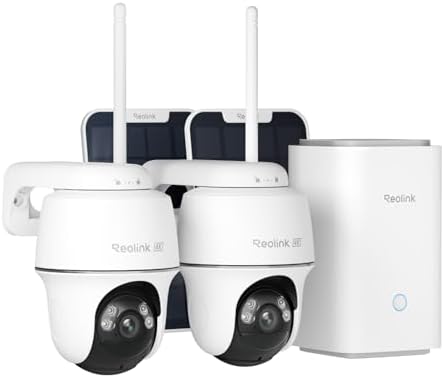
- 4K 8MP FULL-COLOR FOOTAGE DAY & NIGHT: Experience the ultimate clarity in the 4K 8MP footage. From day till night, the s…
- 100% WIRE-FREE + 2.4/5GHZ WI-FI: With the flexibility of both 2.4GHz for extended coverage and 5GHz for faster data rate…
- 360° COVERAGE + MONITOR POINT: With 355° pan and 140° tilt capabilities, the cameras included rotate their eyes to monit…
Key specs: Reolink lists 4K at 15 fps, 355° pan, 140° tilt, motion-triggered recording, a 21.6Wh battery, microSD up to 512GB, and Wi-Fi 6. Older reviews and retailers list different figures: a 128GB card limit, Wi-Fi 4 and IP64. Those differences suggest version or region changes. reolinkcnx-software
Solar charging design: Optional. It supports the Reolink Solar Panel, and the bundle varies by seller (for example, a 3W panel in one Amazon bundle versus the 6W Solar Panel 2 elsewhere). reolink
Recording method: Motion-triggered.
Night vision and AI: Two IR LEDs (about 10 m) plus spotlights, with person, vehicle and pet detection.
Advantages: Wide 140° tilt range, 4K, and local storage.
Limitations: No continuous recording, and specs vary by version.
Who should buy it: Buyers who want pan/tilt and 4K detail for event clips.
Who should skip it: Anyone who wants continuous recording.
Can Solar Security Cameras Really Record 24/7?
Sometimes, but “solar” tells you nothing about it. Recording behavior is a separate feature. Here is the vocabulary:
- Solar charging: How the battery gets topped up. It says nothing about what the camera records.
- Motion-triggered recording: The camera wakes on movement (often a PIR sensor) and records a clip.
- Event recording: Same idea, with AI deciding which events (person, vehicle, pet) count.
- Scheduled recording: Recording only during set hours.
- 24/7 Capture / low-frame-rate monitoring: Snapshots or low-fps video fill the gaps between events. TP-Link says this yields results similar to continuous recording, with lower power consumption, but it is not full video. TP-Link’s own answer to “is this true 24/7 recording?” is no. tp-link
- True continuous recording: Full-frame video all day. Reolink’s Altas PT Ultra lists it, and it’s what a wired or PoE camera does by default.
Why the gap? Wire-free cameras sleep to save power. TP-Link notes that most of its battery cameras enter sleep mode when inactive and can’t monitor motion continuously the way plugged-in cameras do. Continuous video draws power all day, so the panel must out-produce it, and that depends on sun. tapo
A useful rule: if a product page says “24/7,” look for the words “continuous recording,” a frame rate, and a battery-shutoff condition.
Solar-Powered vs Battery-Powered Security Cameras
Every solar camera in this guide is a battery camera with a panel. The battery is the workhorse and the panel is the refill.
- Battery-only: No panel, but you climb a ladder every few weeks or months to recharge. Cheapest upfront, most maintenance.
- Solar-assisted: The panel offsets daily use. If the panel out-produces the camera’s average draw, you may rarely touch it. If not, you’re only slowing the drain.
For background on trade-offs, see “Wireless vs. Wired Security Cameras: Which One Should You Buy? and Security Camera Buying Guide.
Built-In Solar Panels vs Separate Solar Panels
Built into the camera (such as eufy’s integrated-panel models): fewer parts and a tidy install. The panel goes wherever the camera goes, which can be a shady eave.
Separate panel: the camera can sit in shade or at a good angle for its view, while the panel sits somewhere sunnier. The Tapo C660 KIT and the Reolink cameras work this way. The Tapo kit’s 3.8-meter cable is one example of the flexibility. tp-link
Independent experience backs this up. When CNX Software reviewed the Reolink Argus PT Ultra, it moved the solar panel to a spot with more sunlight. cnx-software
If your best camera position is shady, prefer a separate panel.
How Much Sunlight Does a Solar Security Camera Need?
There is no universal answer. Manufacturers give different figures based on different assumptions:
- Tapo says 45 minutes of direct sunlight can power a full day of operation, with an asterisk on the claim. tp-link
- eufy says 2 hours of direct daily sunlight for the S340. eufy
- Reolink says at least 5 hours of direct sunlight daily for continuous recording or frequent pre-recording on the Altas PT Ultra. manuals
Those numbers differ because the cameras and settings differ. Treat them as ceilings for ideal conditions, not guarantees.
What changes real-world results:
- Direct sun vs partial shade: Panels charge best in direct light. Tree shade or a roof overhang can cut output sharply.
- Cloudy weather: Output falls but rarely to zero. How far depends on the panel and cloud thickness.
- Winter: Fewer daylight hours and a lower sun angle. Check the camera’s operating temperature range too. Reolink lists −10 to 55°C for the Argus PT Ultra.
- Panel orientation: Face the panel toward the sun’s path for your latitude (generally south in the Northern Hemisphere). Tilt it so snow slides off.
- Dirt and snow: A dusty or snow-covered panel produces less. Wipe it seasonally.
- Battery reserve: A bigger battery buys time (see next section).
- Placement: The best camera view and the best panel spot are often different places, which favors a separate panel.
What Happens During Several Cloudy Days?
The camera runs on its battery. How long that lasts depends on settings.
- Event-only settings: Battery reserve is long. eufy says the S340 has up to 3 months of power in reserve. Reolink says the Altas PT Ultra can last up to 500 days in PIR mode. Both are manufacturer claims tied to light-use assumptions. eufyreolink
- Continuous or 24/7 settings: Reserve drops much faster. Reolink lists 96 hours of continuous recording on a full charge for the Altas. After that, without enough sun, it stops. reolink
- Tapo 24/7 Capture: As noted above, it turns itself off at low battery until recharged.
The takeaway: several gloomy days can quietly turn a “24/7” setup into a motion-only one. Check your app’s battery indicator after bad weather.
Best Solar Security Cameras for Different Use Cases
Categories are assigned only where documented specs support them.
- Closest to continuous monitoring: Reolink Altas PT Ultra (documented continuous mode). Runner-up: Tapo C660 KIT, with the snapshot-style caveat.
- Remote driveways: Altas PT Ultra or Argus PT Ultra for tracking range. A remote spot still needs Wi-Fi coverage (see the installation section).
- Large yards: Argus PT Ultra (140° tilt) or the Altas PT Ultra (355° pan, auto-tracking).
- Off-grid locations: None of these fits well. The S340 is listed as “LTE Connectivity: No”, and the others need Wi-Fi. For a place with no Wi-Fi, look at cellular solar cameras, which we haven’t evaluated here. abt
- Subscription-free: Altas PT Ultra and eufy S340 both state no monthly fee. The Tapo C660 uses microSD for free local storage, with optional cloud.
- 4K: C660, Altas PT Ultra and Argus PT Ultra all list 8MP/4K.
- Smart-home integration: Tapo C660 KIT lists the widest set in the sources I read (Alexa, Google, Siri Shortcuts), but no HomeKit.
- Budget-minded: TechRadar’s independent review called the C660 Kit relatively affordable, with a launch price of $169.99 / £179.99. Prices change, so compare current prices.
Local Storage vs Cloud Storage
- microSD: Cheap and private, and it keeps working if your internet drops. Risk: a thief who steals the camera steals the card.
- Camera built-in storage: The eufy S340’s 8GB is convenient but small. Once full, old clips are overwritten.
- Hub or base station: Reolink Home Hub and eufy HomeBase store footage away from the camera, which helps if the camera is stolen. Reolink’s manual says its hubs pair with up to 16TB of storage. manuals
- Cloud: Off-site backup and easy access, usually with a monthly fee. Tapo Care and Reolink Cloud are optional here.
Also consider privacy: cloud footage lives on the company’s servers, and local footage lives on your property. For more on setting up a well-rounded system, see DIY Home Security Setup.
How to Install a Solar Security Camera
- Pick the view first. Aim at the entry point or path you care about, not the sunniest wall.
- Check Wi-Fi at that spot. Test with your phone. A weak signal causes dropped clips. Note that some models are 2.4GHz only.
- Choose a mounting height out of easy reach but low enough for faces (many installers use roughly 8 to 10 feet; follow the maker’s guidance).
- Position the panel. Face it toward the sun’s path, avoid shade from trees or eaves, and tilt it to shed rain and snow. Use a separate panel if the camera spot is shady.
- Charge the battery first. Some setups start with a USB-C charge before mounting.
- Verify charging in the app over a few sunny days and confirm the battery percentage is stable or rising.
- Test at night. Check IR or color night vision, spotlight behavior and detection range.
- Re-check after bad weather and adjust settings if the battery slides.
For more setup ideas, see Smart Home Security Essentials Every Homeowner Should Have.
Solar Security Camera Buying Guide
- Resolution: 4K helps with details at distance. It also means bigger files.
- Frame rate: Many of these cameras record at 15 to 20 fps, which is fine for most uses but not smooth like plugged-in models.
- Field of view: Wider means less panning. The cameras here list roughly 105 to 135°.
- Pan/tilt: Extra coverage, but mechanical parts and motion use battery.
- Night vision: IR is black-and-white. Spotlights give color but announce the camera.
- Color night vision: Nice for identifying clothing. Compare independent sample footage.
- AI detection: Person/vehicle/pet filters cut false alerts.
- Battery capacity: Larger reserve means more cloudy-day headroom.
- Solar panel: Compare wattage, cable length and whether it’s included.
- IP rating: IP65 covers dust and water jets, but check the exact model, since sources sometimes differ.
- Wi-Fi: Confirm 2.4GHz vs dual-band and signal at the mounting spot.
- Local vs cloud storage: Check card limits and what a subscription adds.
- Subscription fees: Read the fine print on what’s free.
- App quality and smart-home support: Check Alexa, Google, and whether HomeKit or RTSP/ONVIF matter to you.
When a Solar Security Camera Is NOT the Right Choice
Consider a wired or PoE camera if:
- You need true, uninterrupted 24/7 recording, for example to review what happened before a triggered clip.
- The camera location gets little direct sun.
- You have a weak Wi-Fi signal, or want footage recorded even when the internet is down.
- You want RTSP or ONVIF for a third-party recorder.
A PoE camera gets power and data through one Ethernet cable and records to a local recorder. Some plug-in cameras also support continuous recording. Tapo’s documentation says battery-powered models like the C420, C400 and D230 don’t support 24/7 recording, while most other Tapo cameras do. For the trade-offs, see Wireless vs. Wired Security Cameras. If lighting matters too, see Best Floodlight Security Cameras for Complete Outdoor Protection. And once your cameras are up, Home Security Mistakes That Could Make Your House an Easy Target is a good sanity check. tapo
Frequently Asked Questions
Are solar security cameras really worth it?
They can be, if you have a sunny panel spot and don’t need true 24/7 video. They cut battery swaps but rely on sunlight.
Can solar security cameras record 24/7?
Only some can. Reolink lists a continuous-recording mode for the Altas PT Ultra, while TP-Link says its 24/7 Capture is low-frame capture, not true 24/7 recording. Most solar cameras record motion events.
Do solar security cameras work at night?
Yes. They run on battery after dark. The panel only charges in daylight.
What happens when there is no sunlight?
The camera keeps running on its battery until it drains. Reserve time depends on settings and manufacturer claims (months in event mode, days in continuous mode).
Do solar cameras work in winter?
They can, but shorter days and lower sun reduce charging, so lean on the battery reserve and check the operating temperature range.
Do solar security cameras need Wi-Fi?
The models here do. Wi-Fi is needed for setup and remote viewing. Some models keep recording locally to microSD if the connection drops (Tapo says its SD recording continues without a router connection).
Can solar security cameras work without a subscription?
Yes. Reolink and eufy state no monthly fee is needed for basic recording, and Tapo supports microSD. Cloud storage is optional and paid.
Are solar security cameras better than wired cameras?
Not universally. Solar wins on flexibility, and wired or PoE wins on reliability and continuous recording.
How long do solar security camera batteries last?
It depends on settings. Reolink cites up to 500 days in PIR mode and 96 hours of continuous recording for the Altas PT Ultra. Those are manufacturer claims under specific conditions.
How much sunlight does a solar camera need?
There’s no universal number. Manufacturers cite 45 minutes (Tapo), 2 hours (eufy) or 5 hours (Reolink continuous mode), and shade, weather, season and settings all change the result.