The best home security systems of 2026 look very different depending on who is buying. A renter in a one-bedroom apartment needs something she can peel off the wall and take with her. A family in a large suburban house may want professional installation and cameras on every side. Someone who simply hates subscriptions wants a system that still works if he never pays a monthly fee.
Gadget Sentinel may earn a commission if you buy through links on this page. That never changes which systems we recommend or how we describe their costs and limitations. Prices below were checked in early October 2026; promotions and plan prices change often, so confirm the final figure at checkout.
Most “best home security system 2026” lists treat all of those buyers the same and lead with the lowest advertised price. That number is rarely what you actually pay. Monitoring fees, camera subscriptions, extra sensors, financing and contract terms decide the real cost, and they differ more between brands than the equipment does.
This guide compares the systems that deserve a place on the shortlist, shows what each costs over five years, and explains the trade-offs honestly. If you are still at the planning stage, start with our complete home security checklist so you know which doors, windows and blind spots you need to cover before you pick hardware.
Quick Picks
- Best overall: SimpliSafe, for flexible no-contract monitoring and strong live-agent features
- Best budget home security system: Ring Alarm, for low equipment prices and $19.99/month professional monitoring
- Best DIY home security system: abode, for free self-monitoring and the widest smart-home compatibility
- Best professionally installed system: Vivint, for large homes that want a fully installed smart-home setup
- Best for established professional monitoring: ADT, if you accept a long contract
- Best home security system without a monthly fee: Eufy, for local storage and no required subscription
- Best no-contract home security system: SimpliSafe, Ring Alarm and abode (all three sell month-to-month monitoring)
Comparison Table
| System | Best For | Equipment Cost | Monthly Monitoring | Installation | Contract | Smart Home | Cameras |
|---|---|---|---|---|---|---|---|
| SimpliSafe | Best overall | Packages from about $251 | $0 self-monitoring; $9.99 self-monitoring with video; $22.99–$79.99 professional | DIY | None | Alexa, Google | Indoor $149.99, outdoor $199.99 |
| Ring Alarm | Budget, Alexa homes | 5-piece kit $199.99 on sale ($244.95 list); Alarm Pro base station from $249.99 | $19.99 Ring Pro (professional) | DIY; pro install from $129.99 per device | None | Alexa (deepest), others via integrations | Full Ring camera and doorbell range |
| abode | DIY, HomeKit, renters | Abode Security Kit $150 | $0 free tier; $8.49 Standard (self-monitoring); $26.99 Pro (professional) | DIY | None | HomeKit (select hubs), Alexa, Google, Z-Wave, Zigbee | Abode Cam 2, video doorbell |
| Vivint | Large smart homes | HomeProtect $199.99 with contract or $349.99 without | From $24.99 with contract; $29.99 without | Professional only | 42–60 months if you finance equipment | Vivint’s own platform | Vivint cameras and doorbells |
| ADT | Pro install, big-brand monitoring | Varies; promotional $99 pro-installed offers exist | From $24.99 (self-setup); from $49.99 (pro-installed) | Pro or self-setup | 36 months (24 in California) for pro install | Google Nest cameras in promotions | ADT and Nest cameras |
| Eufy | No subscription | 5-piece Home Alarm Kit $159.99 | $0 required; optional cloud storage from $3.99 | DIY | None | Alexa, Google, HomeKit (select models) | 4K and solar-powered options |
How We Evaluated the Best Home Security Systems
To be clear about our method: Gadget Sentinel did not physically lab-test these systems for this guide. This is a research-based buyer’s guide built from manufacturers’ published pricing and plan pages, contract terms, current reporting from established security-review publications, and the consumer-protection guidance of the Federal Trade Commission. Where those sources disagree, we use the most recent official figure and flag the uncertainty.
We scored each system against the same criteria:
- Equipment quality and range: sensors, panels, sirens, cameras and how well they scale
- Monitoring: what each tier actually does, from alerts to live-agent intervention
- Upfront and recurring cost: including the five-year total
- Installation and contracts: DIY or professional, and how hard it is to leave
- Smart-home integration: Alexa, Google Home and Apple Home support
- App experience and customer support: as reported by reviewers and customers
- Outage resilience: battery backup and cellular backup
- Privacy: local versus cloud storage and account protection
- Overall value: how much protection you get per dollar over time
We only recommend a system when it clearly leads a category. That is why Frontpoint and Brinks appear in the “Also Considered” section rather than the main picks.
Best Home Security Systems of 2026
SimpliSafe — Best Overall
Best For: Most households that want an easy-to-install system with professional monitoring and no contract.

- Simple to set up. Seriously secure – Get ready to protect right out of the box. Just plug in the Base Station, download …
- 1 FREE month of professional monitoring for fast police response when you need it most. With optional monitoring service…
- Complete control of your system with the SimpliSafe App – Arm, disarm and protect anytime, anywhere.
Why We Recommend It: SimpliSafe is the most balanced system we found. You buy the equipment once, install it yourself, and choose a monitoring tier that matches your needs. You can change that tier or cancel without a long-term contract. Its higher tiers also let live agents use your cameras to speak to an intruder, a feature many rivals lack.
Key Features:
- Wireless sensors that stick on with adhesive mounts
- Cellular backup included on every professional monitoring plan
- Live-agent “Intruder Intervention” using the indoor camera on the Core plan
- “Active Guard Outdoor Protection” on the Pro and Pro Plus plans, which requires a wired SimpliSafe outdoor camera
- A lifetime equipment warranty when you subscribe to the Core, Pro or Pro Plus plans
Pricing: Packages start at about $251 for the Foundation package (base station, keypad, one entry sensor, one motion sensor) and climb to roughly $734 for the camera-heavy Beacon package. SimpliSafe’s Wireless Indoor Camera costs $149.99 and the Wireless Outdoor Camera costs $199.99.
Monitoring: SafeHome’s breakdown of SimpliSafe’s plans lists a Standard plan at $22.99 per month with 24/7 professional monitoring and cellular backup. Core costs $32.99, Pro costs $49.99 (Active Guard overnight, 8 p.m. to 6 a.m.) and Pro Plus costs $79.99 (Active Guard around the clock). A self-monitoring plan with camera recordings costs $9.99 per month. You can also run the system with no plan, but its capabilities are limited.
Installation: DIY, using adhesive-mounted wireless sensors.
Pros:
- No long-term contract
- Clear, published tiers
- Strong live-agent features at the Core level and above
- Easy expansion as your needs grow
Cons:
- No Apple Home/HomeKit support (it works with Alexa and Google)
- Monitoring prices have risen over time, and the premium outdoor tiers are expensive
- Cameras are far more useful with a paid plan
Who Should Buy It: Homeowners and renters who want professional monitoring without being locked in, and anyone who values live agents watching the cameras during an alarm.
Who Should Skip It: Apple-centric households, and buyers who want a system that does everything without any monthly fee.
Ring Alarm — Best Budget Home Security System
Best For: Budget-conscious buyers, and households already using Alexa or Ring cameras.

- WiFi‑Powered Protection, No SIM Card Needed: Our dedicated home security system connects exclusively to your 2.4GHz WiFi…
- Remote App Control & DIY Expansion: Manage your home alarm system via Smart Life/Tuya APP: arm/disarm remotely, customiz…
- Voice & Color Screen Convenience: Future-proof your security. Control with voice assistants (Alexa) and view system stat…
Why We Recommend It: Ring pairs low-priced equipment with one of the cheapest professional monitoring plans from a major brand, and it connects tightly to Ring cameras and doorbells. Nobody else makes it as inexpensive to put a monitored alarm and a few cameras under one app.
Key Features:
- Alarm kits, plus the Alarm Pro base station with a built-in eero Wi-Fi 6 router
- Backup internet for Alarm Pro when you subscribe to Ring Pro, with 3 GB of data included monthly and extra data at $1 per GB
- Local video storage to a microSD card in Alarm Pro on the Pro plan
- 180 days of video history on the camera plans
- Optional Virtual Security Guard live video monitoring
Pricing: On Ring’s own site, the 5-piece Alarm Security Kit (2nd generation) was $199.99, marked down from $244.95. The Alarm Pro base station starts at $249.99 on Ring’s pricing pages and eero’s product listing.
Monitoring: Ring’s current plan page lists Ring Solo at $4.99 per month (one camera or doorbell), Ring Multi at $9.99 (all devices at one location), Ring Pro at $19.99 (adds 24/7 professional monitoring, SOS Response and AI features) and Virtual Security Guard at $99 per month. Ring notes that it does not own its monitoring center, and that local permit or false-alarm fees may apply. Ring says some features work without a plan, but remote arming and Device Modes are listed as plan features, so budget for at least one paid tier.
Installation: DIY, with optional professional installation starting at $129.99 per device.
Pros:
- Low equipment prices
- $19.99 professional monitoring with no contract
- Excellent Alexa integration
- Large range of cameras and doorbells
Cons:
- Many advanced camera features require a subscription
- Ring Pro price creep: camera plans have gone up repeatedly over the years
- Ring Alarm Pro’s backup internet only works while the router has power
Who Should Buy It: Alexa users, budget shoppers, and anyone who wants cameras and an alarm from one brand.
Who Should Skip It: Buyers who want local-only video, or those who need HomeKit.
abode — Best DIY Home Security System
Best For: Tinkerers, Apple Home users, renters and anyone who wants the option of paying nothing monthly.
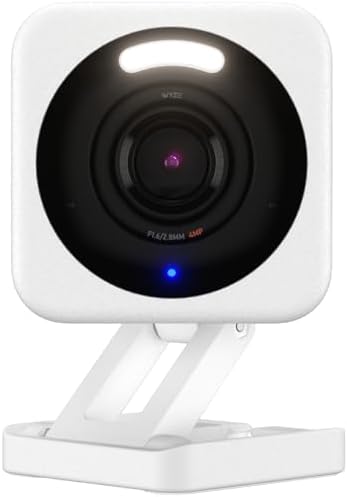
- SMART 2.5K QHD RESOLUTION — CAPTURE EVERY DETAIL — Record in crystal-clear 2560×1440 video with a 120° wide field of vie…
- ENHANCED COLOR NIGHT VISION — SEE CLEARLY IN TOTAL DARKNESS — Industry-leading Starlight Sensor paired with a 72-lumen s…
- IP65 WEATHERPROOF — BUILT FOR EVERY SEASON — Rated IP65 for dust-tight, water-jet-resistant protection against rain, sno…
Why We Recommend It: abode is the most flexible DIY platform in this guide. Its free tier includes full app access, live video and smart-home integrations. You can add professional monitoring later, when you need it, and cancel any time.
Key Features:
- Apple HomeKit support on the Smart Security Kit and Iota hubs
- Integrations with Alexa, Google Home, Z-Wave, Zigbee, Home Assistant and IFTTT
- A hub that includes battery backup, with 4G cellular backup on the Pro plan
- Smart detection for people, packages and pets on paid plans
Pricing: The Abode Security Kit (hub, mini door/window sensor, key fob) lists at $150, and abode runs frequent sales on its kits. Additional sensors are inexpensive. abode’s official plans page lists the Standard plan at $8.49 per month ($79.99 per year) and the Pro plan at $26.99 per month ($245.99 per year). 24/7 video recording costs $9.99 per month per camera, and camera-only setups are $3.99 per month per camera.
Monitoring: The free plan is self-monitoring. Standard adds a 30-day event timeline and AI detection. Pro adds 24/7 professional monitoring, cellular backup and automatic dispatch. abode says there is no contract or cancellation fee.
Installation: DIY.
Pros:
- Genuinely useful free tier
- Best smart-home compatibility
- No contracts
- Good fit for apartments and rentals
Cons:
- HomeKit only works on certain hubs
- Professional monitoring at $26.99 is not the cheapest
- Some reviewers report reliability issues with its cameras
Who Should Buy It: Smart-home enthusiasts, HomeKit households, and renters.
Who Should Skip It: Anyone who wants a fully managed experience or the lowest-priced professional monitoring.
Vivint — Best Professionally Installed System for Large Homes
Best For: Large homes and buyers who want a technician to install everything.

- Home Monitoring with Instant Notifications: Keep a close eye on your home with the indoor cam Eve Cam and get notificati…
- Maximum Privacy and Data Security: Protect your privacy with maximum data security Eve Cam exclusively supports Apple Ho…
- Smart Motion Detection and Automation: Record every motion automatically or distinguish between people and pets (People/…
Why We Recommend It: Vivint’s strength is a professionally installed, fully integrated smart-home platform. If you do not want to mount a dozen sensors yourself, and you have the budget, Vivint takes that work off your plate.
Key Features:
- Professional installation (Vivint does not offer a DIY option)
- Monitoring that scales with video and smart-home features
- Equipment financing, with terms up to 60 months
Pricing: Entry-level HomeProtect equipment is $199.99 with a 36-month monitoring agreement, or $349.99 without a contract plus an installation fee, according to SafeWise’s review. Vivint’s own cost guide says month-to-month service agreements are available when you buy equipment outright.
Monitoring: Professional monitoring starts at $24.99 per month with a contract, or $29.99 without one, and higher tiers add cloud storage and full smart-home features, with $49.99 per month cited for top tiers.
Installation: Professional only.
Pros:
- Polished, integrated smart-home platform
- Professional installation and support
- Scales well to large or complex homes
Cons:
- Contracts of 42–60 months when you finance equipment
- Costs more than DIY alternatives
- Harder to take with you if you move
Who Should Buy It: Homeowners with large properties who want everything installed and integrated.
Who Should Skip It: Renters, budget shoppers and anyone who dislikes long financing terms.
ADT — Best for Established Professional Monitoring (With a Contract)
Best For: Buyers who want the best-known professional monitoring brand and are comfortable signing a contract.

Why We Recommend It: ADT is the established choice for the best professionally monitored home security system, and it now offers both self-setup and professionally installed options. Self-setup professional monitoring starts at $24.99 per month on ADT’s site.
Key Features:
- Professional or DIY installation
- Its own monitoring centers
- Frequent promotions on equipment and installation
Pricing: Promotions change constantly. As of September 2026, Parade reported a $99 professionally installed offer that includes a Google Nest camera, but it requires a 36-month monitoring plan and has eligibility requirements. Professionally installed monitoring starts at $49.99 per month in that report.
Monitoring: ADT’s pro-install plans typically carry a 36-month contract (24 months in California). Under ADT’s residential terms, early termination can cost 75 percent of the monthly charges due for the remainder of the initial term.
Installation: Professional installation or self-setup.
Pros:
- Established brand with its own monitoring centers
- Professional installation
- Often runs heavily discounted promotions
Cons:
- Long contracts and steep early-termination fees
- Pro-installed monitoring costs more than DIY rivals
- Pricing is less transparent than SimpliSafe or Ring
Who Should Buy It: Owners who plan to stay put and want a big-name installer.
Who Should Skip It: Renters, movers and anyone who wants flexibility.
Eufy — Best Home Security System Without Monthly Fees
Best For: Buyers who want a home security system without a monthly fee, and who prioritize privacy.

- 𝐄𝐧𝐡𝐚𝐧𝐜𝐞𝐝 𝐃𝐮𝐚𝐥-𝐂𝐚𝐦𝐞𝐫𝐚 𝐂𝐥𝐚𝐫𝐢𝐭𝐲 𝐚𝐭 𝐔𝐩 𝐭𝐨 𝟒𝟎 𝐟𝐭 (𝟏𝟐 𝐦): Capture every event around your home in ultra-clear 3K resolution. E…
- 𝐒𝐨𝐥𝐚𝐫-𝐏𝐨𝐰𝐞𝐫𝐞𝐝, 𝐈𝐧𝐬𝐭𝐚𝐥𝐥 𝐎𝐧𝐜𝐞 𝐚𝐧𝐝 𝐢𝐭 𝐑𝐮𝐧𝐬 𝐅𝐨𝐫𝐞𝐯𝐞𝐫: Experience constant peace of mind with this solar-powered security came…
- 𝟑𝟔𝟎° 𝐆𝐮𝐚𝐫𝐝𝐢𝐚𝐧, 𝐍𝐨 𝐁𝐥𝐢𝐧𝐝 𝐒𝐩𝐨𝐭𝐬: Say goodbye to blind spots with full home coverage by installing the product vertically. …
Why We Recommend It: Eufy is camera-first. Its hubs store footage locally, and core features such as person detection and live view work without a subscription.
Key Features:
- HomeBase 3 with 16 GB of built-in storage, expandable up to 16 TB with a drive
- Solar-powered and 4K camera options
- On-device AI detection
- Alexa, Google Assistant and HomeKit support on select models
Pricing: SafeHome lists the 5-piece Home Alarm Kit at $159.99. Whole-home bundles run from roughly $1,300 to $2,100. Optional cloud storage starts at $3.99 per month for one device or $13.99 per month for unlimited devices.
Monitoring: Eufy is primarily a self-monitored system. Some reviewers note an optional professional monitoring partnership with Noonlight, but plan details have changed, so verify the current offer on Eufy’s site before you count on it.
Installation: DIY.
Pros:
- No required subscription
- Local storage reduces cloud exposure
- Strong camera hardware for the price
Cons:
- No built-in professional monitoring for most buyers
- The HomeBase 3 lacks cellular backup, according to one review (the HomeBase Professional S1 is listed with 4G LTE and battery backup)
- A weaker alarm-sensor ecosystem than SimpliSafe or abode
Who Should Buy It: Privacy-minded buyers who want cameras with no subscription.
Who Should Skip It: Anyone who wants police dispatch when an alarm trips.
Also Considered: Cove, Frontpoint and Brinks
Cove is a legitimate contender for budget professional monitoring. Reviewers report no long-term service contract, and recent figures put plans at $22.99 (Basic), $32.99 (Plus) and $42.99 (Premium). Equipment is often heavily discounted. Cove’s pricing and equipment-financing terms vary by source and promotion, so read the agreement carefully before you buy.
Frontpoint has solid hardware but expensive monitoring, around $49.99 per month for its Ultimate plan. SafeHome and Security.org both note that buying online can default you into a three-year contract unless you call to arrange something else.
Brinks Home requires professional installation, a 36-month contract, and monitoring that runs roughly $39.99 to $54.99 per month. It also has no self-monitoring option. We cannot recommend it over more flexible competitors.
DIY vs. Professional Home Security Systems
DIY installation means you receive the equipment in the mail and set it up in an afternoon. Costs are lower, installation is free, and the system moves with you. Troubleshooting is on you, though most modern DIY systems have excellent app guides and phone support. Our DIY home security setup guide walks through planning, placement and testing.
Professional installation adds cost, but a technician mounts devices, runs wiring and configures everything. It makes the most sense in large homes, on complex properties, or when you simply do not want to do the work. Ring’s professional installation, for example, starts at $129.99 per device, while ADT and Vivint often bundle installation into a long-term contract.
For renters, DIY is nearly always better because you can take the system with you. Homeowners in large houses are the main group for whom professional installation pays off. The trade-off is moving: a professionally installed system tied to a multi-year contract can be expensive to cancel or transfer.
Self-Monitoring vs. Professional Monitoring
Self-monitoring: The system alerts your phone, and you decide what to do. It is free or cheap, but if you miss the alert, nobody calls the police for you.
Professional monitoring: A monitoring center receives the alarm, tries to contact you and requests emergency dispatch. It costs more but works when you are asleep, in a meeting or unreachable.
Video monitoring: Live agents view camera footage during an alarm, which helps verify real emergencies and can deter intruders through two-way audio. SimpliSafe’s Core, Pro and Pro Plus tiers and Ring’s Virtual Security Guard ($99 per month) are examples.
No-subscription security: You keep all the footage and alerts yourself. You gain lower costs and more privacy, and you lose automatic emergency dispatch.
Best Home Security Systems Without Monthly Fees
Several systems work without a required monthly fee, but “no fee” does not mean “no limits.”
- Eufy: best for cameras with local storage and no required subscription.
- abode: the free tier gives you app control, live video and smart-home integrations. Self-monitoring is the default, and you can add professional monitoring when you need it.
- SimpliSafe: runs without a plan, but capabilities are limited and cameras gain value with a subscription.
- Ring: some features work without a plan, but arming from the app and video history effectively require one.
If you want professional dispatch without a large monthly bill, the cheapest options we found are Ring Pro at $19.99 and SimpliSafe Standard at $22.99. If you want to avoid professional monitoring altogether, our guide to home alarm systems without professional monitoring goes deeper on the trade-offs.
How Much Does a Home Security System Really Cost?
The advertised starting price usually covers a starter kit that protects one door and one room. A real home needs more, so budget for:
- Equipment: extra door and window sensors, motion detectors, sirens and smoke or flood sensors
- Installation: free for DIY, or about $99–$200 per visit for professional installation (often waived under a contract)
- Monitoring: the largest long-term expense
- Cameras: often $100–$200 each, plus camera subscriptions
- Cloud storage: Ring Solo is $4.99 per month, Eufy cloud is $3.99 per device, and abode’s 24/7 video recording is $9.99 per camera
- Batteries and replacement parts: minor but real
- Contracts and financing: the hidden cost, because cancelling early can mean paying 75 percent of the remaining balance with ADT
Five-Year Cost of Ownership
Over five years, monitoring fees dominate. Here is what the monthly fees alone add up to over 60 months, using the verified prices above:
| Plan | Monthly | Five-Year Monitoring Cost |
|---|---|---|
| abode free tier | $0 | $0 |
| Eufy (no required plan) | $0 | $0 |
| Ring Solo (one camera) | $4.99 | $299.40 |
| abode Standard | $8.49 | $509.40 |
| SimpliSafe self-monitoring with video | $9.99 | $599.40 |
| Ring Pro (professional monitoring) | $19.99 | $1,199.40 |
| SimpliSafe Standard | $22.99 | $1,379.40 |
| ADT self-setup (starting price) | $24.99 | $1,499.40 |
| abode Pro | $26.99 | $1,619.40 |
| SimpliSafe Core | $32.99 | $1,979.40 |
| ADT pro-installed (starting price) | $49.99 | $2,999.40 |
| SimpliSafe Pro | $49.99 | $2,999.40 |
Add starter equipment to see a more realistic picture:
- Ring Alarm 5-piece kit ($199.99) + Ring Pro: about $1,399 over five years (about $1,200 if you pay for Ring Pro annually at $199.99 per year)
- SimpliSafe Foundation ($250.96) + Standard: about $1,630
- abode Security Kit ($150) + Pro: about $1,769
- abode Security Kit ($150) + free tier: $150
- Eufy 5-piece Home Alarm Kit ($159.99): $159.99, with no required monitoring fee
- ADT $99 promotional install + pro-installed monitoring at $49.99: about $3,098, based on the starting price and subject to the promotion’s terms
These are floors, not final bills. A starter kit covers only a few openings, so most homes add sensors and cameras, and every extra camera can add a subscription. Our estimates also exclude taxes, financing interest, permit fees and any promotions or price increases after publication.
Best Systems for Different Types of Homes
Apartments
Choose a small kit that you can mount without drilling. abode and Ring Alarm work well, and SimpliSafe’s adhesive sensors are renter-friendly. A free or cheap plan keeps costs down in a small space.
Renters
DIY, no contract and portable is the formula. abode, SimpliSafe and Ring Alarm all fit. Avoid contract-heavy providers if you might move within a few years.
Small Homes
SimpliSafe or Ring Alarm handle most small homes well. Start with entry sensors on exterior doors, a motion detector in the main hallway and one camera.
Large Homes
Vivint suits large homes that want professional installation. DIY buyers can scale SimpliSafe or abode, though you need to plan sensor placement carefully and expect higher equipment costs.
Families
Ring Alarm and SimpliSafe are good picks because their apps are easy for multiple adults and older children to use, and both offer keypads and key fobs that do not require a phone.
Seniors
Look for simple controls, a physical keypad and professional monitoring that can send medical help. SimpliSafe’s Standard plan covers medical alarms, and Ring Pro lists SOS Response among its features. A system that does not rely on a smartphone for everyday arming is a safer pick.
Home Security Cameras vs. Complete Security Systems
A camera records events. A complete system detects them, sounds a siren and, with monitoring, calls for help. Cameras alone are usually cheaper, but a camera cannot dispatch police by itself, and a burglar who spots it can simply avoid it.
If you are weighing camera brands before committing to an ecosystem, our Ring vs Arlo vs Eufy comparison explains how their cloud, local-storage and subscription models differ.
When you are ready to choose individual cameras, our security camera buying guide covers resolution, night vision, motion detection and storage. Before you buy, work out how many security cameras your home needs based on entry points, property size and blind spots, so you do not overspend on cameras (and their subscriptions) you will never use.
For outdoor protection around driveways, side yards and backyards, see our picks for the best floodlight security cameras. If wiring or power is a problem, such as a shed, gate or detached garage, solar-powered security cameras can provide continuous outdoor monitoring without running a cable.
Alexa vs. Google Home vs. Apple Home
Smart-home compatibility varies more than most spec sheets suggest.
- Amazon Alexa: Ring has the deepest integration, and SimpliSafe, abode and Eufy also support Alexa.
- Google Home: SimpliSafe, abode and Eufy support it. ADT’s current promotions bundle Google Nest cameras.
- Apple Home/HomeKit: abode supports it on its Smart Security Kit and Iota hubs, and Eufy supports it on select models. Ring and SimpliSafe do not offer meaningful HomeKit alarm support.
- Matter: support differs by product, and alarm panels lag behind locks and sensors. Check the exact model’s spec sheet before relying on it.
Smart locks are where integration matters most, because you may want to arm the system when the door locks. Our guide to smart door locks compatible with Alexa, Google Home, and Apple Home shows which models work with which platforms. Video doorbells follow the same pattern: Ring’s work best in Alexa homes, while Eufy and abode offer wider platform choices.
What Happens During a Power or Internet Outage?
Internet outage: Systems with cellular backup keep talking to the monitoring center. SimpliSafe includes cellular backup on all professional plans, abode adds 4G backup on Pro, and Ring lists cellular backup on its compare chart. Without it, a self-monitored system may keep sounding the siren locally but stop sending alerts to your phone. abode’s FAQ says this is how its free and Standard tiers behave during an internet outage.
Power outage: Base stations and hubs usually include battery backup, but battery life varies, and the Wi-Fi router in your home will go down unless it also has backup power. Ring’s backup internet on Alarm Pro only works when power is available, according to Ring.
Offline functionality: Local storage helps. Eufy’s HomeBase keeps recordings on-site, and Ring Alarm Pro can record to a microSD card on the Pro plan. Cloud-only cameras stop recording when the internet goes down.
If outages are common where you live, favor cellular backup and test it. Pull the router plug and confirm you still get an alert.
Privacy and Security Considerations
- Cloud versus local storage: Cloud storage makes footage reachable anywhere and protects against theft of the device, but it means a company holds your video and you usually pay for it. Local storage keeps footage in your control but can be lost to theft or hardware failure. Neither is risk-free: reviewers note that both Eufy and Ring have faced security and privacy questions.
- Account security: The FTC advises using strong, unique passwords and turning on two-factor authentication where it is available. See the FTC’s guide to securing home security cameras for a practical checklist.
- Camera privacy: Place indoor cameras away from bedrooms and bathrooms, and use privacy modes.
- Subscription dependence: Many features disappear if you stop paying. Check what happens to stored video and smart features when you cancel.
How to Choose the Right Home Security System
- Decide how much help you want. If an alarm should always trigger a call for help, choose professional monitoring. If you can respond yourself, self-monitoring may be enough.
- Choose your contract tolerance. If you might move within three years, avoid long contracts.
- Match your smart-home platform. Alexa homes lean Ring, HomeKit homes lean abode, and privacy-first homes lean Eufy.
- Count your openings. List every exterior door, ground-floor window and garage entry. Buy sensors for those first.
- Add cameras where they matter. Front door, back door and driveway cover most homes.
- Compare the five-year cost, not the advertised price.
- Avoid easy-to-prevent errors. Read our rundown of common home security mistakes before you finalize your setup.
Frequently Asked Questions
What is the best home security system of 2026? For most people, SimpliSafe offers the best balance of flexibility, monitoring quality and no-contract pricing. Ring Alarm is the better budget pick, and abode is the best DIY pick for smart homes.
What is the best DIY home security system? abode is our pick for flexibility and smart-home support. SimpliSafe and Ring Alarm are also strong DIY options if you prefer simpler setups.
What is the best budget home security system? Ring Alarm combines low equipment prices with $19.99 per month professional monitoring through Ring Pro. If you want no monthly fee at all, Eufy or abode’s free tier are cheaper over time.
What is the best no-contract home security system? SimpliSafe, Ring Alarm and abode all offer month-to-month monitoring. Avoid long contracts unless the equipment discount clearly justifies them.
What is the best home security system without a monthly fee? Eufy is the strongest option for subscription-free cameras with local storage. abode’s free tier is the best fee-free alarm platform, though it relies on you to respond to alerts.
Do I need professional monitoring? Not always. If you are rarely unreachable and can call authorities yourself, self-monitoring can work. Professional monitoring is worth it if you travel, sleep through notifications or want help for fire and medical emergencies.
Can I cancel ADT early? You can, but ADT may charge 75 percent of the remaining monthly service charges under a standard 36-month contract. Read the terms carefully before signing.
Do home security systems lower insurance costs? Many insurers offer discounts for monitored systems. abode says discounts of 5–30 percent are common, but your savings depend on your insurer, so ask for a written quote.
Final Verdict
The best home security systems of 2026 come down to how you answer three questions: Do you want professional monitoring, will you tolerate a contract, and which smart-home platform do you use?
SimpliSafe is the best overall choice for most households because it is flexible, contract-free and genuinely strong at professional monitoring. Ring Alarm is the best budget pick, especially if you already live in Alexa’s world. abode is the best DIY system and the strongest choice for HomeKit users and renters. Eufy wins for buyers who want a home security system without a monthly fee. Vivint and ADT make sense when you want a professional install and can accept a long agreement.
Whatever you choose, price the full five years, protect your accounts with two-factor authentication, and test your backup before you need it. A cheaper kit with the right monitoring beats a flashy system that you stop paying for.