Affiliate and testing disclosure: Some links on Gadget Sentinel may be affiliate links, and we may earn a commission at no extra cost to you. We did not hands-on test the cameras below and we did not measure noise levels. This guide draws on manufacturer documentation, published reviews and owner reports, and we label which is which. Specs, plans and prices change often, so confirm details on the manufacturer’s site before you buy.
Introduction
A pet camera is meant to give you peace of mind. For a light sleeper, it can do the opposite: a motor whirs when the camera follows your dog across the room, a treat dispenser clicks, a speaker chirps, a status light glows, or your phone buzzes at 2 a.m. for a cat walking to its water bowl.
That is why the best pet cameras for light sleepers are chosen differently from the usual “best pet camera” picks. Video resolution and treat-tossing matter less than three questions: What sounds can the camera itself make? What light does it emit in a dark room? How much control do you have over alerts?
When we reviewed general pet camera roundups, most focused on image quality, two-way audio and treat tossing. Few addressed bedroom noise, indicator lights or alert controls. Where published evidence on noise was thin, we say so rather than guess.
For broader context on camera types, see our indoor security camera guide for pets, kids and elderly care.
Quick Comparison: Best Quiet Pet Cameras
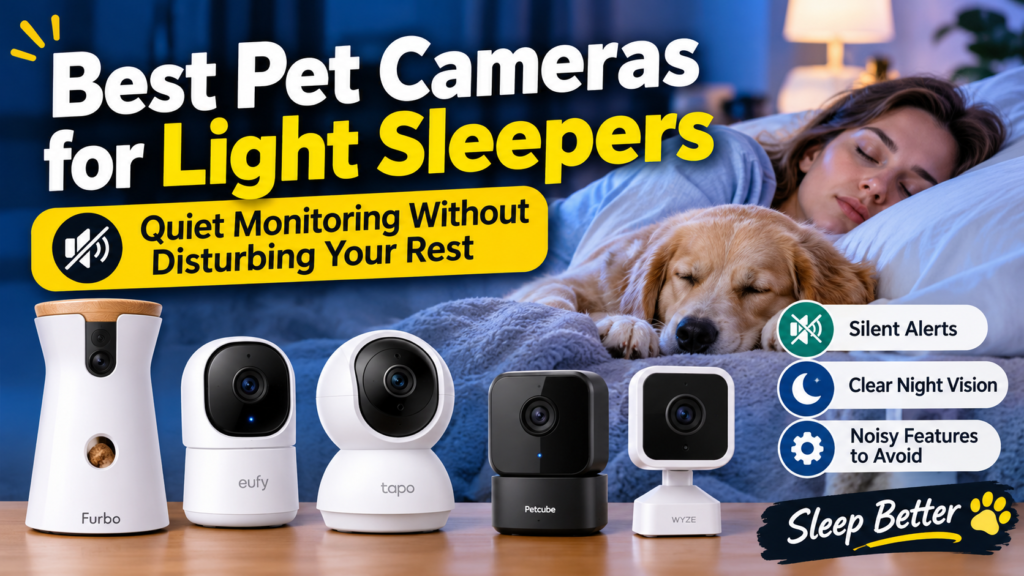
No independent decibel measurements were available, so “Potential Sleep Disruption” is an editorial assessment of design (motors, tossers, lights), not a measurement.
| Product | Best For | Movement Type | Night Vision | Notification Controls | Potential Sleep Disruption | Subscription |
|---|---|---|---|---|---|---|
| Wyze Cam v4 | Fewest moving parts | Fixed (no pan/tilt motor) | 850 nm IR LEDs plus color night vision via starlight sensor and optional spotlight | Motion detection zones; AI alerts need Cam Plus | Lower mechanical noise by design; visible status light and possible IR glow | Not required for local microSD recording; Cam Plus optional |
| eufy Indoor Cam C220 | Room coverage without fees | 360° pan, limited tilt; AI tracking | Infrared; IR wavelength not stated in sources we found | Human, motion and pet detection; eufy lists scheduling and snooze guides | Motor noise during tracking is possible; no independent measurements found | Not required for local microSD (up to 128 GB); cloud optional |
| TP-Link Tapo C210 | Sharp video on a budget | 360° pan, 114° tilt; motion tracking | 850 nm IR, up to 30 ft | Activity zones, motion tracking | Motor noise during tracking is possible; possible faint red IR glow | Not required for local microSD (up to 512 GB); Tapo Care optional |
| Petcube Cam 360 | Basic live view of cats and dogs | 360° pan/tilt | Night vision up to 30 ft; wavelength not stated | Motion and sound alerts; smarter alerts need Care | Motor noise possible; no treat dispenser | Live view free; clip recording and smart alerts need Petcube Care |
| Furbo 360° Dog Camera | Dog owners who want treat tossing | Rotating 360° with auto dog tracking | Infrared plus color night vision in low light | Barking alerts; AI activity alerts need Furbo Dog Nanny | Highest on paper: motor, treat tosser and optional sounds | Optional Dog Nanny; some retail bundles require a plan |
Best Pet Cameras for Light Sleepers
1. Wyze Cam v4: Best for Minimizing Mechanical Noise
Best for: Light sleepers who want a camera with no pan-and-tilt motor to listen for.
- SMART 2.5K QHD RESOLUTION — CAPTURE EVERY DETAIL — Record in crystal-clear 2560×1440 video with a 120° wide field of vie…
- ENHANCED COLOR NIGHT VISION — SEE CLEARLY IN TOTAL DARKNESS — Industry-leading Starlight Sensor paired with a 72-lumen s…
- IP65 WEATHERPROOF — BUILT FOR EVERY SEASON — Rated IP65 for dust-tight, water-jet-resistant protection against rain, sno…
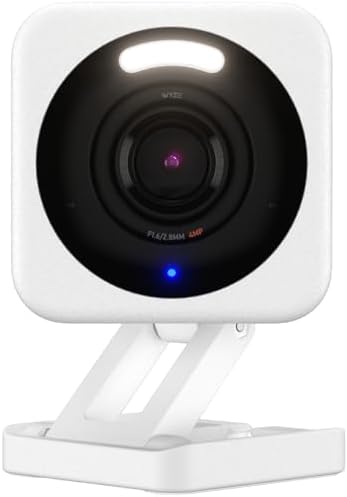
Main features: According to Wyze’s tech specs, the v4 has four 850 nm IR LEDs and two spotlight LEDs, plus color night vision. Wyze’s product pages describe 2.5K resolution, a siren, two-way talk and local microSD recording. It is a fixed camera.
Nighttime performance: Wyze advertises color night vision from a starlight sensor, and a Wyze support article explains the status light. After setup, a solid red light means a live stream is being viewed or a recording is in progress. A solid blue light means the camera is working normally.
Potential noise and light sources: With no motor, the main concerns are the status light, the 850 nm IR LEDs (see our infrared section) and any speaker sounds you trigger. The 99 dB siren is a feature to keep switched off in a bedroom.
Advantages: No pan-and-tilt mechanism. Local recording without a mandatory fee. Low cost.
Disadvantages: A fixed view can miss parts of a room. Only 2.4 GHz Wi-Fi. AI alerts and cloud backup need the optional Cam Plus plan. We could not confirm from official sources whether the status light can be turned off, so check the app.
Who should buy it: Light sleepers with one room or one pet area to cover who prefer a camera with fewer ways to make noise.
2. eufy Indoor Cam C220: Best for Room Coverage Without Monthly Fees
Best for: Pan-and-tilt coverage with local storage.

- High-Definition 2K Resolution: The 2K lens delivers highly detailed video quality for comprehensive home monitoring, ens…
- Advanced AI Detection Technology: On-device AI detects and recognizes human figures, then records their entire route whi…
- Complete 360 Surveillance Coverage: Pan and tilt capabilities provide a full view of your space without blind spots, ens…
Main features: Retailer and manufacturer listings describe 2K video, 360° pan, human and pet detection, AI tracking and local microSD storage up to 128 GB. Tilt range varies by listing (75° to 96°), so confirm on eufy’s site. The eufy C220 user guide lists an LED indicator that shows solid red when recording or when the live stream is viewed.
Nighttime performance: eufy’s regional pages list infrared night vision. Its guide advises keeping the camera at least 0.2 m from walls or objects to avoid infrared reflections that hurt night vision.
Potential noise sources: The pan-and-tilt motor and automatic tracking. We found no independent noise measurements for the C220. For a different eufy pan-tilt model, eufy’s support article says higher speeds make a slight mechanical sound and recommends a lower speed and tightly secured mounting. That is a different product, but it shows speed and mounting can matter.
Advantages: No subscription for local recording. Pan/tilt coverage. eufy’s support center lists scheduling and snooze guides.
Disadvantages: 2.4 GHz only. Tracking can make the motor move more often. eufy has faced past privacy scrutiny, so read its current privacy policy.
Who should buy it: Buyers who want one camera covering a larger room and will turn off auto-tracking at night.
3. TP-Link Tapo C210: Best for Sharp Video on a Budget
Best for: Higher-resolution video with local storage.

- Ultra-High-Definition Video —— Records every image in crystal-clear 3MP definition
- Pan and Tilt —— 360º horizontal range
- Advanced Night Vision —— Provides a visual distance of up to 30 ft
Main features: TP-Link’s product page lists 2K (3 MP) video, 360° horizontal range, 114° vertical range, 850 nm infrared night vision up to 30 ft, two-way audio and local microSD storage. TP-Link’s regional pages list up to 512 GB, activity zones and motion tracking, with optional Tapo Care cloud storage. Its spec sheet lists a system LED.
Nighttime performance: Per TP-Link, the camera uses 850 nm IR LEDs, which can produce a faint red glow (see below).
Potential noise sources: The pan/tilt motor and motion tracking. We found no measurements for the C210. A HomeCamCafe review of a different camera, the Kasa Spot Pan Tilt EC70, called its motor louder than any pan/tilt camera the reviewer had tested, including the C210. That is a relative comparison, not a measurement.
Advantages: Sharp 2K video, local storage, activity zones.
Disadvantages: Motor noise is possible. An owner review on a retailer listing says the status light can be switched off in the Tapo app. Confirm this in the app before relying on it.
Who should buy it: Budget buyers who will disable tracking at night.
4. Petcube Cam 360: Best for a Simple Live View of Cats and Dogs
Best for: Owners who mainly want live viewing and are comfortable with an optional plan.

- SEE EVERY CORNER: See, hear and comfort your pet in 1080p HD with this 360° pan-tilt pet camera — view the whole room, n…
- SPOT CHANGES EARLY: The first signs of trouble are easy to miss. Daily Diary recaps your dog or cat's day and Smart Filt…
- A VET IN YOUR POCKET: Clinic visits add up fast — and most start with a simple question. Get instant answers from our AI…
Main features: Listings describe 1080p video, a 105° lens, 360° pan/tilt, 8x digital zoom, night vision up to 30 ft, two-way audio and Alexa support. Listings are inconsistent (one Canadian retailer calls it “2K”), so verify the model. Petcube says live viewing works without a subscription, but recording clips and smart alerts require Petcube Care.
Nighttime performance: Digital Camera World’s review described the night vision as sharp. The IR wavelength was not stated in sources we found.
Potential noise sources: The pan/tilt motor and speaker sounds. There is no treat dispenser.
Advantages: Low price, no treat-tosser mechanics, and a listed privacy “shut-eye” feature.
Disadvantages: Without Petcube Care, the camera does not record clips.
Who should buy it: Light sleepers who want a live view and do not need recordings.
5. Furbo 360° Dog Camera: Best for Dogs, With Noise Caveats
Best for: Dog owners who value treat tossing, barking alerts and tracking.

- BASIC SEE, TALK & TOSS FEATURES INCLUDED, NO SUBSCRIPTION REQUIRED – Included features: 1080p live view, 360° rotating v…
- FULL HD 360° ROTATING PET SECURITY CAM – Best-in-class 1080p video with a motorized 360° rotating view covers your entir…
- REAL-TIME 2-WAY AUDIO & COLOR NIGHT VISION – Seamlessly hear and speak with pets and family members at home, with in-app…
Main features: Furbo lists 1080p video, two-way audio, barking alerts, a 100-treat capacity and infrared night vision. Furbo’s help center compares its 360° models. A separate Furbo page lists a 7 m infrared range for the 360° model and a “wheel mill” tossing design.
Nighttime performance: Furbo says the camera switches to color night vision when a distant light source is present. The Independent reported that the status light glows from under the device.
Potential noise sources: This is the camera with the most sound sources here: a rotating body, a tossing mechanism, and optional sounds before a treat. The Independent said the camera can play a jingle before tossing, and This Old House noted a clicking sound before tossing on an earlier model.
Advantages: Dog-specific features and barking alerts.
Disadvantages: Treat-tossing is a poor fit for a bedroom at night. Advanced alerts need a Furbo Dog Nanny plan, and some retail bundles require a subscription. We could not verify whether the status light can be dimmed.
Who should buy it: Dog owners who place it outside the bedroom or can schedule treat tossing for daytime.
What Makes a Pet Camera Quiet Enough for Light Sleepers?
Think of a camera as five possible sources of disturbance:
- Motors. Pan-and-tilt mechanisms are the most obvious. Owners of the Wyze Cam Pan report on Wyze’s community forum that the motor can be audible. The same thread described a motor sound triggering the camera’s own sound alert.
- Mechanical parts. Treat dispensers add clicks and rattles.
- Speakers. Two-way audio, startup chimes and sirens can all be loud in a quiet room.
- Lights. Status LEDs and infrared emitters.
- Alerts. Phone sounds and vibration, which are separate from the camera itself.
Noise varies by model and setting. Digital Trends reported that the Wyze Cam Pan’s noise increased at higher motor speeds.
Silent Notifications vs Truly Quiet Camera Operation
These are two different things:
- A physically quiet camera makes little or no sound in the room: no motor movement, no beeps, no treat-tossing.
- Silent notifications only mean your phone does not make noise: Do Not Disturb, vibration-only alerts, or notification schedules.
A camera can have silent notifications and still whir beside your bed. A fixed camera can be physically quiet and still buzz your phone. The best setup for light sleepers is quiet hardware and quiet alerts. We do not call any camera completely silent because we found no reliable evidence for that.
Does Infrared Night Vision Disturb Sleep?
We make no medical claims, but we can describe what the light looks like. Infrared is generally invisible to people. However, Swann’s support FAQ explains that most cameras use around 850 nm IR LEDs, which sit near the edge of visible light and appear as a faint red glow in dark rooms. Cameras using 940 nm LEDs are nearly invisible, but they give less illumination and a shorter range.
For this guide:
- The Wyze Cam v4 and Tapo C210 are listed with 850 nm IR LEDs, so a faint glow is plausible.
- For the eufy C220, Petcube Cam 360 and Furbo 360°, the sources we found do not state a wavelength.
- Our indoor camera guide cites TP-Link as describing 940 nm “invisible” night vision on the Tapo C225, a different model worth checking if glow concerns you.
Visible indicator lights are a separate issue. The Wyze and eufy guides above both say a red light indicates live viewing or recording. If your camera is in a room where you sleep, a light that turns on whenever you check your phone may be more noticeable than the IR glow.
Fixed Cameras vs Pan-and-Tilt Cameras
| Fixed camera | Pan-and-tilt camera | |
|---|---|---|
| Movement noise | None from a motor | Possible, especially while tracking |
| Coverage | One view | Can cover a full room |
| Automatic tracking | None | Moves frequently when pets move |
| Best use | A bed, door or food bowl | A larger room or active pet |
Noise varies by model. PCWorld described the Ring Pan-Tilt Indoor Cam as having a quiet motor, while the HomeCamCafe review mentioned above called a different pan/tilt model loud. Those are reviewer impressions, not measurements, and they show how much results differ.
For many light sleepers, a fixed camera aimed at the pet’s bed is the least likely to cause nighttime noise. PCMag’s pet camera roundup also notes that a general indoor security camera may serve a pet owner well, which can save money.
How to Set Up a Pet Camera Without Disturbing Your Sleep
- Turn off automatic tracking at night. Tracking makes the motor move more often. Use fixed preset positions if the app offers them.
- Lower the motor speed if the app has a setting. Both Digital Trends and eufy’s support article point to speed as a factor.
- Disable the siren and any sound alarms in the bedroom.
- Turn the speaker volume down or disable two-way audio at night.
- Check the status LED setting. Look for an option to turn it off. If there isn’t one, consider placement or a physical cover that does not block the lens.
- Set alert schedules. Use motion or sound sensitivity settings, activity zones and quiet hours where available.
- Use phone controls. Set Do Not Disturb or a Focus/sleep mode that allows only urgent apps, or choose vibration-free alerts.
- Reduce false alerts. Lower sound sensitivity and mask out windows or hallways with activity zones.
- Use privacy mode when you are in the room, if the camera offers it.
- Test one night, then adjust.
Best Camera Placement for Light Sleepers
- Distance matters. Place the camera across the room or outside the bedroom, rather than on a nightstand. Sound from a motor, speaker or tossing mechanism is easier to notice up close.
- Mount securely. eufy’s support article says loose bracket screws can amplify motor vibration. A solid wall mount may reduce vibration compared with a hollow shelf or table.
- Mind reflections. The eufy C220 guide advises keeping the camera at least 0.2 m from walls or objects.
- Aim away from the bed so the camera does not point at people sleeping, and so the status light is less likely to face you.
- Think about the pet’s area. A fixed view of a dog bed, litter box or door can be more useful than a camera that sweeps the whole room. For layout guidance, see our security camera buying guide.
- Choose wired power carefully. Our wireless vs wired camera guide explains the trade-offs.
Pet Camera Features Light Sleepers Should Avoid
- Treat dispensers in or near the bedroom. The mechanism can click or rattle, and some cameras add pre-toss sounds.
- Automatic tracking if you cannot turn it off at night.
- Loud sirens and sound alarms that cannot be disabled.
- Hard-to-control status lights. A light you cannot turn off or dim may be a problem in a dark room.
- Cameras that cannot schedule or snooze alerts.
How to Choose the Right Pet Camera
Use this checklist:
- Is the camera fixed, or does it have a motor?
- Can you turn off tracking, patrol modes and speaker sounds?
- Can you turn off or dim the status LED?
- What IR wavelength does it use (850 nm or 940 nm)?
- Can you schedule or snooze alerts, and set quiet hours?
- Can you adjust motion and sound sensitivity, and set activity zones?
- Is there a privacy mode or lens cover for when you are home?
- Does it support local microSD recording, and what needs a subscription?
- What are the privacy practices, and does it support two-factor authentication?
On privacy: the FTC advises changing default passwords, keeping firmware updated and securing your Wi-Fi. A camera in or near a bedroom deserves extra care, including who has access to the account. For more on storage trade-offs, see our home security gadgets guide and our smart home security essentials guide.
Frequently Asked Questions
What is the quietest pet camera?
We cannot name a measured winner because we found no independent decibel testing. A fixed camera has no pan/tilt motor, so among our picks the Wyze Cam v4 has the fewest mechanical noise sources. It still has speakers, lights and alerts.
Are pet cameras noisy at night?
Fixed cameras generally are not, apart from speaker sounds or alarms. Pan-and-tilt cameras can be audible when they move, and treat-tossing models add clicks or jingles.
Do infrared pet cameras produce visible light?
Often a little. Most cameras use 850 nm IR LEDs, which can show a faint red glow, per Swann. 940 nm LEDs are nearly invisible but have shorter range.
Can a pet camera operate without sound?
Often, yes. You can usually disable the speaker, siren and audio prompts and silence phone alerts. Whether you can turn off every sound depends on the model, so check the app.
Are fixed pet cameras quieter than rotating cameras?
In principle, yes, because they have no pan/tilt motor. Rotating models vary, and some reviewers describe quiet motors.
Can I disable pet camera notifications at night?
Usually. Use the camera app’s schedules, snooze or sensitivity settings, plus your phone’s Do Not Disturb or Focus mode. Features vary by camera.
Do pet cameras have silent night vision?
Night vision itself makes no sound, but IR LEDs may glow faintly red and status lights can be visible.
What is the best pet camera for a bedroom?
For minimal noise, a fixed camera with controllable alerts is a sensible starting point, such as the Wyze Cam v4. If you need room coverage, consider the eufy C220 or Tapo C210 and disable tracking at night.
Can pet cameras record without a subscription?
Some can. The Wyze Cam v4, eufy C220 and Tapo C210 support local microSD recording. Petcube’s live view is free, but clip recording needs Petcube Care. Furbo’s advanced alerts need Furbo Dog Nanny.
How can I monitor my pet without disturbing my sleep?
Use a fixed camera or turn off tracking, lower speaker volume, disable sirens, schedule alerts, place the camera away from the bed, and use Do Not Disturb with only the alerts you need.
Final Verdict
- Quietest by design: The Wyze Cam v4 is our top pick for light sleepers because it has no pan/tilt motor. Watch the status light and IR glow.
- Room coverage without monthly fees: The eufy Indoor Cam C220 or Tapo C210, with tracking turned off at night.
- Simple live viewing: The Petcube Cam 360, if you do not need recordings.
- Dog owners who want treat tossing: The Furbo 360° Dog Camera, ideally outside the bedroom or with tossing limited to daytime.
No camera here is proven silent, and we have not tested them. Check the app’s settings before buying, and test any camera for a night or two inside the return window.